> ## Documentation Index
> Fetch the complete documentation index at: https://help.reevo.ai/llms.txt
> Use this file to discover all available pages before exploring further.
# Ask Reevo Slack Integration
> Bring your Reevo AI sales assistant into Slack to ask about deals, meetings, and contacts and take CRM actions with your approval, without leaving your workspace.
Ask Reevo brings your Reevo AI sales assistant into Slack. You @mention it in a channel, send it a direct message, or open it in Slack's native AI assistant pane, and it answers questions about your pipeline, meetings, contacts, and deals, and can take action in your CRM on your behalf. It is the same agent that runs inside the Reevo app.
How it works:
* It responds only when you @mention it or message it directly. Regular team chat continues normally.
* You approve every action that writes to your CRM before it happens.
* It reads the current thread you mention it in for context. It reads other threads or channel history only when you explicitly ask it to, and only after you approve the request.
***
## Install Ask Reevo in Slack
Installing the workspace bot requires Slack workspace admin permissions. Once it is installed, everyone in your Reevo organization can use Ask Reevo in Slack.
1. Sign in to Reevo and open **Settings → [Integrations](https://app.reevo.ai/settings/integrations)**.
2. Under **Workspace Integrations**, click **Connect** on the **Reevo Bot for Slack** card.
3. Approve the install in Slack and choose the workspace you want to add it to.
4. Link your personal Slack account so Ask Reevo can give you personalized answers and notifications.
**Need the full admin walkthrough?** See [Workspace Integrations](/Getting-started/Integrations/Workspace) for connecting the workspace bot and linking personal accounts.
***
## Use Ask Reevo in Slack
After install, @mention **@Reevo** in any channel it has been added to, send it a direct message, or open it in the Slack assistant pane, then ask in plain language. In a channel you may need to invite it first by typing `/invite @Reevo`.
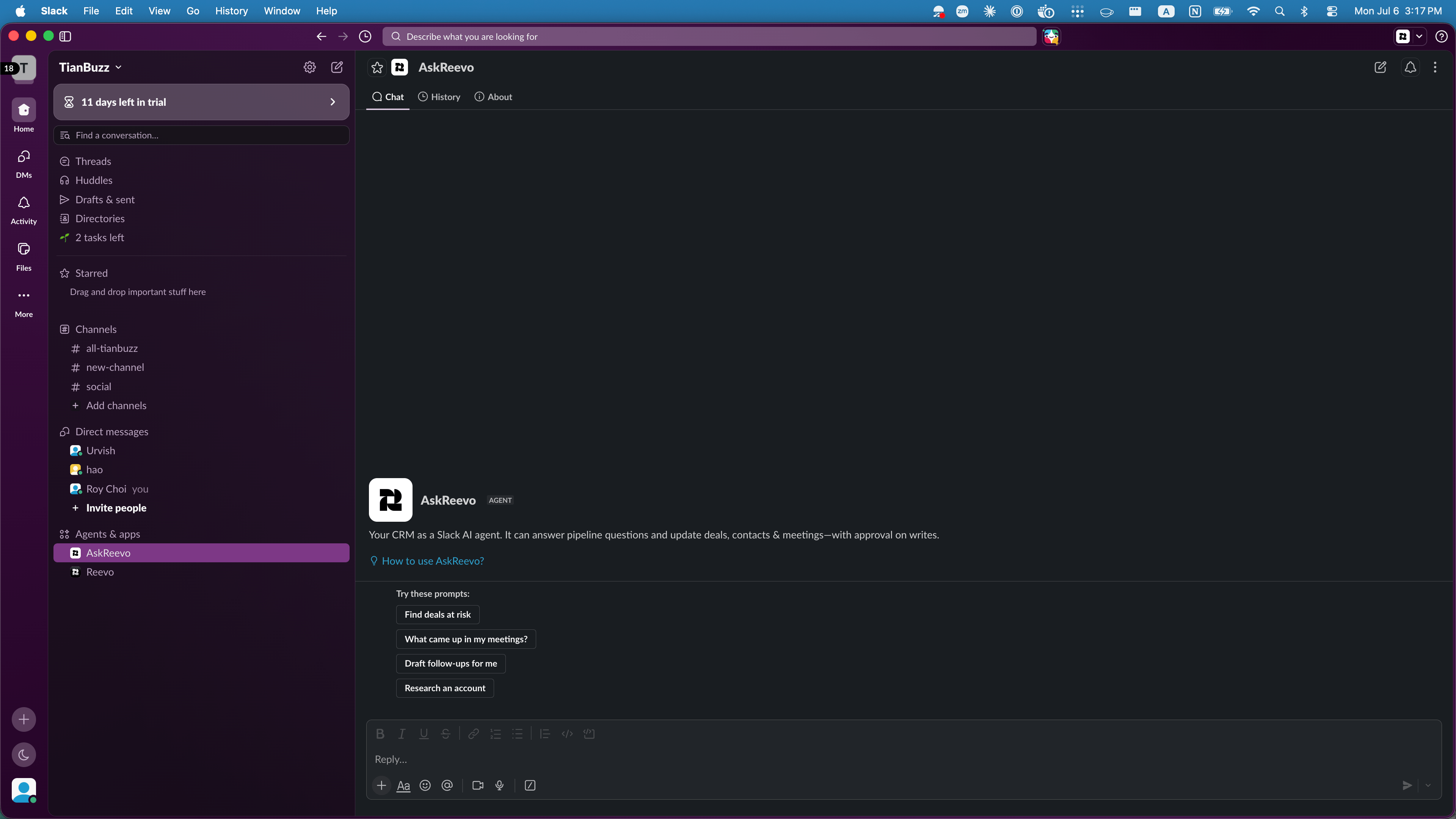 Examples of what you can ask:
* "What meetings do I have this week?"
* "Summarize my last call with Acme Corp."
* "Which of my open deals are at risk?"
* "Draft a follow-up email for the contacts I met this week."
***
## What you can do
* **Answer questions about your CRM:** ask about contacts, accounts, pipeline health, and tasks, and get answers with links back to the relevant records in Reevo.
* **Summarize meetings and calls:** ask for a recap, key points, or next steps, with links to the full recording and transcript in Reevo.
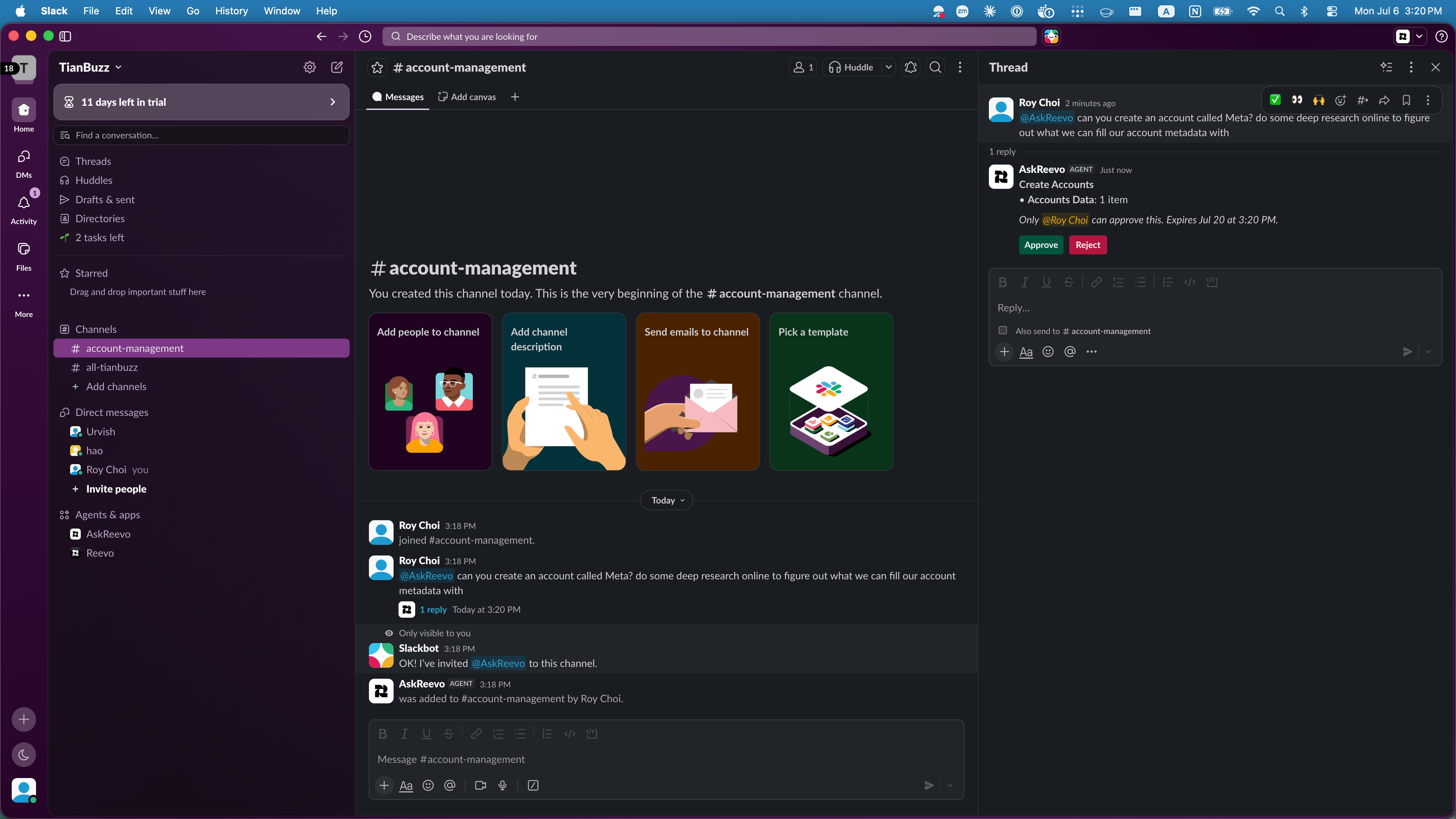
* **Take action with your approval:** ask it to update a deal, create a task, or draft a follow-up. It shows you an approval card and proceeds only when you approve.
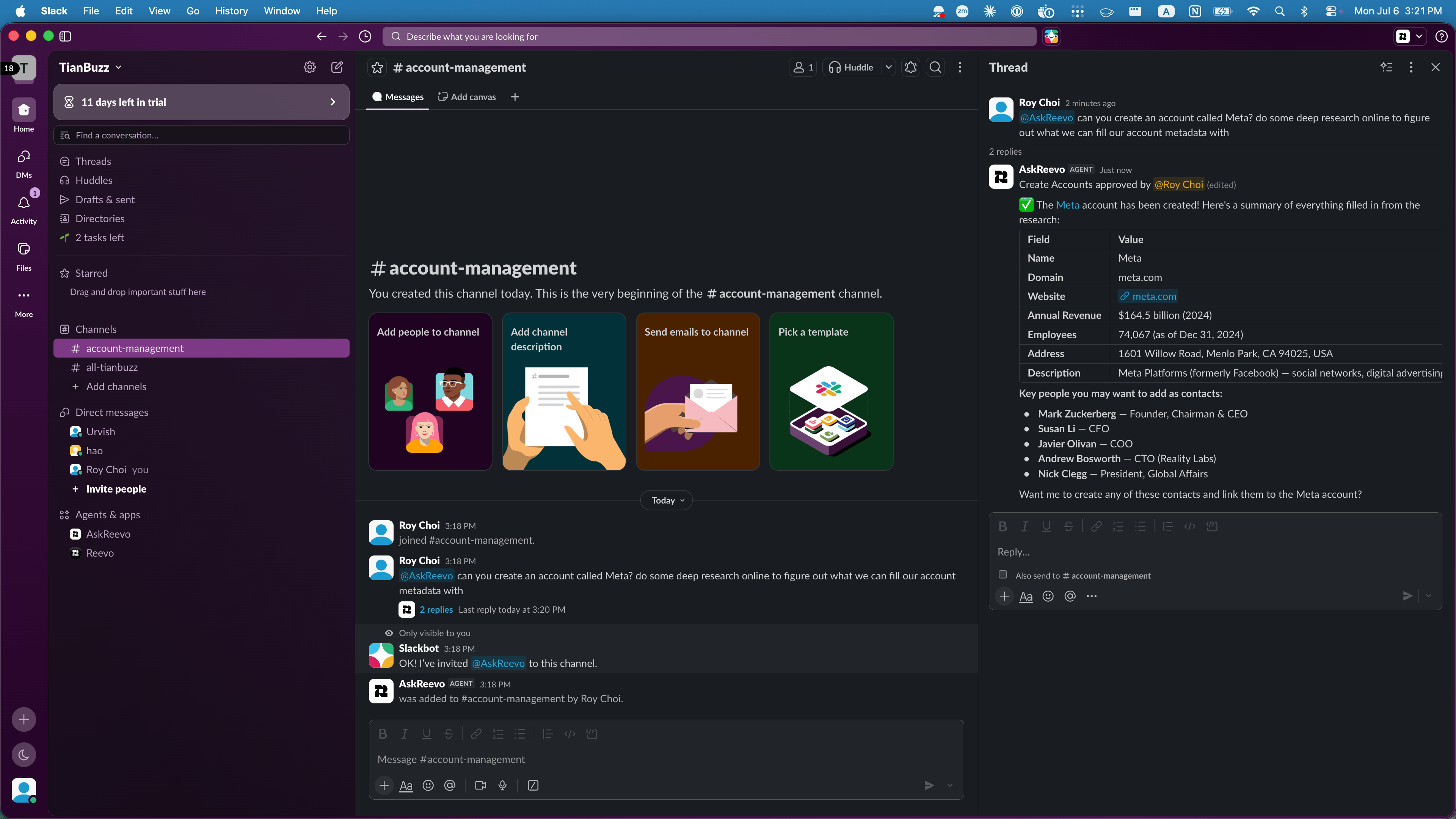
* **Return long-form answers:** longer results, such as account research, are posted as a Slack canvas or inline so they stay readable.
Examples of what you can ask:
* "What meetings do I have this week?"
* "Summarize my last call with Acme Corp."
* "Which of my open deals are at risk?"
* "Draft a follow-up email for the contacts I met this week."
***
## What you can do
* **Answer questions about your CRM:** ask about contacts, accounts, pipeline health, and tasks, and get answers with links back to the relevant records in Reevo.
* **Summarize meetings and calls:** ask for a recap, key points, or next steps, with links to the full recording and transcript in Reevo.
* **Take action with your approval:** ask it to update a deal, create a task, or draft a follow-up. It shows you an approval card and proceeds only when you approve.
* **Return long-form answers:** longer results, such as account research, are posted as a Slack canvas or inline so they stay readable.
 ***
## Technology and AI disclosure
Ask Reevo uses generative AI to interpret your requests and generate responses from your Reevo data.
**Ask Reevo can generate inaccurate or incomplete responses.** As with any generative AI product, verify important information in Reevo before you act on it.
**Your Slack data is not used to train or fine-tune AI models.**
What the technology does:
* Interprets your natural-language requests.
* Generates responses based on your Reevo data and the Slack messages you share with it.
* Suggests actions, which you approve before anything is written.
***
## Data and privacy
### What Ask Reevo accesses
* Messages in a thread when you @mention it there, and messages in other threads or channels only when you explicitly ask it to scan them and approve the request.
* Basic channel and user details needed to respond and to deliver notifications.
* Your email address, used only to match your Slack identity to your existing Reevo account.
### How the data is handled
* It is used only to operate the assistant, and it is processed when you make a request.
* It is not used to train or fine-tune AI models, and it is not sold.
* Slack message content is not stored in Reevo beyond what is needed to answer your request.
* When you remove the app from Slack, Reevo's access is revoked and the stored connection tokens are deleted.
For the full details of what Reevo collects, how it is used and retained, and how to access or delete your data, see the Reevo [Privacy Policy](https://reevo.ai/privacy).
***
## Support
Need help with Ask Reevo for Slack? Email [support@reevo.ai](mailto:support@reevo.ai). We respond within 2 business days, and you do not need a Reevo account to contact us.
***
## Troubleshooting and FAQs
Confirm the workspace bot is installed and, in a channel, that you have invited it with `/invite @Reevo`. If it still doesn't respond, contact your Slack workspace admin.
The workspace bot must be connected first. If you don't see the personal option, ask your workspace admin to connect the Reevo Bot for Slack.
Check that you have permission to view that data in Reevo, then try naming the contact, account, or date range in your question.
Ask Reevo can make mistakes. Flag the response with the thumbs-down icon, then verify the details directly in Reevo.
Email [support@reevo.ai](mailto:support@reevo.ai). We respond within 2 business days, and no Reevo account is required.
In Reevo, open Settings then Integrations, find the Reevo Bot for Slack card, open the three-dot menu next to the Connected badge, and select Disconnect. Removing the app also revokes Reevo's access and deletes the stored tokens.
> Still have questions? [Sign in to Reevo](https://app.reevo.ai) and ask Ask Reevo, or email [support@reevo.ai](mailto:support@reevo.ai).
***
## Technology and AI disclosure
Ask Reevo uses generative AI to interpret your requests and generate responses from your Reevo data.
**Ask Reevo can generate inaccurate or incomplete responses.** As with any generative AI product, verify important information in Reevo before you act on it.
**Your Slack data is not used to train or fine-tune AI models.**
What the technology does:
* Interprets your natural-language requests.
* Generates responses based on your Reevo data and the Slack messages you share with it.
* Suggests actions, which you approve before anything is written.
***
## Data and privacy
### What Ask Reevo accesses
* Messages in a thread when you @mention it there, and messages in other threads or channels only when you explicitly ask it to scan them and approve the request.
* Basic channel and user details needed to respond and to deliver notifications.
* Your email address, used only to match your Slack identity to your existing Reevo account.
### How the data is handled
* It is used only to operate the assistant, and it is processed when you make a request.
* It is not used to train or fine-tune AI models, and it is not sold.
* Slack message content is not stored in Reevo beyond what is needed to answer your request.
* When you remove the app from Slack, Reevo's access is revoked and the stored connection tokens are deleted.
For the full details of what Reevo collects, how it is used and retained, and how to access or delete your data, see the Reevo [Privacy Policy](https://reevo.ai/privacy).
***
## Support
Need help with Ask Reevo for Slack? Email [support@reevo.ai](mailto:support@reevo.ai). We respond within 2 business days, and you do not need a Reevo account to contact us.
***
## Troubleshooting and FAQs
Confirm the workspace bot is installed and, in a channel, that you have invited it with `/invite @Reevo`. If it still doesn't respond, contact your Slack workspace admin.
The workspace bot must be connected first. If you don't see the personal option, ask your workspace admin to connect the Reevo Bot for Slack.
Check that you have permission to view that data in Reevo, then try naming the contact, account, or date range in your question.
Ask Reevo can make mistakes. Flag the response with the thumbs-down icon, then verify the details directly in Reevo.
Email [support@reevo.ai](mailto:support@reevo.ai). We respond within 2 business days, and no Reevo account is required.
In Reevo, open Settings then Integrations, find the Reevo Bot for Slack card, open the three-dot menu next to the Connected badge, and select Disconnect. Removing the app also revokes Reevo's access and deletes the stored tokens.
> Still have questions? [Sign in to Reevo](https://app.reevo.ai) and ask Ask Reevo, or email [support@reevo.ai](mailto:support@reevo.ai).