> ## Documentation Index
> Fetch the complete documentation index at: https://help.reevo.ai/llms.txt
> Use this file to discover all available pages before exploring further.
# Required Microsoft Teams Configurations
> Certain Microsoft settings can prevent the Reevo Notetaker from joining meetings. An organization's Microsoft Workspace Admin will need to adjust settings to allow the bot to join.
Certain Microsoft Teams settings can prevent the Reevo Notetaker from joining your organization's meetings. As a Microsoft Workspace Admin, you may need to adjust one or more of the following settings to ensure Reevo can join and record meetings as expected.
### Meeting Settings
If any of the following settings are set, the Reevo Notetaker may be unable to join meetings.
* Anonymous users cannot join meetings
* Anonymous users are not allowed without verification
* User verification checks are enabled
Your Microsoft Workspace Admin will need to adjust the settings to allow access.
In most cases adding the Reevo.com domain to your domain allowlist should be sufficient
Microsoft allows you to specify which external domains can access your Teams meetings while blocking others.
Then, navigate to the following settings page:
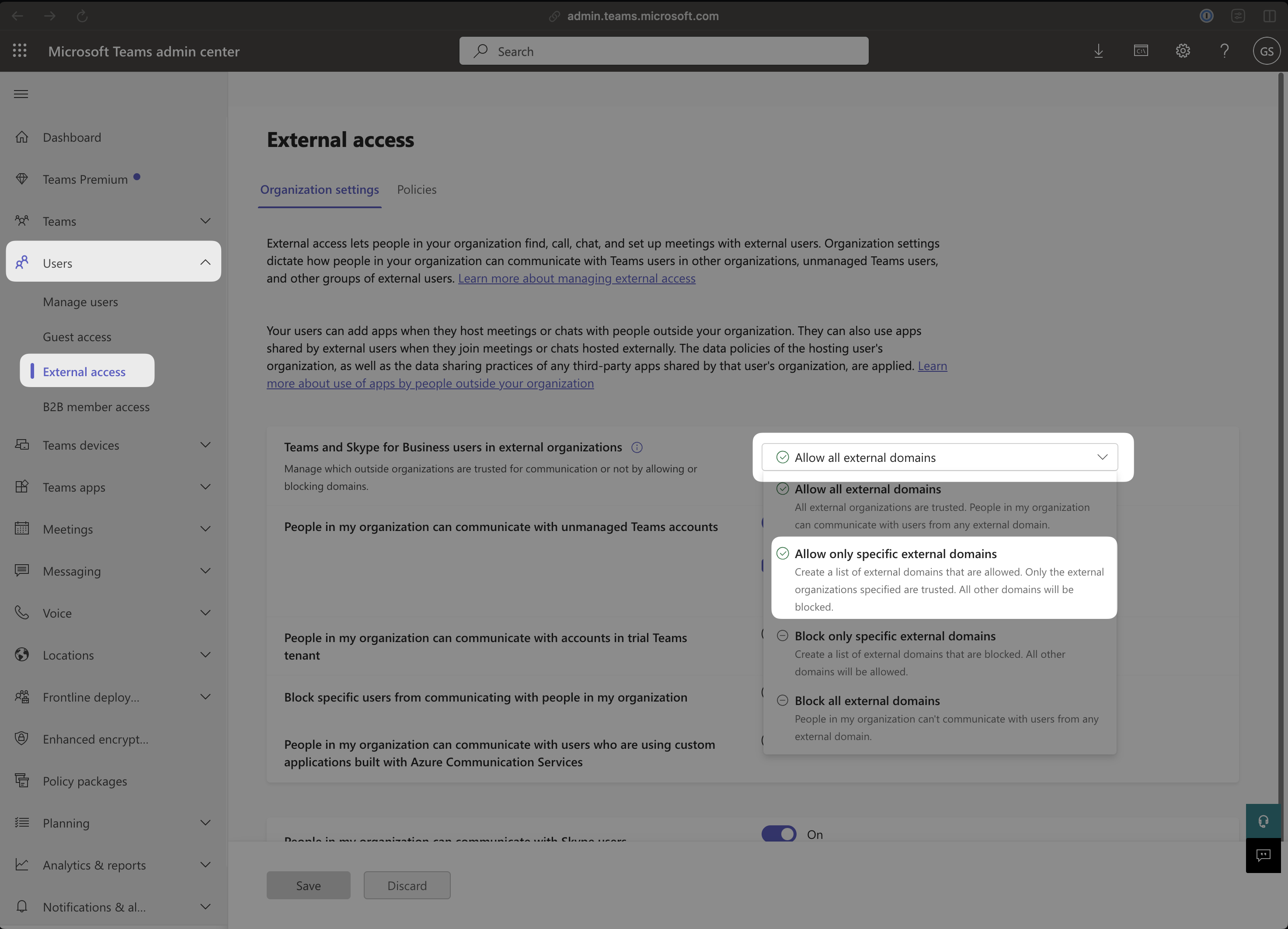
**[Teams Admin Center → Users → External Access](https://admin.teams.microsoft.com/company-wide-settings/external-communications)**
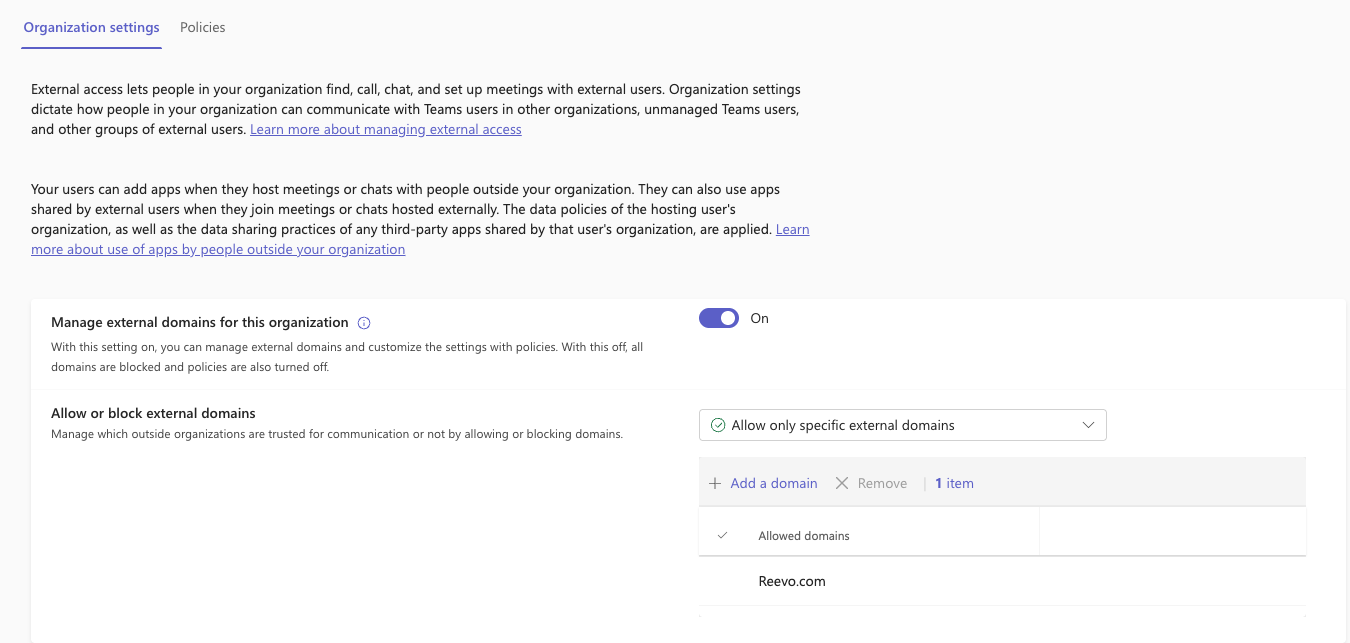
Change the **Allow or block external domains** (or it may be called **\`Teams and Skype for Business users in external organizations**) setting to **"Allow only specified external domains"**.
Add **"reevo.com"** to the allow list.
 or
or
 However, you may also wish to alter the specific settings which affect the Reevo Notetaker.
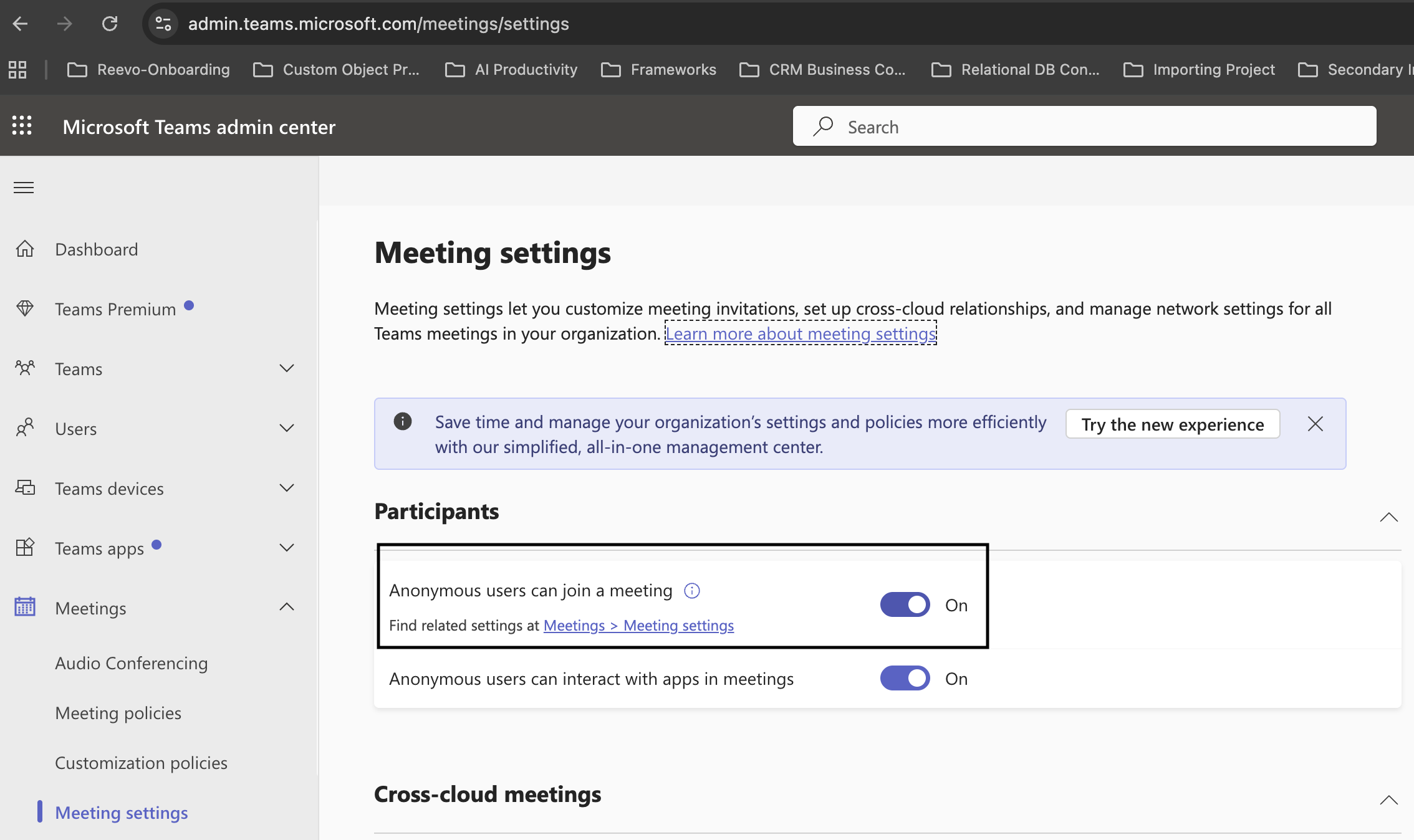
By default, some Microsoft tenants block anonymous users from joining Teams meetings. The Reevo Notetaker joins as an anonymous participant, so this setting must be configured to allow it.
Navigate to the following settings page:
**[Teams Admin Center → Meetings → Meeting settings](https://admin.teams.microsoft.com/meetings/settings)**
Set **Anonymous users can join a meeting** to **ON**
However, you may also wish to alter the specific settings which affect the Reevo Notetaker.
By default, some Microsoft tenants block anonymous users from joining Teams meetings. The Reevo Notetaker joins as an anonymous participant, so this setting must be configured to allow it.
Navigate to the following settings page:
**[Teams Admin Center → Meetings → Meeting settings](https://admin.teams.microsoft.com/meetings/settings)**
Set **Anonymous users can join a meeting** to **ON**
 * Allows anyone to attempt to join meetings, even those who have NOT signed in
* Includes:
* External people
* People from other Microsoft tenants
* People not on your allowed domain list
* Browsers in incognito mode
* Sends them to the **meeting join flow** (lobby rules still apply)
**Important:**
* This does **not** mean they automatically get into the meeting
* Lobby, verification, and admit rules still apply
* This toggle only answers: *"Are anonymous joins allowed at all?"*
Navigate to the following settings page:
**[Teams Admin Center → Policies → Meeting policies](https://admin.teams.microsoft.com/policies/meetings)**
For all meeting policies for users using Reevo (or the Global default policy) you will need to change the following:
Under **Meeting join & lobby**, find **"Anonymous users can join a meeting unverified"** and set it to **ON**.
* Anonymous users can join a meeting without authentication or identity verification
* They land directly in the lobby (unless lobby bypass rules allow otherwise)
**Important:**
* This does **not** mean they automatically get into the meeting
* Lobby, verification, and admit rules still apply
* This toggle only controls whether verification is required before reaching the lobby
This setting determines whether anonymous users must complete an email verification check before joining meetings. If set to require verification, the Reevo Notetaker will be blocked.
Navigate to the following settings page:
**[Teams Admin Center → Policies → Meeting policies](https://admin.teams.microsoft.com/policies/meetings)**
Select your meeting policy (or the Global default policy).
Under **Meeting join & lobby**, find **"Require a verification check from"** and set it to **"Not required"**.
* No one is required to verify their identity before joining
* Anonymous users can:
1. Click the meeting link
2. Enter a display name
3. Go straight to the lobby
**This allows the following to join without friction:**
* Anonymous users
* Bots and AI note-takers (including Reevo)
* External users from other organizations
* Anyone with the meeting link
**Important:**
* This does **not** mean they automatically get into the meeting
* Lobby and admit rules still apply
* This only removes the verification step
* Anonymous users must complete a verification check (typically email-based) before reaching the lobby
**This will block:**
* Most bots (including the Reevo Notetaker)
* Automated joiners
* Headless browsers
**Who can still get in:**
* Real humans who can complete the email verification
**Note:** If this is enabled and you want Reevo to join your meetings, you must change this setting to "Not required".
#
> Still have questions? [Sign in](https://reevo.ai/) and use AskReevo for instant answers or to raise a support ticket.
* Allows anyone to attempt to join meetings, even those who have NOT signed in
* Includes:
* External people
* People from other Microsoft tenants
* People not on your allowed domain list
* Browsers in incognito mode
* Sends them to the **meeting join flow** (lobby rules still apply)
**Important:**
* This does **not** mean they automatically get into the meeting
* Lobby, verification, and admit rules still apply
* This toggle only answers: *"Are anonymous joins allowed at all?"*
Navigate to the following settings page:
**[Teams Admin Center → Policies → Meeting policies](https://admin.teams.microsoft.com/policies/meetings)**
For all meeting policies for users using Reevo (or the Global default policy) you will need to change the following:
Under **Meeting join & lobby**, find **"Anonymous users can join a meeting unverified"** and set it to **ON**.
* Anonymous users can join a meeting without authentication or identity verification
* They land directly in the lobby (unless lobby bypass rules allow otherwise)
**Important:**
* This does **not** mean they automatically get into the meeting
* Lobby, verification, and admit rules still apply
* This toggle only controls whether verification is required before reaching the lobby
This setting determines whether anonymous users must complete an email verification check before joining meetings. If set to require verification, the Reevo Notetaker will be blocked.
Navigate to the following settings page:
**[Teams Admin Center → Policies → Meeting policies](https://admin.teams.microsoft.com/policies/meetings)**
Select your meeting policy (or the Global default policy).
Under **Meeting join & lobby**, find **"Require a verification check from"** and set it to **"Not required"**.
* No one is required to verify their identity before joining
* Anonymous users can:
1. Click the meeting link
2. Enter a display name
3. Go straight to the lobby
**This allows the following to join without friction:**
* Anonymous users
* Bots and AI note-takers (including Reevo)
* External users from other organizations
* Anyone with the meeting link
**Important:**
* This does **not** mean they automatically get into the meeting
* Lobby and admit rules still apply
* This only removes the verification step
* Anonymous users must complete a verification check (typically email-based) before reaching the lobby
**This will block:**
* Most bots (including the Reevo Notetaker)
* Automated joiners
* Headless browsers
**Who can still get in:**
* Real humans who can complete the email verification
**Note:** If this is enabled and you want Reevo to join your meetings, you must change this setting to "Not required".
#
> Still have questions? [Sign in](https://reevo.ai/) and use AskReevo for instant answers or to raise a support ticket.