> ## Documentation Index
> Fetch the complete documentation index at: https://help.reevo.ai/llms.txt
> Use this file to discover all available pages before exploring further.
# API Integrations with Other Tools
> Reevo’s API keys let you connect external tools and automatically bring data into your workspace without manual entry.
# Overview
Reevo provides API keys that allow you to connect external tools and automate data flow into your workspace. With API keys, you can push contacts from platforms like Clay or Zapier, build custom integrations, or sync data from your own systems directly into Reevo without manual entry.
API keys use a permission-based system, allowing you to control exactly what each key can access. This means you can create separate keys for different integrations with only the permissions they need.
## **Prerequisites**
* You must be an **admin** in your Reevo workspace to create API keys
* Your organization must have available quota for public requests
# Watch: How to Generate and Manage API Keys
***
# **Step-by-Step Instructions**
### **Creating a New API Key**
1. Navigate to [**Settings**](https://app.reevo.ai/settings/integrations) in your Reevo workspace
2. Go to the [**API Keys section**](https://app.reevo.ai/settings/integrations) → **New API key** button
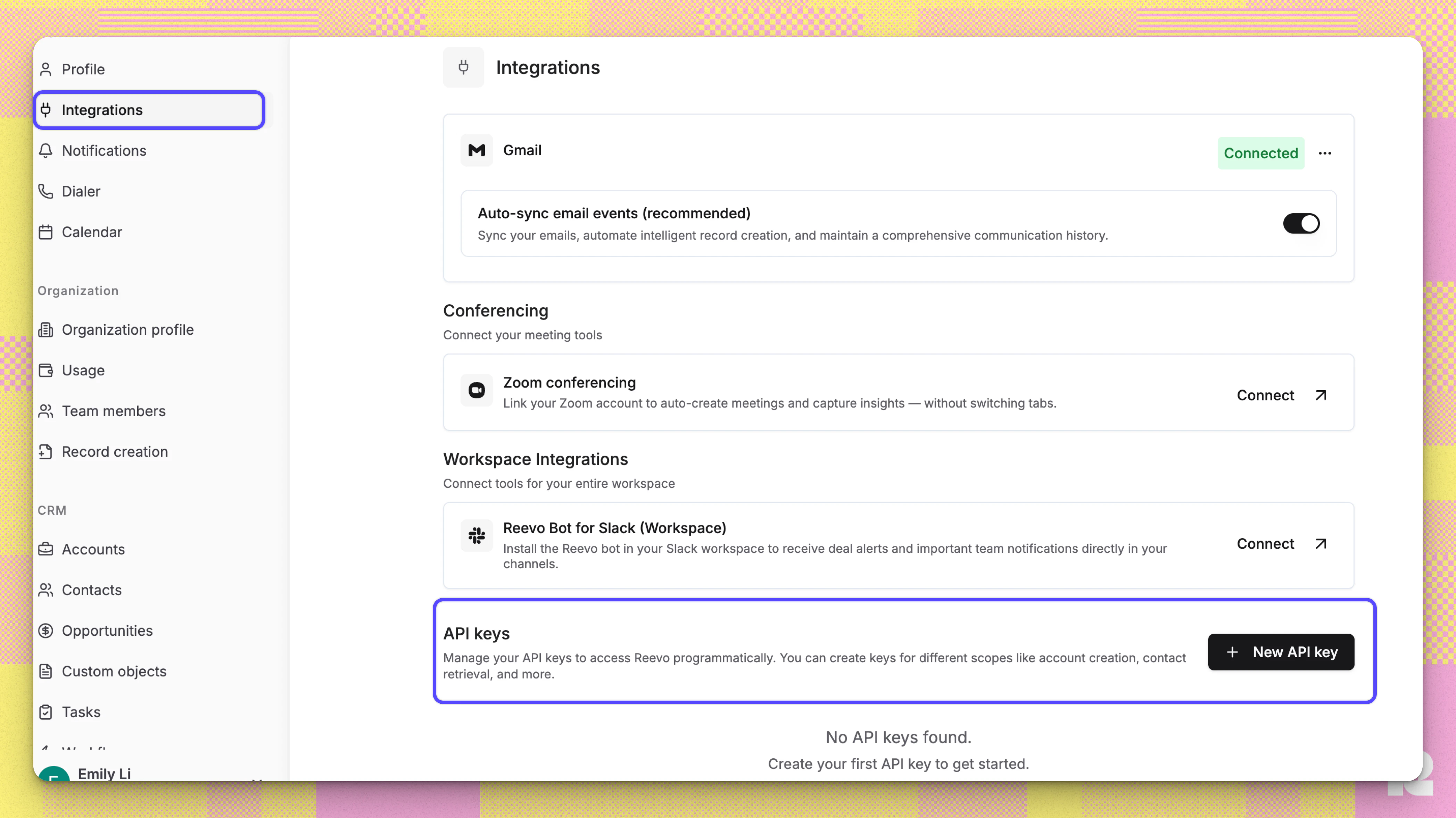 3. Give your key a descriptive name (for example, "Clay Integration" or "Zapier Webhook")
4. Select the permissions your integration needs:
| Permissions | Read | Write |
| :------------------ | :--: | :---: |
| Accounts | ✓ | ✓ |
| Contacts | ✓ | ✓ |
| Opportunities | ✓ | ✓ |
| Tasks | ✓ | ✓ |
| Activities | X | ✓ |
| Users | ✓ | X |
| Mailbox | ✓ | X |
| Sequence Enrollment | ✓ | ✓ |
| Webhooks | ✓ | ✓ |
**Read permissions** allow an API key to view and retrieve data, but not modify it. For example, with **Accounts Read**, you can fetch account information but cannot create or update accounts.
**Write permissions** allow an API key to create, update, or modify data. Importantly, write permissions automatically include read permissions for the same resource. So if you have **Contacts Write**, you can both read and write contact data without needing to also select **Contacts Read**.
5. Click **Generate**
**Important**: Copy the API key immediately and store it securely. You will not be able to view it again after closing the popup.
***
### **Managing Existing API Keys**
You can manage Existing API Keys under Setting → [Integrations](https://app.reevo.ai/settings/integrations). The API keys table shows:
* **Name**: The label you gave the key
* **Permissions**: What the key can access
* **Status**: Whether the key is Active or Expired
Active keys are listed first, followed by expired keys, sorted alphabetically by name.
***
### **Expiring an API Key**
If you need to revoke access for a key:
1. Find the key in your API keys table
2. Click the three-dot menu next to the key
3. Select **Expire key**
4. The key will immediately stop working and show as "Expired" in your table
***
### **Using Your API Key**
In your external tool, configure Webhooks by:
1. **Assigning a new HTTP API** and include your API key in the request header:
* **Header name**: `x-api-key`
* **Header value**: Your API key
The system automatically validates that your key has the required permissions for each request. If a key lacks necessary permissions, the request will be rejected with a clear error message indicating which permissions are missing.
2. **Set your request details**
* **Endpoint**: See available endpoints below.
* **Query Parameter**:
* Key: `payload_type`
* Value: `json`
3. **Define the body of your request. See example requests and supported values for each endpoint below:**
This does upsert for account and contact.
Supported values:
```
email: str*
first_name: str | None = None
last_name: str | None = None
middle_name: str | None = None
phone_number: str | None = None
company: str | None = None
title: str | None = None
department: str | None = None
contact_linkedin_url: str | None = None
contact_facebook_url: str | None = None
contact_zoominfo_url: str | None = None
contact_x_url: str | None = None
contact_owner_email: str | None = None
account_linkedin_url: str | None = None
account_facebook_url: str | None = None
account_zoominfo_url: str | None = None
account_x_url: str | None = None
account_owner_email: str | None = None
account_website: str | None = None
account_custom_fields: dict[UUID | str, str | list[str]] | None = None
contact_custom_fields: dict[UUID | str, str | list[str]] | None = None
```
Example full request:
```
curl -X POST "https://api.reevo.ai/api/v1/public/account_contact" \
-H "Content-Type: application/json" \
-H "X-Api-Key: Your API KEY" \
-d '{
"email": "postcon@postman.com",
"contact_owner_email": "john.doe@acme.com",
"account_website": "https://www.acme.com",
"account_linkedin_url": "https://linkedin.com/company/acme-corp",
"account_facebook_url": "https://facebook.com/acmecorp",
"account_zoominfo_url": "https://zoominfo.com/c/acme-corporation",
"account_x_url": "https://twitter.com/acmecorp",
"contact_custom_fields": {"Your_Custom_Field_API_Name_1": "Your Value"},
"account_custom_fields": {"Your_Custom_Field_API_Name_2": "Your Value"}
}'
```
Create a new account in your CRM.
Supported values:
```
name: str*
owner_email: str | None = None
official_website: str | None = None
domain_name: str | None = None
linkedin_url: str | None = None
facebook_url: str | None = None
zoominfo_url: str | None = None
x_url: str | None = None
custom_fields: dict[UUID | str, str | list[str]] | None = None
```
Example full request:
```
curl -X POST "https://api.reevo.ai/api/v1/public/accounts" \
-H "Content-Type: application/json" \
-H "x-api-key: Your API Key" \
-d '{
"name": "Acme Corporation",
"owner_email": "john.doe@acme.com",
"official_website": "https://www.acme.com",
"domain_name": "acme.com",
"linkedin_url": "https://linkedin.com/company/acme-corp",
"facebook_url": "https://facebook.com/acmecorp",
"zoominfo_url": "https://zoominfo.com/c/acme-corporation",
"x_url": "https://twitter.com/acmecorp",
"custom_fields": {
"industry": "Technology",
"employee_count": "500-1000"
}
}'
```
Update an existing account by its ID. You can retrieve an account ID from the **Search by domain name** endpoint, or from the account URL in your Reevo workspace.
**Path parameter:** `{account_id}` - the UUID of the account to update.
Supported values:
```
name: str | None = None
owner_email: str | None = None
official_website: str | None = None
linkedin_url: str | None = None
facebook_url: str | None = None
zoominfo_url: str | None = None
x_url: str | None = None
custom_fields: dict[UUID | str, str | list[str]] | None = None
```
Example full request:
```
curl -X PATCH "https://api.reevo.ai/api/v1/public/accounts/{account_id}" \
-H "Content-Type: application/json" \
-H "x-api-key: Your API Key" \
-d '{
"name": "Acme Corporation Updated",
"owner_email": "new.owner@acme.com",
"custom_fields": {
"industry": "Technology"
}
}'
```
Retrieve a specific account by its ID.
**Path parameter:** `{account_id}` - the UUID of the account to retrieve.
Example full request:
```
curl -X GET "https://api.reevo.ai/api/v1/public/accounts/{account_id}" \
-H "Content-Type: application/json" \
-H "x-api-key: Your API Key"
```
Search for accounts whose domain name contains the given string. Returns matching accounts with their full profile, owner email, and custom fields.
Supported values:
```
domain_name: str*
limit: int = 100
offset: int = 0
```
Example full request:
```
curl -X POST "https://api.reevo.ai/api/v1/public/accounts/search" \
-H "Content-Type: application/json" \
-H "x-api-key: Your API Key" \
-d '{"domain_name": "acme.com"}'
```
Example response:
```
[{"id":"01abc234-de56-7890-abcd-ef1234567890","name":"Acme Corporation","status":"CUSTOMER","official_website":"https://www.acme.com","domain_name":"acme.com","linkedin_url":"https://www.linkedin.com/company/acme-corp","facebook_url":null,"zoominfo_url":null,"x_url":null,"owner_email":"owner@acme.com","custom_fields":null}]
```
Retrieve a specific contact by ID. Returns the contact's profile, owner, custom fields, and associated account/opportunity links where applicable.
**Path parameter:** `{contact_id}` - the UUID of the contact to retrieve.
Example full request:
```
curl -X GET "https://api.reevo.ai/api/v1/public/contacts/{contact_id}" \
-H "Content-Type: application/json" \
-H "x-api-key: Your API Key"
```
Search contacts by contact email or owner email. At least one of `contact_email` or `owner_email` is required.
Supported values:
```
contact_email: EmailStr | None = None
owner_email: EmailStr | None = None
limit: int = 50
offset: int = 0
```
Example full request:
```
curl -X POST "https://api.reevo.ai/api/v1/public/contacts/search" \
-H "Content-Type: application/json" \
-H "x-api-key: Your API Key" \
-d '{
"contact_email": "jane.doe@acme.com"
}'
```
Create a new opportunity tied to an existing account. The account must already exist in your CRM (use the **Accounts > Create** or **Search by domain name** endpoint to look it up).
Supported values:
```
display_name: str*
account_id: UUID*
owner_email: str | None = None
primary_contact_email: str | None = None
amount: Decimal | None = None
pipeline_name: str | None = None
custom_fields: dict[UUID | str, str | list[str]] | None = None
```
Example full request:
```
curl -X POST "https://api.reevo.ai/api/v1/public/opportunities" \
-H "Content-Type: application/json" \
-H "x-api-key: Your API Key" \
-d '{
"display_name": "Enterprise Software Deal",
"account_id": "01abc234-de56-7890-abcd-ef1234567890",
"owner_email": "owner@acme.com",
"primary_contact_email": "contact@acme.com",
"amount": 50000.00,
"pipeline_name": "Default Pipeline",
"custom_fields": {
"deal_source": "Inbound",
"probability": "75%"
}
}'
```
Update an existing opportunity by its ID. You can retrieve an opportunity ID from the **Search** endpoint, or from the opportunity URL in your Reevo workspace.
**Path parameter:** `{opportunity_id}` - the UUID of the opportunity to update.
Supported values:
```
display_name: str | None = None
account_id: UUID | None = None
owner_email: str | None = None
primary_contact_email: str | None = None
additional_contact_emails: list[str] | None = None
amount: Decimal | None = None
next_step_details: str | None = None
next_step_due_at: ZoneRequiredDateTime | None = None
custom_fields: dict[UUID | str, str | list[str]] | None = None
```
Opportunity stage cannot be changed via PATCH. To shift an opportunity to a different stage, use the **Shift Stage** endpoint instead.
Example full request:
```
curl -X PATCH "https://api.reevo.ai/api/v1/public/opportunities/{opportunity_id}" \
-H "Content-Type: application/json" \
-H "x-api-key: Your API Key" \
-d '{
"amount": 95000.00,
"next_step_details": "Send final proposal and contract for review",
"next_step_due_at": "2024-02-20T10:00:00Z",
"custom_fields": {
"deal_stage": "Proposal Sent",
"probability": "90%"
}
}'
```
Retrieve a specific opportunity by its ID.
**Path parameter:** `{opportunity_id}` - the UUID of the opportunity to retrieve.
Example full request:
```
curl -X GET "https://api.reevo.ai/api/v1/public/opportunities/{opportunity_id}" \
-H "Content-Type: application/json" \
-H "x-api-key: Your API Key"
```
Search for opportunities by display name, account, owner, status, or pipeline stage. Returns matching opportunities with their full profile and custom fields.
Supported values:
```
display_name: str | None = None
account_id: UUID | None = None
owner_email: EmailStr | None = None
status: PipelineStatus | None = None # One of: PROSPECT, DEAL
stage_name: str | None = None
limit: int = 100
offset: int = 0
```
Example full request:
```
curl -X POST "https://api.reevo.ai/api/v1/public/opportunities/search" \
-H "Content-Type: application/json" \
-H "x-api-key: Your API Key" \
-d '{"account_id": "01abc234-de56-7890-abcd-ef1234567890"}'
```
Move an opportunity to a different stage in its pipeline.
**Path parameter:** `{opportunity_id}` - the UUID of the opportunity to shift.
Supported values:
```
target_stage_name: str*
closed_reason_names: list[str] | None = None
closed_reason_custom_detail: str | None = None
```
`closed_reason_names` is required when shifting to a closed stage (won/lost). The system automatically determines whether these should be won or lost reasons based on the target stage.
Example full request:
```
curl -X POST "https://api.reevo.ai/api/v1/public/opportunities/{opportunity_id}/shift_stage" \
-H "Content-Type: application/json" \
-H "x-api-key: Your API Key" \
-d '{
"target_stage_name": "Qualified"
}'
```
Create a new task for a user, optionally tied to an account, contact, or opportunity. Tasks appear in the assigned user's task list in Reevo.
Supported values:
```
title: str*
owner_email: EmailStr*
status: TaskStatus = "OPEN" # One of: OPEN, IN_PROGRESS, BLOCKED, COMPLETED, CLOSED
priority: TaskPriority = "MEDIUM" # One of: URGENT, HIGH, MEDIUM, LOW
type: TaskType = "REMINDER" # One of: ACTION_ITEM, LINKEDIN_MESSAGE, REMINDER, SCHEDULING, EMAIL, VOICE_CALL, LINKEDIN_CONNECT_REQUEST, SMS_MESSAGE, CUSTOM_TASK
due_at: ZoneRequiredDateTime | None = None
note: str | None = None
account_id: UUID | None = None
contact_emails: list[EmailStr] | None = None
opportunity_name: str | None = None
```
Example full request:
```
curl -X POST "https://api.reevo.ai/api/v1/public/tasks" \
-H "Content-Type: application/json" \
-H "x-api-key: Your API Key" \
-d '{
"title": "Create Task API Test",
"owner_email": "john.doe@acme.com",
"type": "REMINDER"
}'
```
Log a manual activity (such as an SMS, LinkedIn message, social media interaction, or other communication channel) against CRM entities like accounts, contacts, opportunities, or sequences. Useful for capturing touches that happen outside Reevo.
Supported values:
```
metadata.activity_time: ZoneRequiredDateTime* # ISO 8601 with timezone, e.g. 2026-03-18T14:30:00Z
metadata.subject: str*
metadata.description: str*
metadata.category: str = "OTHER" # One of: TEXT, LINKEDIN, SOCIAL_MEDIA, EVENT, CONFERENCE, WEBINAR, CALL, OTHER
account_id: UUID | None = None
contact_ids: list[UUID] | None = None
pipeline_id: UUID | None = None # Associated opportunity ID
sequence_id: UUID | None = None
```
Example full request:
```
curl -X POST "https://api.reevo.ai/api/v1/public/manual_activities" \
-H "Content-Type: application/json" \
-H "x-api-key: Your API Key" \
-d '{
"metadata": {
"activity_time": "2026-03-18T14:30:00Z",
"subject": "SMS follow-up with prospect",
"description": "Sent reminder about upcoming demo scheduled for Thursday",
"category": "TEXT"
},
"account_id": "01abc234-de56-7890-abcd-ef1234567890",
"contact_ids": ["02bcd345-ef67-8901-bcde-f23456789012"]
}'
```
Search organization user via email.
```
email: EmailStr*
```
Example full request:
```
curl -X POST "https://api.reevo.ai/api/v1/public/users/search" \
-H "Content-Type: application/json" \
-H "x-api-key: Your API Key" \
-d '{
"email": "john.doe@acme.com"
}'
```
Search mailboxes via the owner's email.
```
owner_user_email: EmailStr*
```
Example full request:
```
curl -X POST "https://api.reevo.ai/api/v1/public/mailboxes/search" \
-H "Content-Type: application/json" \
-H "X-Api-Key: Your API Key" \
-d '{"owner_user_email": "john.doe@acme.com"}'
```
Enroll a single contact into a sequence. One contact per API request.
Supported values:
```
contact_email: EmailStr*
sequence_id: UUID*
mailbox_email: EmailStr | None # Optional - see mailbox behavior below
```
**Mailbox behavior:**
* If `mailbox_email` is provided, that specific mailbox will be used to send emails for this enrollment.
* If `mailbox_email` is omitted, Reevo defaults to a random mailbox from the contact's CRM owner's available mailboxes.
The API supports one contact per request. For bulk enrollment, use the Sequences UI.
Example full request:
```
curl -X POST "https://api.reevo.ai/api/v1/public/sequence_enrollments" \
-H "Content-Type: application/json" \
-H "x-api-key: Your API Key" \
-d '{
"contact_email": "jane.doe@prospect.com",
"sequence_id": "your-sequence-uuid",
"mailbox_email": "sender@yourcompany.com"
}'
```
* First create the field in Reevo. Refer to [this article](https://help.reevo.ai/CRM-configurations/Custom-Fields) to learn how to create custom fields.
* To find your custom field's API name, go to settings where the custom field was created and hover over the field
3. Give your key a descriptive name (for example, "Clay Integration" or "Zapier Webhook")
4. Select the permissions your integration needs:
| Permissions | Read | Write |
| :------------------ | :--: | :---: |
| Accounts | ✓ | ✓ |
| Contacts | ✓ | ✓ |
| Opportunities | ✓ | ✓ |
| Tasks | ✓ | ✓ |
| Activities | X | ✓ |
| Users | ✓ | X |
| Mailbox | ✓ | X |
| Sequence Enrollment | ✓ | ✓ |
| Webhooks | ✓ | ✓ |
**Read permissions** allow an API key to view and retrieve data, but not modify it. For example, with **Accounts Read**, you can fetch account information but cannot create or update accounts.
**Write permissions** allow an API key to create, update, or modify data. Importantly, write permissions automatically include read permissions for the same resource. So if you have **Contacts Write**, you can both read and write contact data without needing to also select **Contacts Read**.
5. Click **Generate**
**Important**: Copy the API key immediately and store it securely. You will not be able to view it again after closing the popup.
***
### **Managing Existing API Keys**
You can manage Existing API Keys under Setting → [Integrations](https://app.reevo.ai/settings/integrations). The API keys table shows:
* **Name**: The label you gave the key
* **Permissions**: What the key can access
* **Status**: Whether the key is Active or Expired
Active keys are listed first, followed by expired keys, sorted alphabetically by name.
***
### **Expiring an API Key**
If you need to revoke access for a key:
1. Find the key in your API keys table
2. Click the three-dot menu next to the key
3. Select **Expire key**
4. The key will immediately stop working and show as "Expired" in your table
***
### **Using Your API Key**
In your external tool, configure Webhooks by:
1. **Assigning a new HTTP API** and include your API key in the request header:
* **Header name**: `x-api-key`
* **Header value**: Your API key
The system automatically validates that your key has the required permissions for each request. If a key lacks necessary permissions, the request will be rejected with a clear error message indicating which permissions are missing.
2. **Set your request details**
* **Endpoint**: See available endpoints below.
* **Query Parameter**:
* Key: `payload_type`
* Value: `json`
3. **Define the body of your request. See example requests and supported values for each endpoint below:**
This does upsert for account and contact.
Supported values:
```
email: str*
first_name: str | None = None
last_name: str | None = None
middle_name: str | None = None
phone_number: str | None = None
company: str | None = None
title: str | None = None
department: str | None = None
contact_linkedin_url: str | None = None
contact_facebook_url: str | None = None
contact_zoominfo_url: str | None = None
contact_x_url: str | None = None
contact_owner_email: str | None = None
account_linkedin_url: str | None = None
account_facebook_url: str | None = None
account_zoominfo_url: str | None = None
account_x_url: str | None = None
account_owner_email: str | None = None
account_website: str | None = None
account_custom_fields: dict[UUID | str, str | list[str]] | None = None
contact_custom_fields: dict[UUID | str, str | list[str]] | None = None
```
Example full request:
```
curl -X POST "https://api.reevo.ai/api/v1/public/account_contact" \
-H "Content-Type: application/json" \
-H "X-Api-Key: Your API KEY" \
-d '{
"email": "postcon@postman.com",
"contact_owner_email": "john.doe@acme.com",
"account_website": "https://www.acme.com",
"account_linkedin_url": "https://linkedin.com/company/acme-corp",
"account_facebook_url": "https://facebook.com/acmecorp",
"account_zoominfo_url": "https://zoominfo.com/c/acme-corporation",
"account_x_url": "https://twitter.com/acmecorp",
"contact_custom_fields": {"Your_Custom_Field_API_Name_1": "Your Value"},
"account_custom_fields": {"Your_Custom_Field_API_Name_2": "Your Value"}
}'
```
Create a new account in your CRM.
Supported values:
```
name: str*
owner_email: str | None = None
official_website: str | None = None
domain_name: str | None = None
linkedin_url: str | None = None
facebook_url: str | None = None
zoominfo_url: str | None = None
x_url: str | None = None
custom_fields: dict[UUID | str, str | list[str]] | None = None
```
Example full request:
```
curl -X POST "https://api.reevo.ai/api/v1/public/accounts" \
-H "Content-Type: application/json" \
-H "x-api-key: Your API Key" \
-d '{
"name": "Acme Corporation",
"owner_email": "john.doe@acme.com",
"official_website": "https://www.acme.com",
"domain_name": "acme.com",
"linkedin_url": "https://linkedin.com/company/acme-corp",
"facebook_url": "https://facebook.com/acmecorp",
"zoominfo_url": "https://zoominfo.com/c/acme-corporation",
"x_url": "https://twitter.com/acmecorp",
"custom_fields": {
"industry": "Technology",
"employee_count": "500-1000"
}
}'
```
Update an existing account by its ID. You can retrieve an account ID from the **Search by domain name** endpoint, or from the account URL in your Reevo workspace.
**Path parameter:** `{account_id}` - the UUID of the account to update.
Supported values:
```
name: str | None = None
owner_email: str | None = None
official_website: str | None = None
linkedin_url: str | None = None
facebook_url: str | None = None
zoominfo_url: str | None = None
x_url: str | None = None
custom_fields: dict[UUID | str, str | list[str]] | None = None
```
Example full request:
```
curl -X PATCH "https://api.reevo.ai/api/v1/public/accounts/{account_id}" \
-H "Content-Type: application/json" \
-H "x-api-key: Your API Key" \
-d '{
"name": "Acme Corporation Updated",
"owner_email": "new.owner@acme.com",
"custom_fields": {
"industry": "Technology"
}
}'
```
Retrieve a specific account by its ID.
**Path parameter:** `{account_id}` - the UUID of the account to retrieve.
Example full request:
```
curl -X GET "https://api.reevo.ai/api/v1/public/accounts/{account_id}" \
-H "Content-Type: application/json" \
-H "x-api-key: Your API Key"
```
Search for accounts whose domain name contains the given string. Returns matching accounts with their full profile, owner email, and custom fields.
Supported values:
```
domain_name: str*
limit: int = 100
offset: int = 0
```
Example full request:
```
curl -X POST "https://api.reevo.ai/api/v1/public/accounts/search" \
-H "Content-Type: application/json" \
-H "x-api-key: Your API Key" \
-d '{"domain_name": "acme.com"}'
```
Example response:
```
[{"id":"01abc234-de56-7890-abcd-ef1234567890","name":"Acme Corporation","status":"CUSTOMER","official_website":"https://www.acme.com","domain_name":"acme.com","linkedin_url":"https://www.linkedin.com/company/acme-corp","facebook_url":null,"zoominfo_url":null,"x_url":null,"owner_email":"owner@acme.com","custom_fields":null}]
```
Retrieve a specific contact by ID. Returns the contact's profile, owner, custom fields, and associated account/opportunity links where applicable.
**Path parameter:** `{contact_id}` - the UUID of the contact to retrieve.
Example full request:
```
curl -X GET "https://api.reevo.ai/api/v1/public/contacts/{contact_id}" \
-H "Content-Type: application/json" \
-H "x-api-key: Your API Key"
```
Search contacts by contact email or owner email. At least one of `contact_email` or `owner_email` is required.
Supported values:
```
contact_email: EmailStr | None = None
owner_email: EmailStr | None = None
limit: int = 50
offset: int = 0
```
Example full request:
```
curl -X POST "https://api.reevo.ai/api/v1/public/contacts/search" \
-H "Content-Type: application/json" \
-H "x-api-key: Your API Key" \
-d '{
"contact_email": "jane.doe@acme.com"
}'
```
Create a new opportunity tied to an existing account. The account must already exist in your CRM (use the **Accounts > Create** or **Search by domain name** endpoint to look it up).
Supported values:
```
display_name: str*
account_id: UUID*
owner_email: str | None = None
primary_contact_email: str | None = None
amount: Decimal | None = None
pipeline_name: str | None = None
custom_fields: dict[UUID | str, str | list[str]] | None = None
```
Example full request:
```
curl -X POST "https://api.reevo.ai/api/v1/public/opportunities" \
-H "Content-Type: application/json" \
-H "x-api-key: Your API Key" \
-d '{
"display_name": "Enterprise Software Deal",
"account_id": "01abc234-de56-7890-abcd-ef1234567890",
"owner_email": "owner@acme.com",
"primary_contact_email": "contact@acme.com",
"amount": 50000.00,
"pipeline_name": "Default Pipeline",
"custom_fields": {
"deal_source": "Inbound",
"probability": "75%"
}
}'
```
Update an existing opportunity by its ID. You can retrieve an opportunity ID from the **Search** endpoint, or from the opportunity URL in your Reevo workspace.
**Path parameter:** `{opportunity_id}` - the UUID of the opportunity to update.
Supported values:
```
display_name: str | None = None
account_id: UUID | None = None
owner_email: str | None = None
primary_contact_email: str | None = None
additional_contact_emails: list[str] | None = None
amount: Decimal | None = None
next_step_details: str | None = None
next_step_due_at: ZoneRequiredDateTime | None = None
custom_fields: dict[UUID | str, str | list[str]] | None = None
```
Opportunity stage cannot be changed via PATCH. To shift an opportunity to a different stage, use the **Shift Stage** endpoint instead.
Example full request:
```
curl -X PATCH "https://api.reevo.ai/api/v1/public/opportunities/{opportunity_id}" \
-H "Content-Type: application/json" \
-H "x-api-key: Your API Key" \
-d '{
"amount": 95000.00,
"next_step_details": "Send final proposal and contract for review",
"next_step_due_at": "2024-02-20T10:00:00Z",
"custom_fields": {
"deal_stage": "Proposal Sent",
"probability": "90%"
}
}'
```
Retrieve a specific opportunity by its ID.
**Path parameter:** `{opportunity_id}` - the UUID of the opportunity to retrieve.
Example full request:
```
curl -X GET "https://api.reevo.ai/api/v1/public/opportunities/{opportunity_id}" \
-H "Content-Type: application/json" \
-H "x-api-key: Your API Key"
```
Search for opportunities by display name, account, owner, status, or pipeline stage. Returns matching opportunities with their full profile and custom fields.
Supported values:
```
display_name: str | None = None
account_id: UUID | None = None
owner_email: EmailStr | None = None
status: PipelineStatus | None = None # One of: PROSPECT, DEAL
stage_name: str | None = None
limit: int = 100
offset: int = 0
```
Example full request:
```
curl -X POST "https://api.reevo.ai/api/v1/public/opportunities/search" \
-H "Content-Type: application/json" \
-H "x-api-key: Your API Key" \
-d '{"account_id": "01abc234-de56-7890-abcd-ef1234567890"}'
```
Move an opportunity to a different stage in its pipeline.
**Path parameter:** `{opportunity_id}` - the UUID of the opportunity to shift.
Supported values:
```
target_stage_name: str*
closed_reason_names: list[str] | None = None
closed_reason_custom_detail: str | None = None
```
`closed_reason_names` is required when shifting to a closed stage (won/lost). The system automatically determines whether these should be won or lost reasons based on the target stage.
Example full request:
```
curl -X POST "https://api.reevo.ai/api/v1/public/opportunities/{opportunity_id}/shift_stage" \
-H "Content-Type: application/json" \
-H "x-api-key: Your API Key" \
-d '{
"target_stage_name": "Qualified"
}'
```
Create a new task for a user, optionally tied to an account, contact, or opportunity. Tasks appear in the assigned user's task list in Reevo.
Supported values:
```
title: str*
owner_email: EmailStr*
status: TaskStatus = "OPEN" # One of: OPEN, IN_PROGRESS, BLOCKED, COMPLETED, CLOSED
priority: TaskPriority = "MEDIUM" # One of: URGENT, HIGH, MEDIUM, LOW
type: TaskType = "REMINDER" # One of: ACTION_ITEM, LINKEDIN_MESSAGE, REMINDER, SCHEDULING, EMAIL, VOICE_CALL, LINKEDIN_CONNECT_REQUEST, SMS_MESSAGE, CUSTOM_TASK
due_at: ZoneRequiredDateTime | None = None
note: str | None = None
account_id: UUID | None = None
contact_emails: list[EmailStr] | None = None
opportunity_name: str | None = None
```
Example full request:
```
curl -X POST "https://api.reevo.ai/api/v1/public/tasks" \
-H "Content-Type: application/json" \
-H "x-api-key: Your API Key" \
-d '{
"title": "Create Task API Test",
"owner_email": "john.doe@acme.com",
"type": "REMINDER"
}'
```
Log a manual activity (such as an SMS, LinkedIn message, social media interaction, or other communication channel) against CRM entities like accounts, contacts, opportunities, or sequences. Useful for capturing touches that happen outside Reevo.
Supported values:
```
metadata.activity_time: ZoneRequiredDateTime* # ISO 8601 with timezone, e.g. 2026-03-18T14:30:00Z
metadata.subject: str*
metadata.description: str*
metadata.category: str = "OTHER" # One of: TEXT, LINKEDIN, SOCIAL_MEDIA, EVENT, CONFERENCE, WEBINAR, CALL, OTHER
account_id: UUID | None = None
contact_ids: list[UUID] | None = None
pipeline_id: UUID | None = None # Associated opportunity ID
sequence_id: UUID | None = None
```
Example full request:
```
curl -X POST "https://api.reevo.ai/api/v1/public/manual_activities" \
-H "Content-Type: application/json" \
-H "x-api-key: Your API Key" \
-d '{
"metadata": {
"activity_time": "2026-03-18T14:30:00Z",
"subject": "SMS follow-up with prospect",
"description": "Sent reminder about upcoming demo scheduled for Thursday",
"category": "TEXT"
},
"account_id": "01abc234-de56-7890-abcd-ef1234567890",
"contact_ids": ["02bcd345-ef67-8901-bcde-f23456789012"]
}'
```
Search organization user via email.
```
email: EmailStr*
```
Example full request:
```
curl -X POST "https://api.reevo.ai/api/v1/public/users/search" \
-H "Content-Type: application/json" \
-H "x-api-key: Your API Key" \
-d '{
"email": "john.doe@acme.com"
}'
```
Search mailboxes via the owner's email.
```
owner_user_email: EmailStr*
```
Example full request:
```
curl -X POST "https://api.reevo.ai/api/v1/public/mailboxes/search" \
-H "Content-Type: application/json" \
-H "X-Api-Key: Your API Key" \
-d '{"owner_user_email": "john.doe@acme.com"}'
```
Enroll a single contact into a sequence. One contact per API request.
Supported values:
```
contact_email: EmailStr*
sequence_id: UUID*
mailbox_email: EmailStr | None # Optional - see mailbox behavior below
```
**Mailbox behavior:**
* If `mailbox_email` is provided, that specific mailbox will be used to send emails for this enrollment.
* If `mailbox_email` is omitted, Reevo defaults to a random mailbox from the contact's CRM owner's available mailboxes.
The API supports one contact per request. For bulk enrollment, use the Sequences UI.
Example full request:
```
curl -X POST "https://api.reevo.ai/api/v1/public/sequence_enrollments" \
-H "Content-Type: application/json" \
-H "x-api-key: Your API Key" \
-d '{
"contact_email": "jane.doe@prospect.com",
"sequence_id": "your-sequence-uuid",
"mailbox_email": "sender@yourcompany.com"
}'
```
* First create the field in Reevo. Refer to [this article](https://help.reevo.ai/CRM-configurations/Custom-Fields) to learn how to create custom fields.
* To find your custom field's API name, go to settings where the custom field was created and hover over the field
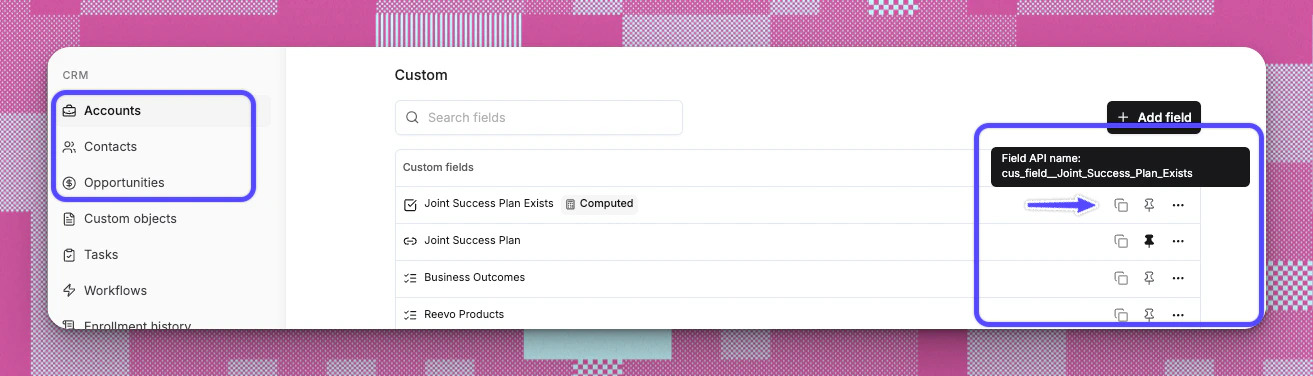 In the JSON body, use:
```
"contact_custom_fields": {
"Your_Custom_Field_API_Name_1": "Your Value",
"Your_Custom_Field_API_Name_2": "Your Value"
}
"account_custom_fields": {
"Your_Custom_Field_API_Name_1": "Your Value",
"Your_Custom_Field_API_Name_2": "Your Value"
}
```
Example payload:
```
{
"first_name": "John",
"last_name": "Doe",
"email": "john.doe@acme.co",
"contact_custom_fields": {
"cus_field__Lead_Source": "inbound_form",
"cus_field__Lead_Source_Details": "board member"
}
}
```
Retrieve account and contact data using one of three exact-match identifiers. Provide exactly one field per request.
Supported values (provide one):
```
contact_email: str | None = None
account_domain: str | None = None
contact_phone_number: str | None = None
```
Example full requests:
```
curl -X GET \
"https://api.reevo.ai/api/v1/public/account_and_contact_retrieval?contact_email=jane.doe@acme.com" \
-H "X-Api-Key: Your API Key"
# OR
curl -X GET \
"https://api.reevo.ai/api/v1/public/account_and_contact_retrieval?contact_phone_number=%2B14151234567" \
-H "X-Api-Key: Your API Key"
```
Phone numbers must be URL-encoded. The `+` sign becomes `%2B`. Example: `+14151234567` becomes `%2B14151234567`.
4. **Publish and run** the test to confirm the data is correctly sent to Reevo
***
# **Troubleshooting / FAQs**
Only workspace admins can create API keys. If you need access, ask an admin to either grant you admin permissions or create the key for you.
No. For security reasons, API keys are only shown once when created. If you lose a key, you must expire the old one and generate a new one.
Requests using an expired key will be rejected with an "API key has expired" error. You'll need to generate a new key and update your integration.
Yes, as long as the key has all the permissions needed by each integration. However, for better security and tracking, consider creating separate keys for each integration.
If your key has write access to a resource (like Contacts Write), it automatically includes read access too (Contacts Read). You don't need to select both.
Your organization has limits on public requests. If you're approaching or exceeding your quota, contact your account manager to discuss increasing your limits.
> Still have questions? [Sign in](https://reevo.ai/) and use AskReevo for instant answers or to raise a support ticket.
In the JSON body, use:
```
"contact_custom_fields": {
"Your_Custom_Field_API_Name_1": "Your Value",
"Your_Custom_Field_API_Name_2": "Your Value"
}
"account_custom_fields": {
"Your_Custom_Field_API_Name_1": "Your Value",
"Your_Custom_Field_API_Name_2": "Your Value"
}
```
Example payload:
```
{
"first_name": "John",
"last_name": "Doe",
"email": "john.doe@acme.co",
"contact_custom_fields": {
"cus_field__Lead_Source": "inbound_form",
"cus_field__Lead_Source_Details": "board member"
}
}
```
Retrieve account and contact data using one of three exact-match identifiers. Provide exactly one field per request.
Supported values (provide one):
```
contact_email: str | None = None
account_domain: str | None = None
contact_phone_number: str | None = None
```
Example full requests:
```
curl -X GET \
"https://api.reevo.ai/api/v1/public/account_and_contact_retrieval?contact_email=jane.doe@acme.com" \
-H "X-Api-Key: Your API Key"
# OR
curl -X GET \
"https://api.reevo.ai/api/v1/public/account_and_contact_retrieval?contact_phone_number=%2B14151234567" \
-H "X-Api-Key: Your API Key"
```
Phone numbers must be URL-encoded. The `+` sign becomes `%2B`. Example: `+14151234567` becomes `%2B14151234567`.
4. **Publish and run** the test to confirm the data is correctly sent to Reevo
***
# **Troubleshooting / FAQs**
Only workspace admins can create API keys. If you need access, ask an admin to either grant you admin permissions or create the key for you.
No. For security reasons, API keys are only shown once when created. If you lose a key, you must expire the old one and generate a new one.
Requests using an expired key will be rejected with an "API key has expired" error. You'll need to generate a new key and update your integration.
Yes, as long as the key has all the permissions needed by each integration. However, for better security and tracking, consider creating separate keys for each integration.
If your key has write access to a resource (like Contacts Write), it automatically includes read access too (Contacts Read). You don't need to select both.
Your organization has limits on public requests. If you're approaching or exceeding your quota, contact your account manager to discuss increasing your limits.
> Still have questions? [Sign in](https://reevo.ai/) and use AskReevo for instant answers or to raise a support ticket.