> ## Documentation Index
> Fetch the complete documentation index at: https://help.reevo.ai/llms.txt
> Use this file to discover all available pages before exploring further.
# Email Verification
> Email Verification automatically validates sender addresses to prevent spoofing and maintain deliverability. It helps protect your domain reputation by filtering or blocking unverified senders.
## Overview
Sending emails to unverified or risky addresses can lead to bounces, spam complaints, and a damaged domain reputation. Reevo's **Email Verification** gives you precise control over which contacts can be enrolled in sequences or receive outbound messages.
With automated verification, Reevo protects your sender reputation by blocking risky addresses before they cause harm during prospecting, enrollment, and email sending. Admins can also enforce organization-wide policies for consistent compliance and deliverability.
**Email Verification lets you:**
* Automatically validate all contact emails in Reevo
* Block high-risk and caution-level emails by default
* Customize risk thresholds through admin settings
* Maintain low bounce rates and avoid spam traps
Reevo categorizes emails by risk level and applies your chosen rules automatically so your team can send confidently while keeping deliverability high.
***
## Email Verification Settings
Only admins can access and manage email verification settings.
### Accessing Email Verification Settings
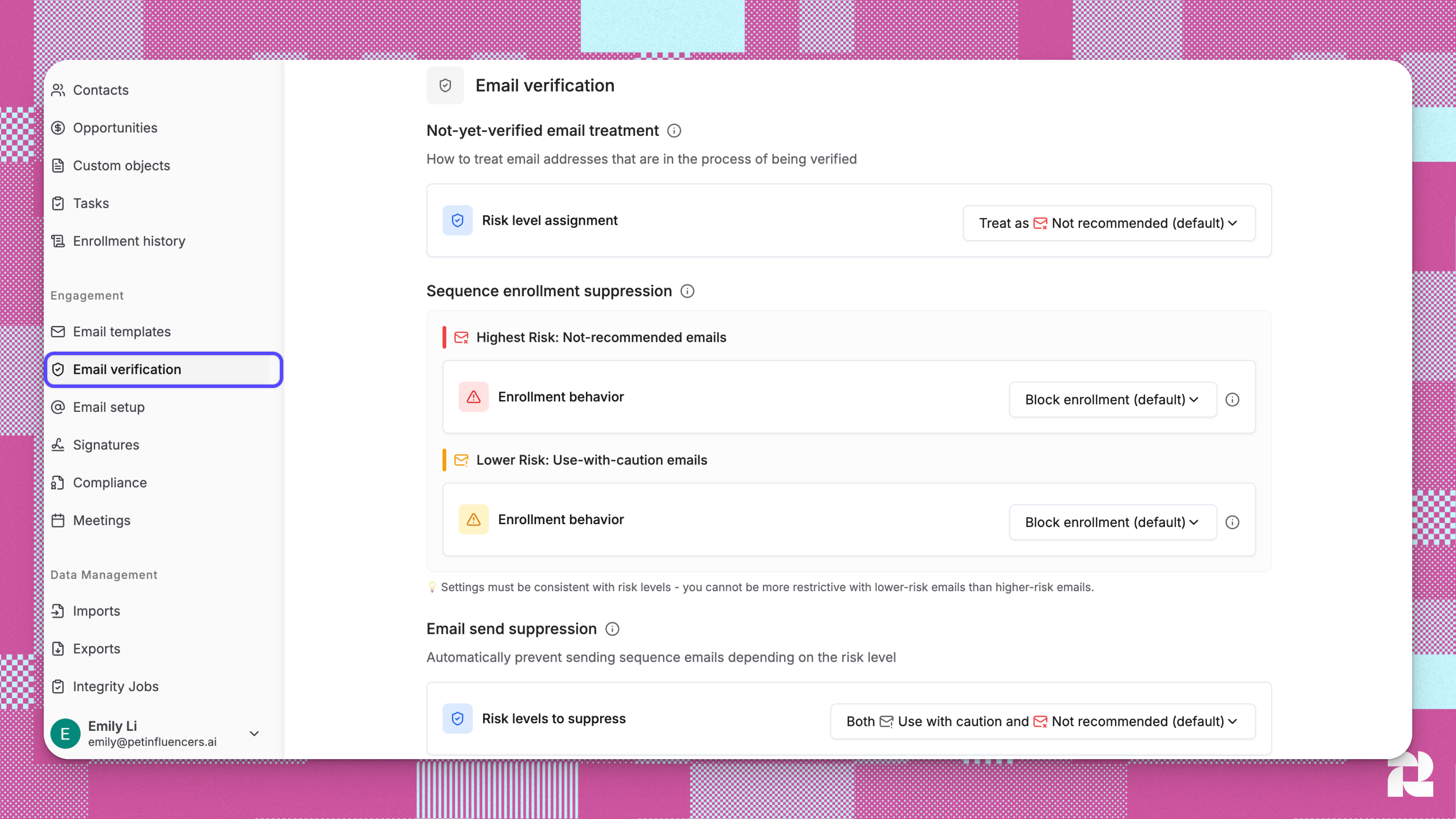
1. Navigate to [**Settings**](https://app.reevo.ai/settings) from the main menu.
2. Select the [**Email Verification**](https://app.reevo.ai/settings/email-verification) section.
 ### Understanding Email Risk Levels
 ### Email Verification Settings Configuration
This tab has **3 configuration areas** that control email handling behavior:
#### 1. Not-Yet-Verified Email Treatment
*This setting determines how Reevo treats emails that haven't been verified yet.*
### Email Verification Settings Configuration
This tab has **3 configuration areas** that control email handling behavior:
#### 1. Not-Yet-Verified Email Treatment
*This setting determines how Reevo treats emails that haven't been verified yet.*
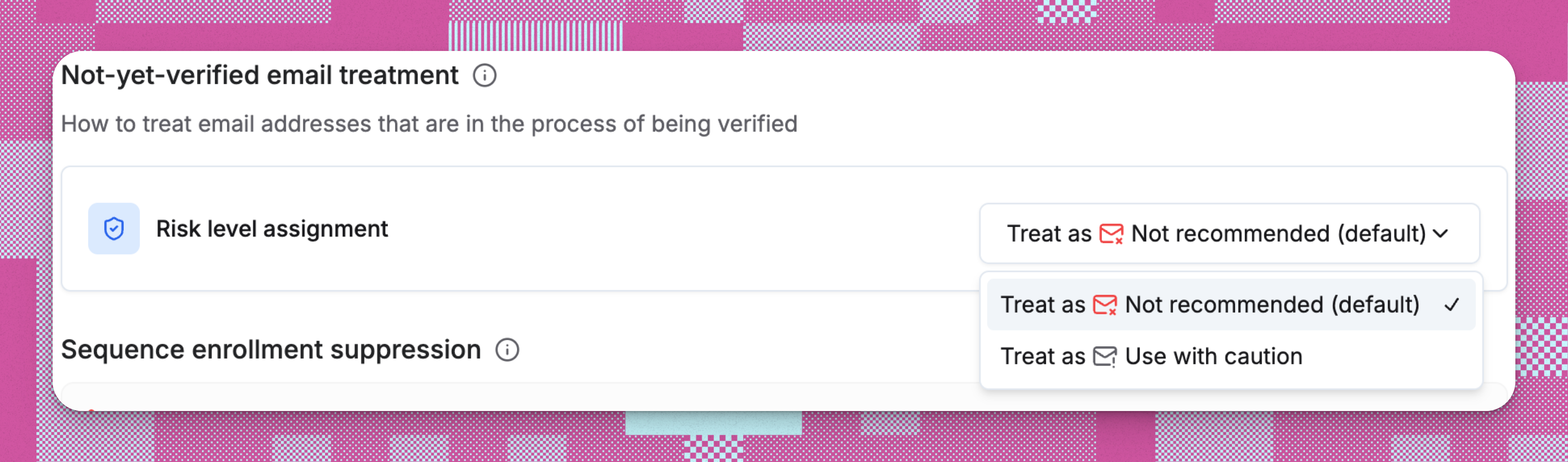 * By default, not-yet-verified emails are treated as **Not recommended**.
* Admins can choose to treat them as **Use with caution** instead.
Once verified, their risk level updates automatically and all related controls apply accordingly.
#### 2. Sequence Enrollment Suppression
*This setting controls whether contacts with risky email addresses can be enrolled in sequences.*
* By default, not-yet-verified emails are treated as **Not recommended**.
* Admins can choose to treat them as **Use with caution** instead.
Once verified, their risk level updates automatically and all related controls apply accordingly.
#### 2. Sequence Enrollment Suppression
*This setting controls whether contacts with risky email addresses can be enrolled in sequences.*
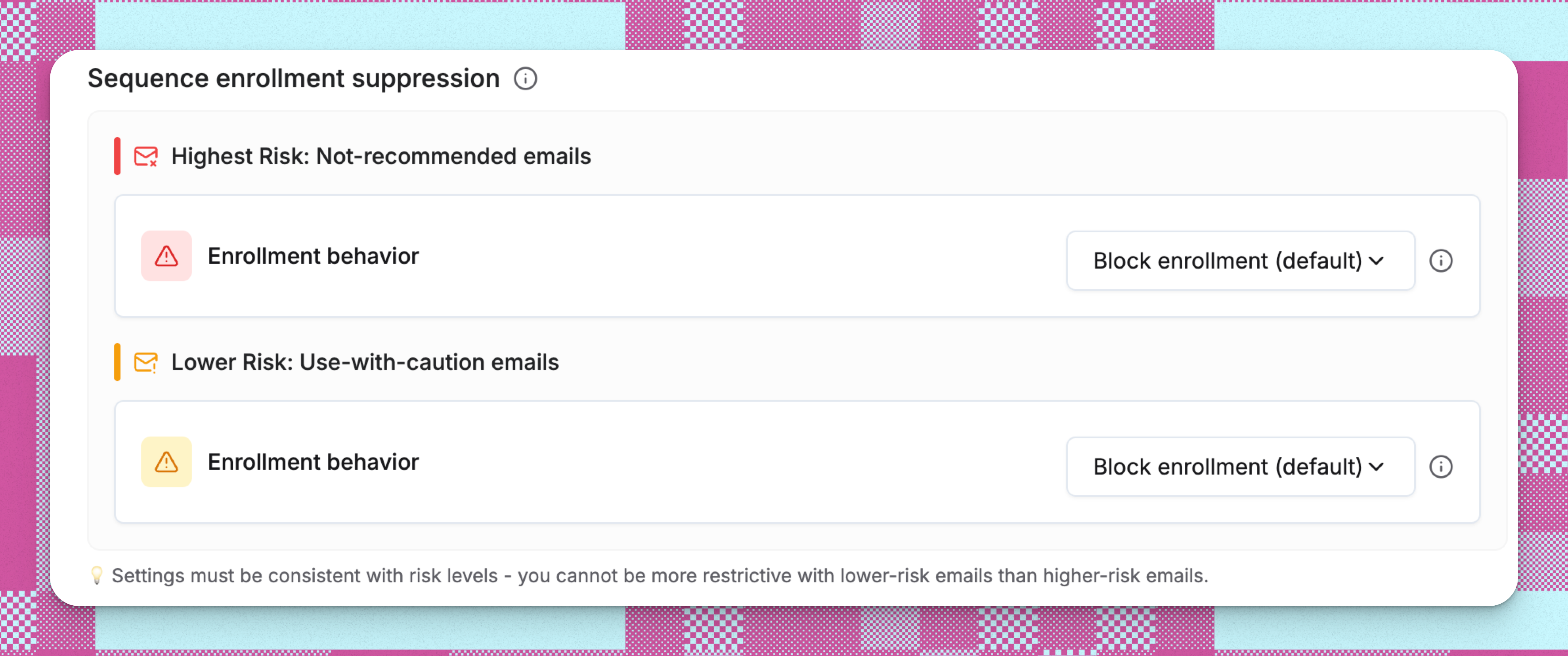 **Not Recommended emails (highest risk)**
* By default, Not recommended emails are blocked from being added to sequences.
* Admins can allow users to override this block and retry enrollment using the **Ignore and Retry** option in the Category Details page.
**Use With Caution emails (lower risk)**
* By default, Use with caution emails are also blocked from sequence enrollment.
* Admins may enable overrides, allowing users to retry enrollment through the **Ignore and Retry** option in the Category Details page.
If you allow overrides for **Use with caution** emails, you can also allow overrides for **Not recommended** emails. The system maintains logical consistency in your suppression rules.
#### 3. Email Send Suppression
This critical setting determines which verified email addresses can actually receive outbound emails from your team.
**Not Recommended emails (highest risk)**
* By default, Not recommended emails are blocked from being added to sequences.
* Admins can allow users to override this block and retry enrollment using the **Ignore and Retry** option in the Category Details page.
**Use With Caution emails (lower risk)**
* By default, Use with caution emails are also blocked from sequence enrollment.
* Admins may enable overrides, allowing users to retry enrollment through the **Ignore and Retry** option in the Category Details page.
If you allow overrides for **Use with caution** emails, you can also allow overrides for **Not recommended** emails. The system maintains logical consistency in your suppression rules.
#### 3. Email Send Suppression
This critical setting determines which verified email addresses can actually receive outbound emails from your team.
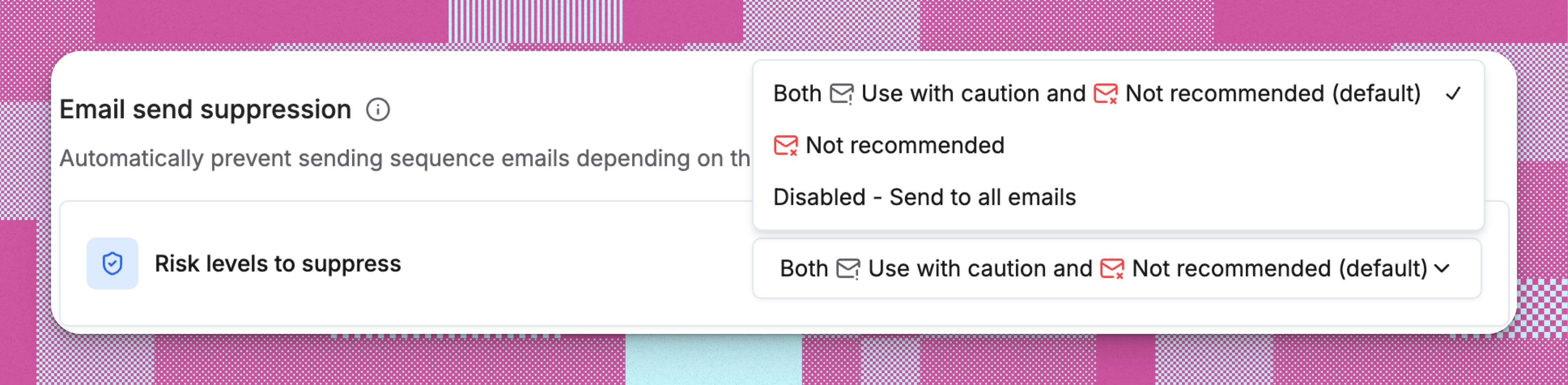 * By default, Reevo blocks both **Use with caution** and **Not recommended** emails from sending.
* Admins can change this setting to block only **Not recommended** emails, or disable send suppression entirely.
***
## Email Verification in Reevo Workflows
Reevo's built-in email verification safeguards every workflow stage (from contact creation to sequence sending) by automatically detecting and blocking risky email addresses. Here's how:
* **Contact Import and Creation** → Email verification is launched behind the scenes when a contact is imported or created in Reevo.
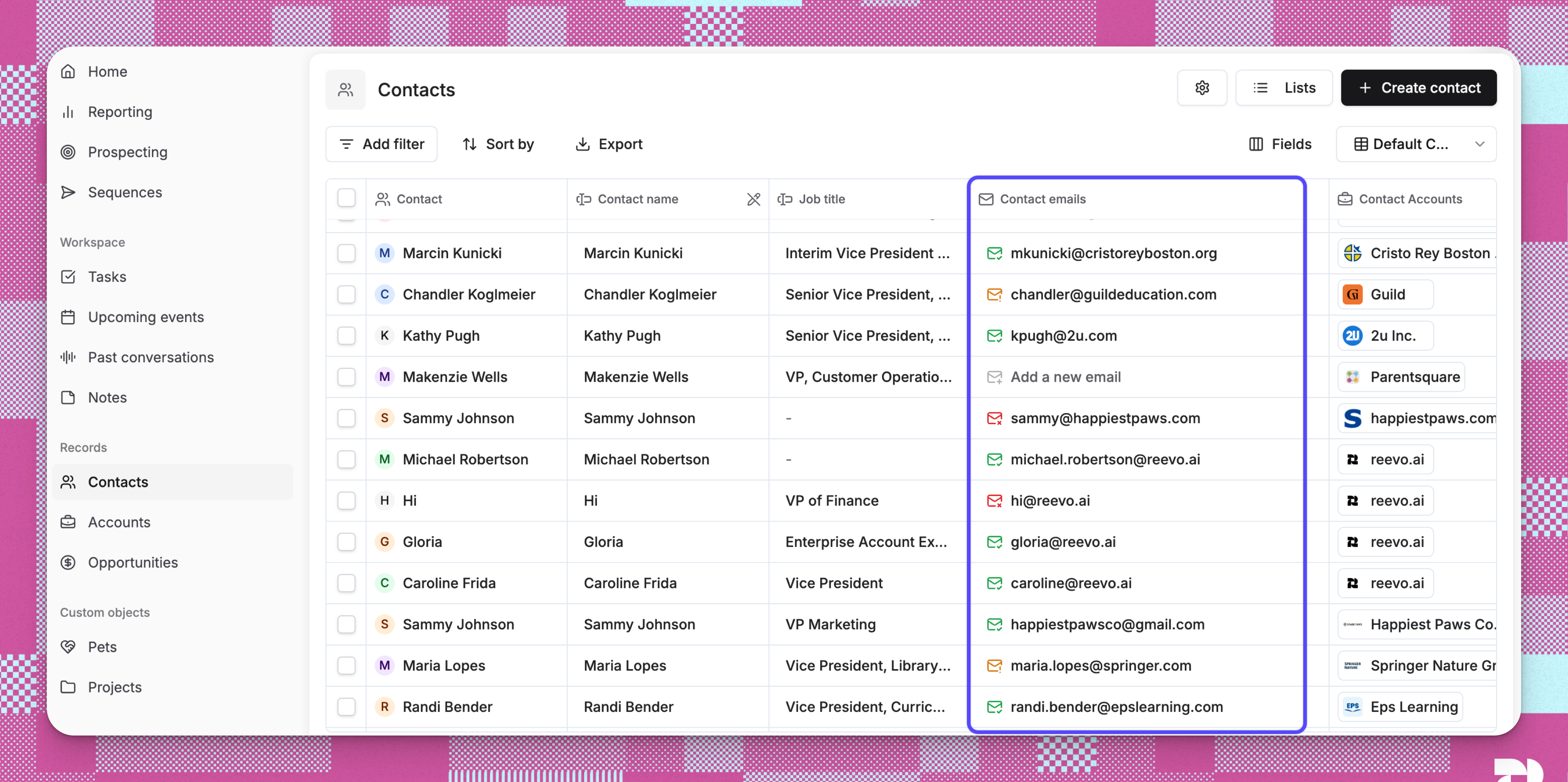
* **Contacts Page** → Visual indicators show verification status for each contact.
* **Prospecting** → Email verification happens during contact enrichment.
* **Sequence Enrollment** → Contacts with risky emails are blocked from sequence enrollment.
* **Sequence Sending** → Automatic blocking prevents risky emails from being sent.
* By default, Reevo blocks both **Use with caution** and **Not recommended** emails from sending.
* Admins can change this setting to block only **Not recommended** emails, or disable send suppression entirely.
***
## Email Verification in Reevo Workflows
Reevo's built-in email verification safeguards every workflow stage (from contact creation to sequence sending) by automatically detecting and blocking risky email addresses. Here's how:
* **Contact Import and Creation** → Email verification is launched behind the scenes when a contact is imported or created in Reevo.
* **Contacts Page** → Visual indicators show verification status for each contact.
* **Prospecting** → Email verification happens during contact enrichment.
* **Sequence Enrollment** → Contacts with risky emails are blocked from sequence enrollment.
* **Sequence Sending** → Automatic blocking prevents risky emails from being sent.
 ### How Email Verification Works
* When you create a contact in Reevo (e.g. manually or by importing via CSV), the contact's email is verified in the background.
* Verification typically takes a minute or two but can take longer if many users are importing or creating contacts at the same time.
* When you enrich a contact's email, the system immediately verifies the email address.
* Not recommended emails are automatically blocked and the contact will not be created with that email.
* By default, both Use with caution and Not recommended emails are blocked from sequence enrollment.
* Admin settings allow relaxation of enrollment suppression.
* Blocked contacts appear in enrollment runs with a failed status.
* By default, the system prevents emails from being scheduled for Use with caution and Not recommended addresses.
* If the emails were already scheduled, they are additionally blocked at send time.
* Sequences pause for these contacts instead of sending to risky addresses.
* Admin settings control the risk threshold for send blocks.
***
## Cost & Quotas
* **Email Verification** is automatically included with your Reevo subscription.
* **No per-verification charges:** there is no charge for verifying emails.
***
## Troubleshooting / FAQs
The system will prevent enrollment and display a message explaining the email's risk level. If you've enabled override permissions, users can manually choose to proceed.
The email is not imported into Reevo, and the contact will not be created with that email.
No, these are organization-wide settings that apply consistently across all users and workflows. This ensures uniform sender reputation protection.
None. Email verification does not incur any credits. We handle verification automatically on your behalf to protect your sending reputation and keep your mailboxes healthy. See **Cost & Quotas** above.
If **Use with caution** emails are set to block enrollment, **Not recommended** emails must also be blocked. Adjust the **Use with caution** setting first to enable more permissive higher-risk options.
Email risk levels are determined by Reevo's verification system and displayed inline when viewing contact details or attempting to send emails.
The contacts likely have Use with caution or Not recommended email addresses. Check the enrollment results for specific risk-based failure reasons.
By default, no. However, your admin can change the setting to allow overriding the block via the **Ignore and Retry** button, which lets you enroll these risky emails. That said, we do not recommend enrolling risky emails as they may harm your mailbox deliverability.
If a contact only has a risky email, the best approach is to try to find an alternate valid email (e.g. via enrichment or research) and update the Contact record. Reevo will automatically re-verify the new email, and if it is no longer risky, you can re-enroll the contact in your sequence. If no alternate address can be found, we recommend not sequencing the risky email to avoid deliverability issues. See also **What if I know an email is valid but Reevo says it's risky?** below.
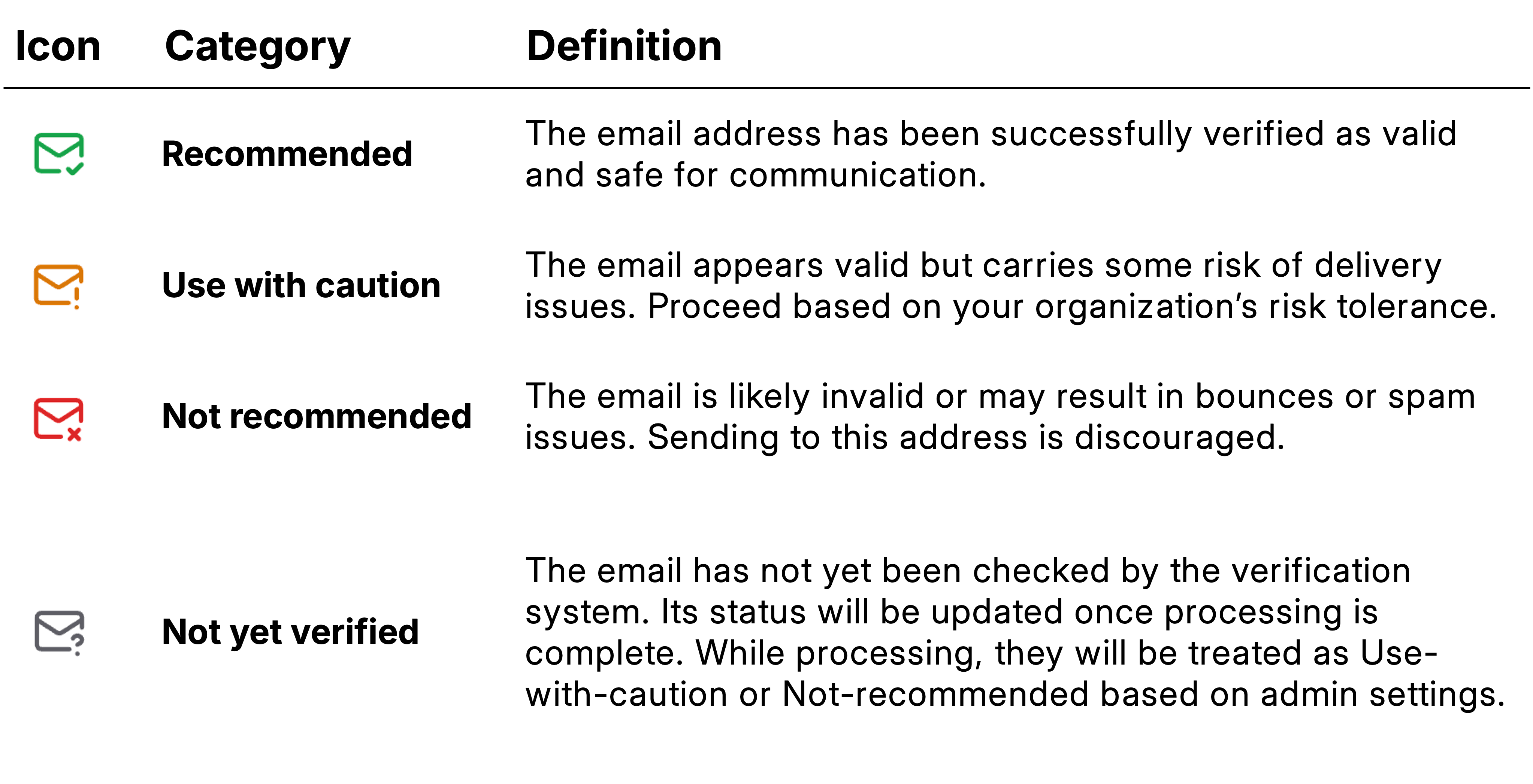
Not recommended emails are very likely to bounce or trigger spam complaints (spam traps, hard bounces). Use with caution emails have equivocal risk: there is some chance of being valid, but they require careful consideration of your risk tolerance.
No, email verification only affects sequence-related emails. Manual one-off emails are not subject to verification blocks.
Verification generally happens in the background within a few minutes, but can be delayed if there is a sudden influx of a large number of new emails into Reevo.
You can see classification information on the Contacts page and on various other pages that render emails. The visual risk indicators appear as color-coded icons.
Depending on the Email send suppression level setting, the sequence may automatically pause for that contact when it reaches an Email Step, protecting your sender reputation from being harmed by bounces or spam traps.
Use the Contacts page filter for **Contact Emails :: Email Risk** and select **Use with caution** and/or **Not recommended** to identify all risky contacts that need attention.
We use multiple verification sources to provide the most accurate risk assessment. While we try our best to gather signals from these sources simultaneously, the signals may not always arrive at the same time. To provide maximum protection to your reputation, we immediately elevate the risk level when new risk signals are detected.
Our email verification partners maintain a very high accuracy rate and false positives are rare. If a legitimate address is flagged, Reevo staff can override the risk level to ensure it isn't blocked from your campaigns. Please contact your dedicated support specialist or [sign in to Reevo](https://app.reevo.ai) and use AskReevo to raise a support ticket.
***
> For assistance, contact your dedicated support specialist or [sign in to Reevo](https://app.reevo.ai) and use AskReevo for instant answers or to raise a support ticket.
### How Email Verification Works
* When you create a contact in Reevo (e.g. manually or by importing via CSV), the contact's email is verified in the background.
* Verification typically takes a minute or two but can take longer if many users are importing or creating contacts at the same time.
* When you enrich a contact's email, the system immediately verifies the email address.
* Not recommended emails are automatically blocked and the contact will not be created with that email.
* By default, both Use with caution and Not recommended emails are blocked from sequence enrollment.
* Admin settings allow relaxation of enrollment suppression.
* Blocked contacts appear in enrollment runs with a failed status.
* By default, the system prevents emails from being scheduled for Use with caution and Not recommended addresses.
* If the emails were already scheduled, they are additionally blocked at send time.
* Sequences pause for these contacts instead of sending to risky addresses.
* Admin settings control the risk threshold for send blocks.
***
## Cost & Quotas
* **Email Verification** is automatically included with your Reevo subscription.
* **No per-verification charges:** there is no charge for verifying emails.
***
## Troubleshooting / FAQs
The system will prevent enrollment and display a message explaining the email's risk level. If you've enabled override permissions, users can manually choose to proceed.
The email is not imported into Reevo, and the contact will not be created with that email.
No, these are organization-wide settings that apply consistently across all users and workflows. This ensures uniform sender reputation protection.
None. Email verification does not incur any credits. We handle verification automatically on your behalf to protect your sending reputation and keep your mailboxes healthy. See **Cost & Quotas** above.
If **Use with caution** emails are set to block enrollment, **Not recommended** emails must also be blocked. Adjust the **Use with caution** setting first to enable more permissive higher-risk options.
Email risk levels are determined by Reevo's verification system and displayed inline when viewing contact details or attempting to send emails.
The contacts likely have Use with caution or Not recommended email addresses. Check the enrollment results for specific risk-based failure reasons.
By default, no. However, your admin can change the setting to allow overriding the block via the **Ignore and Retry** button, which lets you enroll these risky emails. That said, we do not recommend enrolling risky emails as they may harm your mailbox deliverability.
If a contact only has a risky email, the best approach is to try to find an alternate valid email (e.g. via enrichment or research) and update the Contact record. Reevo will automatically re-verify the new email, and if it is no longer risky, you can re-enroll the contact in your sequence. If no alternate address can be found, we recommend not sequencing the risky email to avoid deliverability issues. See also **What if I know an email is valid but Reevo says it's risky?** below.
Not recommended emails are very likely to bounce or trigger spam complaints (spam traps, hard bounces). Use with caution emails have equivocal risk: there is some chance of being valid, but they require careful consideration of your risk tolerance.
No, email verification only affects sequence-related emails. Manual one-off emails are not subject to verification blocks.
Verification generally happens in the background within a few minutes, but can be delayed if there is a sudden influx of a large number of new emails into Reevo.
You can see classification information on the Contacts page and on various other pages that render emails. The visual risk indicators appear as color-coded icons.
Depending on the Email send suppression level setting, the sequence may automatically pause for that contact when it reaches an Email Step, protecting your sender reputation from being harmed by bounces or spam traps.
Use the Contacts page filter for **Contact Emails :: Email Risk** and select **Use with caution** and/or **Not recommended** to identify all risky contacts that need attention.
We use multiple verification sources to provide the most accurate risk assessment. While we try our best to gather signals from these sources simultaneously, the signals may not always arrive at the same time. To provide maximum protection to your reputation, we immediately elevate the risk level when new risk signals are detected.
Our email verification partners maintain a very high accuracy rate and false positives are rare. If a legitimate address is flagged, Reevo staff can override the risk level to ensure it isn't blocked from your campaigns. Please contact your dedicated support specialist or [sign in to Reevo](https://app.reevo.ai) and use AskReevo to raise a support ticket.
***
> For assistance, contact your dedicated support specialist or [sign in to Reevo](https://app.reevo.ai) and use AskReevo for instant answers or to raise a support ticket.