> ## Documentation Index
> Fetch the complete documentation index at: https://help.reevo.ai/llms.txt
> Use this file to discover all available pages before exploring further.
# Conferencing
> Connect Zoom, use Microsoft Teams via Outlook Calendar, or rely on Google Meet through Google Calendar.
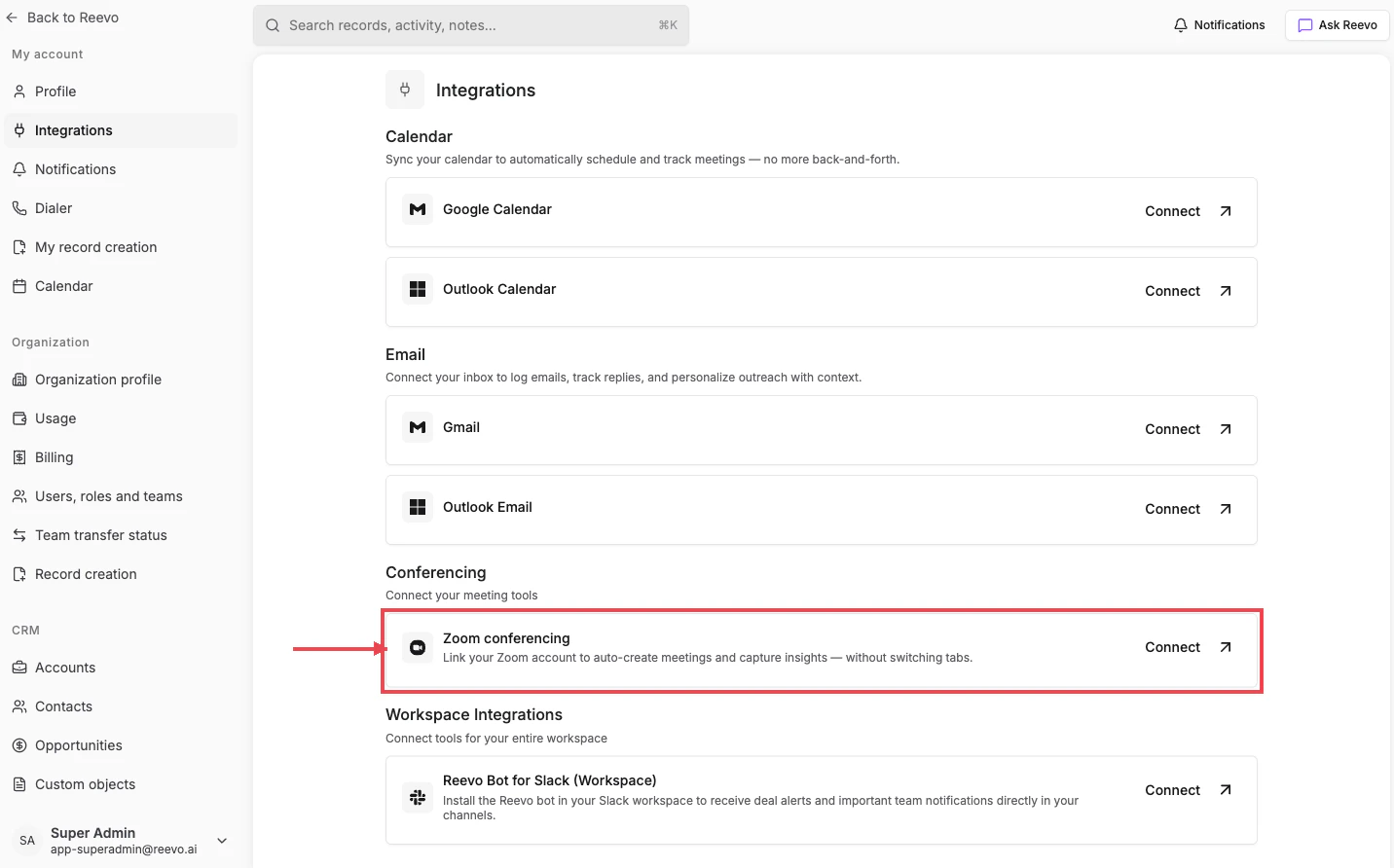
The **Conferencing** section on Settings → Integrations ("Connect your meeting tools") is where you link the platform you actually run meetings on, so Reevo can create meeting links, dispatch the Notetaker, and capture recordings.
 ***
## Zoom
Card label: **Zoom conferencing**, *"Link your Zoom account to auto-create meetings and capture insights, without switching tabs."*
### Connecting Zoom
1. On **Settings → [Integrations](https://app.reevo.ai/settings/integrations)**, find the **Conferencing** section.
2. Click **Connect** on the **Zoom conferencing** card.
3. Approve the Zoom OAuth permissions.
4. The card shows **Connected** when finished.
### After connecting
* New meetings created in Reevo can use Zoom as the conferencing provider, the Zoom link is generated automatically.
* The [Notetaker Bot](/Conversations/Notetaker-Bot) joins your Zoom calls based on your [meeting recording settings](/Conversations/Meetings-and-Bot-Settings).
* Recordings, transcripts, and AI summaries appear on the meeting record in Reevo.
Unlike email and calendar, Zoom **can** be disconnected directly from the same card via the dropdown menu.
***
## Microsoft Teams
Microsoft Teams isn't a separate card on the Integrations page, it comes along with Outlook Calendar for paid Microsoft accounts. See [Microsoft Teams](/Conversations/Microsoft/Microsoft-Teams) and [Required Microsoft Teams Configurations](/Conversations/Microsoft/Required-Microsoft-Teams-Configurations) for the admin setup.
***
## Google Meet
Google Meet works automatically once Google Calendar is connected. No separate card or connection step is needed, when you create a meeting in Reevo and pick Google Meet as the conferencing provider, the Meet link is generated through your Google account.
***
## Troubleshooting / FAQs
Yes, if you run meetings on Zoom. Zoom handles the meeting itself (link, recording), while Google Calendar (or Outlook Calendar) is what schedules and surfaces the meeting in Reevo.
Yes. The Notetaker depends on the calendar sync. To stop the bot without disconnecting your calendar, change your [meeting recording settings](/Conversations/Meetings-and-Bot-Settings) instead.
#
> Still have questions? [Sign in](https://reevo.ai/) and use AskReevo for instant answers or to raise a support ticket.
***
## Zoom
Card label: **Zoom conferencing**, *"Link your Zoom account to auto-create meetings and capture insights, without switching tabs."*
### Connecting Zoom
1. On **Settings → [Integrations](https://app.reevo.ai/settings/integrations)**, find the **Conferencing** section.
2. Click **Connect** on the **Zoom conferencing** card.
3. Approve the Zoom OAuth permissions.
4. The card shows **Connected** when finished.
### After connecting
* New meetings created in Reevo can use Zoom as the conferencing provider, the Zoom link is generated automatically.
* The [Notetaker Bot](/Conversations/Notetaker-Bot) joins your Zoom calls based on your [meeting recording settings](/Conversations/Meetings-and-Bot-Settings).
* Recordings, transcripts, and AI summaries appear on the meeting record in Reevo.
Unlike email and calendar, Zoom **can** be disconnected directly from the same card via the dropdown menu.
***
## Microsoft Teams
Microsoft Teams isn't a separate card on the Integrations page, it comes along with Outlook Calendar for paid Microsoft accounts. See [Microsoft Teams](/Conversations/Microsoft/Microsoft-Teams) and [Required Microsoft Teams Configurations](/Conversations/Microsoft/Required-Microsoft-Teams-Configurations) for the admin setup.
***
## Google Meet
Google Meet works automatically once Google Calendar is connected. No separate card or connection step is needed, when you create a meeting in Reevo and pick Google Meet as the conferencing provider, the Meet link is generated through your Google account.
***
## Troubleshooting / FAQs
Yes, if you run meetings on Zoom. Zoom handles the meeting itself (link, recording), while Google Calendar (or Outlook Calendar) is what schedules and surfaces the meeting in Reevo.
Yes. The Notetaker depends on the calendar sync. To stop the bot without disconnecting your calendar, change your [meeting recording settings](/Conversations/Meetings-and-Bot-Settings) instead.
#
> Still have questions? [Sign in](https://reevo.ai/) and use AskReevo for instant answers or to raise a support ticket.