> ## Documentation Index
> Fetch the complete documentation index at: https://help.reevo.ai/llms.txt
> Use this file to discover all available pages before exploring further.
# Record creation
> Control how Reevo automatically creates Accounts and Contacts based on user activity.
Control how Reevo automatically creates Accounts and Contacts based on email and calendar activity from everyone in your workspace.
# Where to Find It
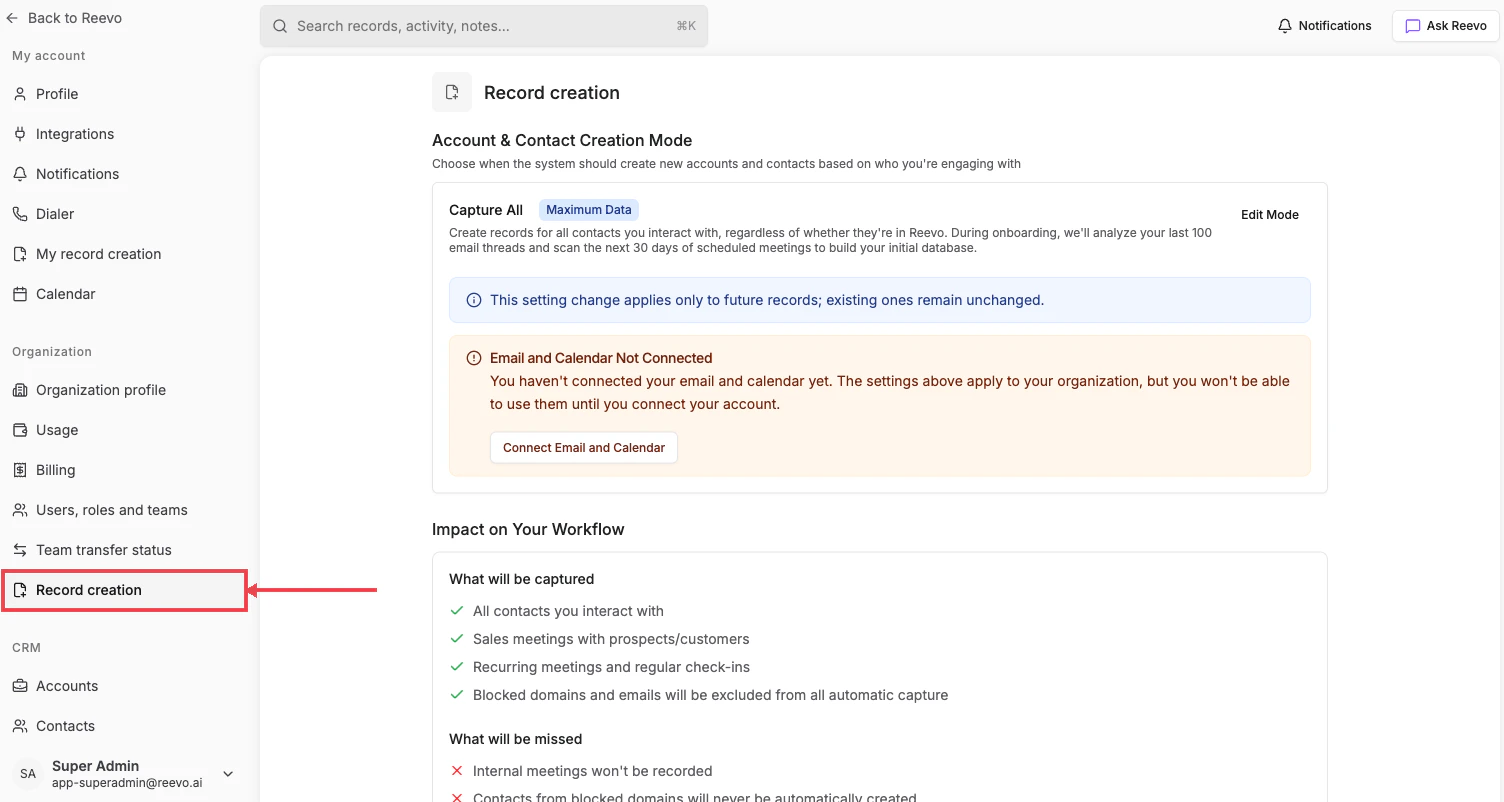
**Settings → Organization → [Record creation](https://app.reevo.ai/settings/record-creation)**
 # What you can configure
* **Account & Contact Creation Mode**: choose from **Capture All** (Maximum Data), **Existing Accounts**, **Outbound Only**, or **Do Not Capture**. Click **Edit Mode** to switch.
* **Blocked domains & emails**: prevent syncing of personal or sensitive correspondence.
* **Meeting Recording Settings**: define when calls and meetings should be recorded. Detailed walkthrough lives in [Meetings & Notetaker Bot Settings](/Conversations/Meetings-and-Bot-Settings).
* **Impact on Your Workflow** panel, at-a-glance "What will be captured" / "What will be missed" lists tailored to the selected mode.
If your organization hasn't connected email and calendar yet, you'll see an **Email and Calendar Not Connected** warning with a **Connect Email and Calendar** shortcut.
This setting applies only to **future** records. Records created before a mode change are not affected.
# Per-user override
Individual users can opt out of automatic record creation for their own activity from [My record creation](/Getting-started/Individual-Account-Settings/My-Record-Creation), even when this organization-level setting is enabled.
# Mode reference
For the full breakdown of each mode and how it interacts with email/calendar sync, see the **Record Auto-Creation Settings** section in [Onboarding to Reevo!](/Getting-started/Onboarding).
#
> Still have questions? [Sign in](https://reevo.ai/) and use AskReevo for instant answers or to raise a support ticket.
# What you can configure
* **Account & Contact Creation Mode**: choose from **Capture All** (Maximum Data), **Existing Accounts**, **Outbound Only**, or **Do Not Capture**. Click **Edit Mode** to switch.
* **Blocked domains & emails**: prevent syncing of personal or sensitive correspondence.
* **Meeting Recording Settings**: define when calls and meetings should be recorded. Detailed walkthrough lives in [Meetings & Notetaker Bot Settings](/Conversations/Meetings-and-Bot-Settings).
* **Impact on Your Workflow** panel, at-a-glance "What will be captured" / "What will be missed" lists tailored to the selected mode.
If your organization hasn't connected email and calendar yet, you'll see an **Email and Calendar Not Connected** warning with a **Connect Email and Calendar** shortcut.
This setting applies only to **future** records. Records created before a mode change are not affected.
# Per-user override
Individual users can opt out of automatic record creation for their own activity from [My record creation](/Getting-started/Individual-Account-Settings/My-Record-Creation), even when this organization-level setting is enabled.
# Mode reference
For the full breakdown of each mode and how it interacts with email/calendar sync, see the **Record Auto-Creation Settings** section in [Onboarding to Reevo!](/Getting-started/Onboarding).
#
> Still have questions? [Sign in](https://reevo.ai/) and use AskReevo for instant answers or to raise a support ticket.