Overview
Sending emails to unverified or risky addresses can lead to bounces, spam complaints, and a damaged domain reputation. Reevo’s Email Verification gives you precise control over which contacts can be enrolled in sequences or receive outbound messages. With automated verification, Reevo protects your sender reputation by blocking risky addresses before they cause harm during prospecting, enrollment, and email sending. Admins can also enforce organization-wide policies for consistent compliance and deliverability. Email Verification lets you:- Automatically validate all contact emails in Reevo
- Block high-risk and caution-level emails by default
- Customize risk thresholds through admin settings
- Maintain low bounce rates and avoid spam traps
Email Verification Settings
Accessing Email Verification Settings
Only admins can access and manage email verification settings- Navigate to Settings from the main menu
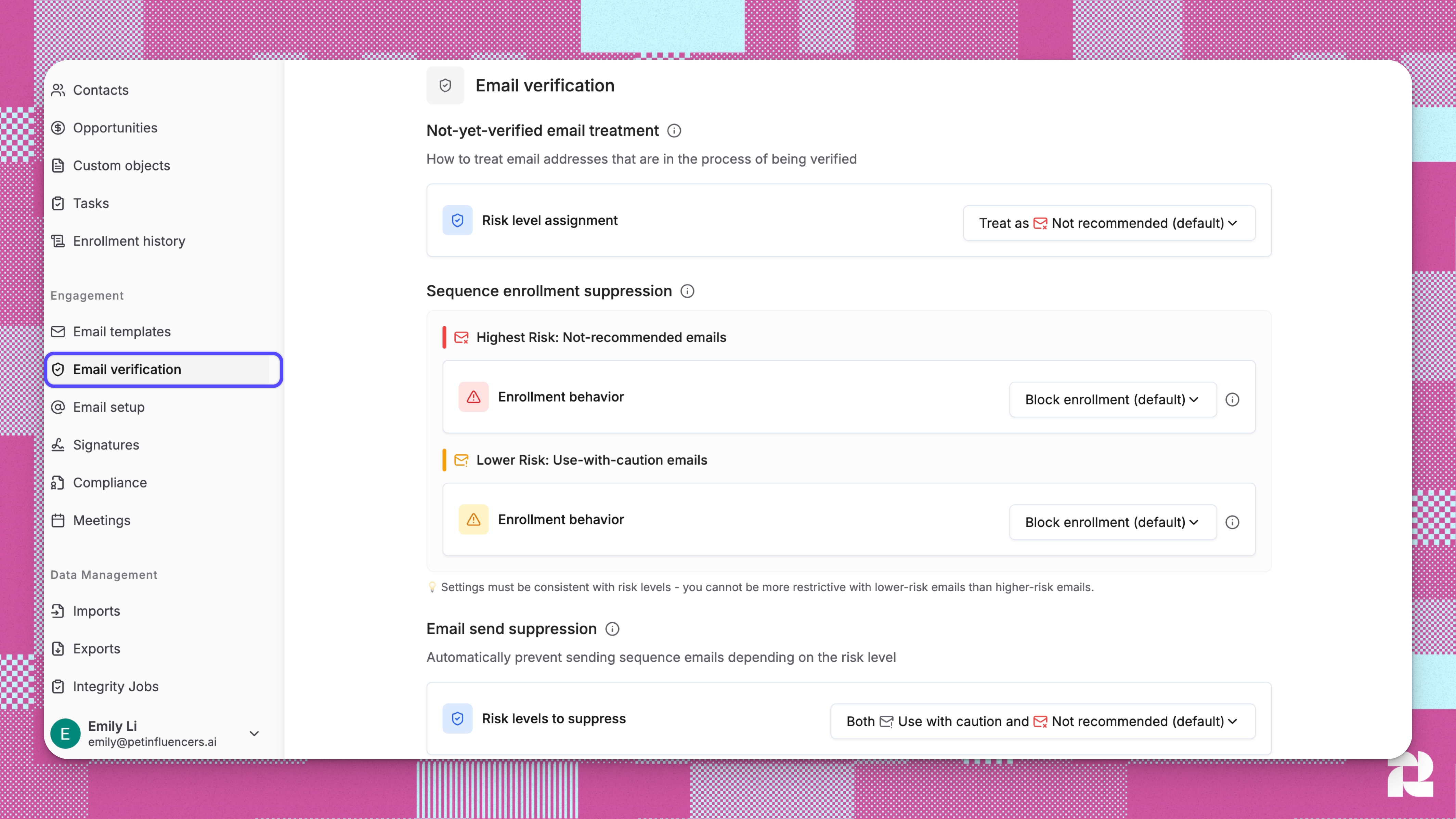
- Select the Email Verification section
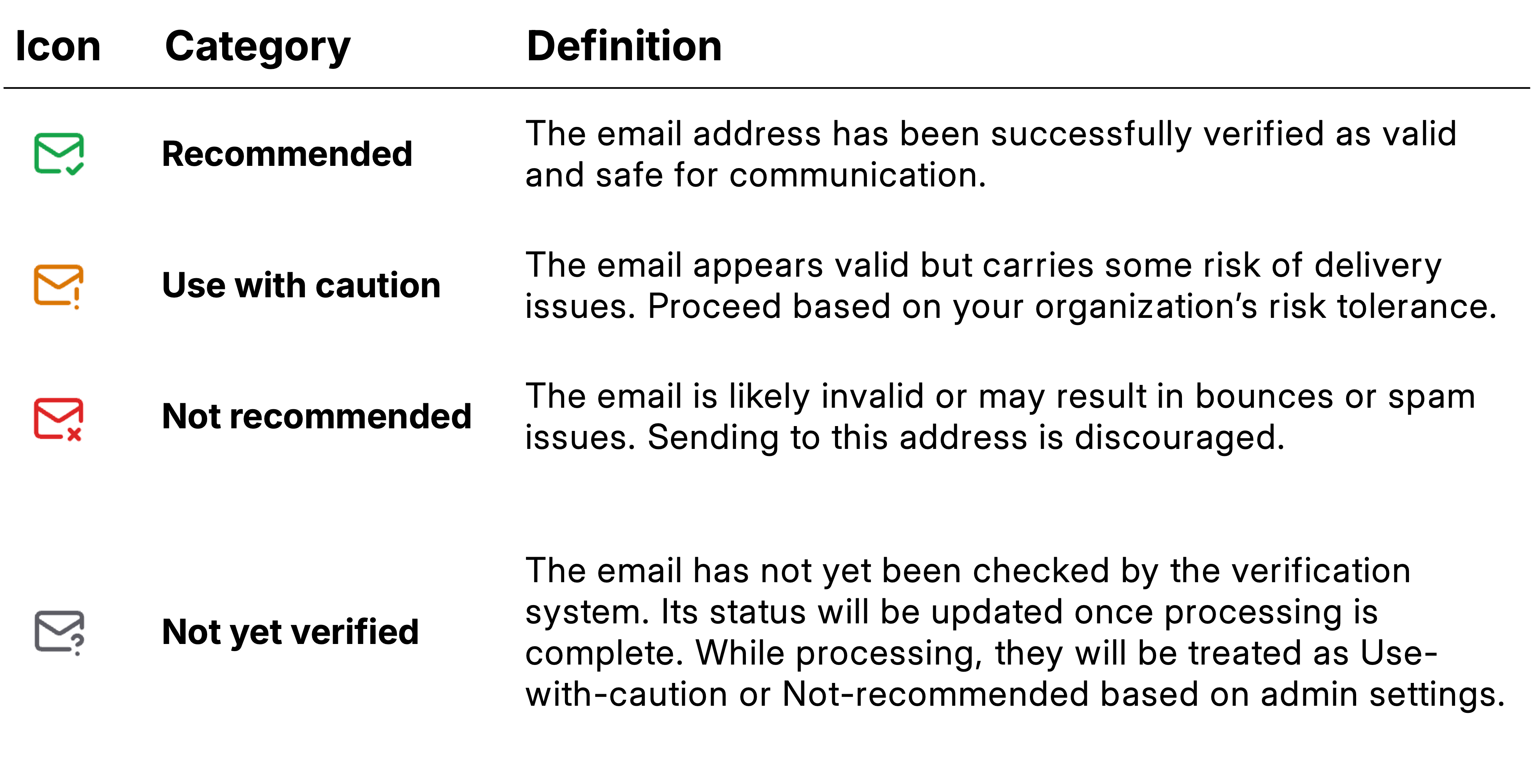
Understanding Email Risk Levels
Email Verification Settings Configuration
There are three main configuration areas that control email handling behavior:1. Not-Yet-Verified Email Treatment
This setting determines how Reevo treats emails that haven’t been verified yet.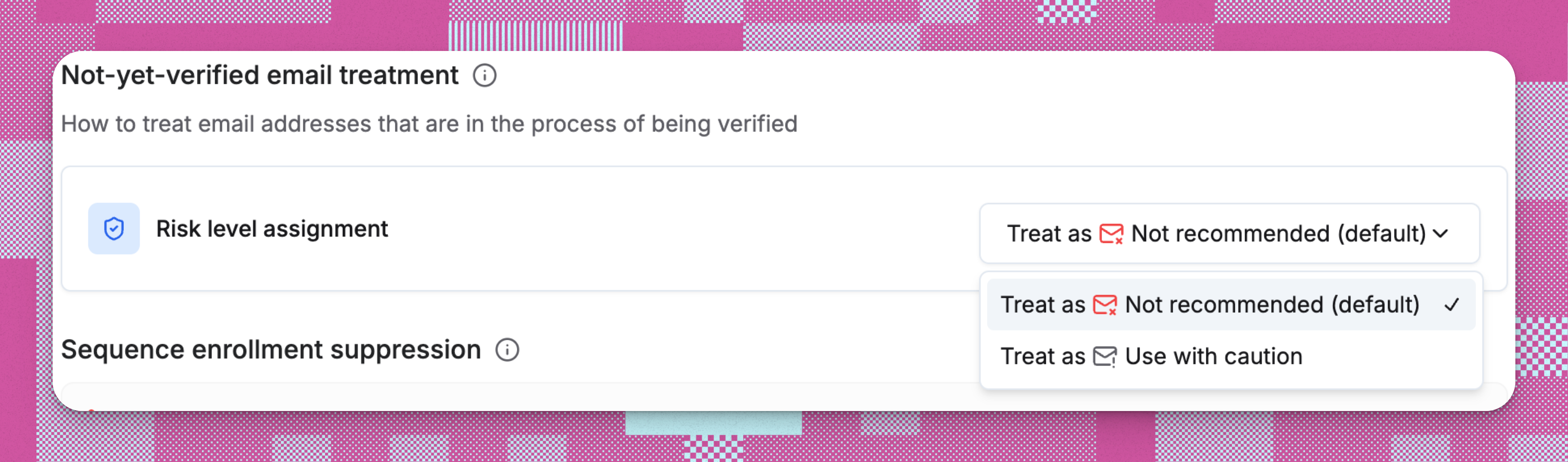
- By default, not-yet-verified emails are treated as Not recommended.
- Admins can choose to treat them as Use with caution instead.
2. Sequence Enrollment Suppression
This setting controls whether contacts with risky email addresses can be enrolled in sequences.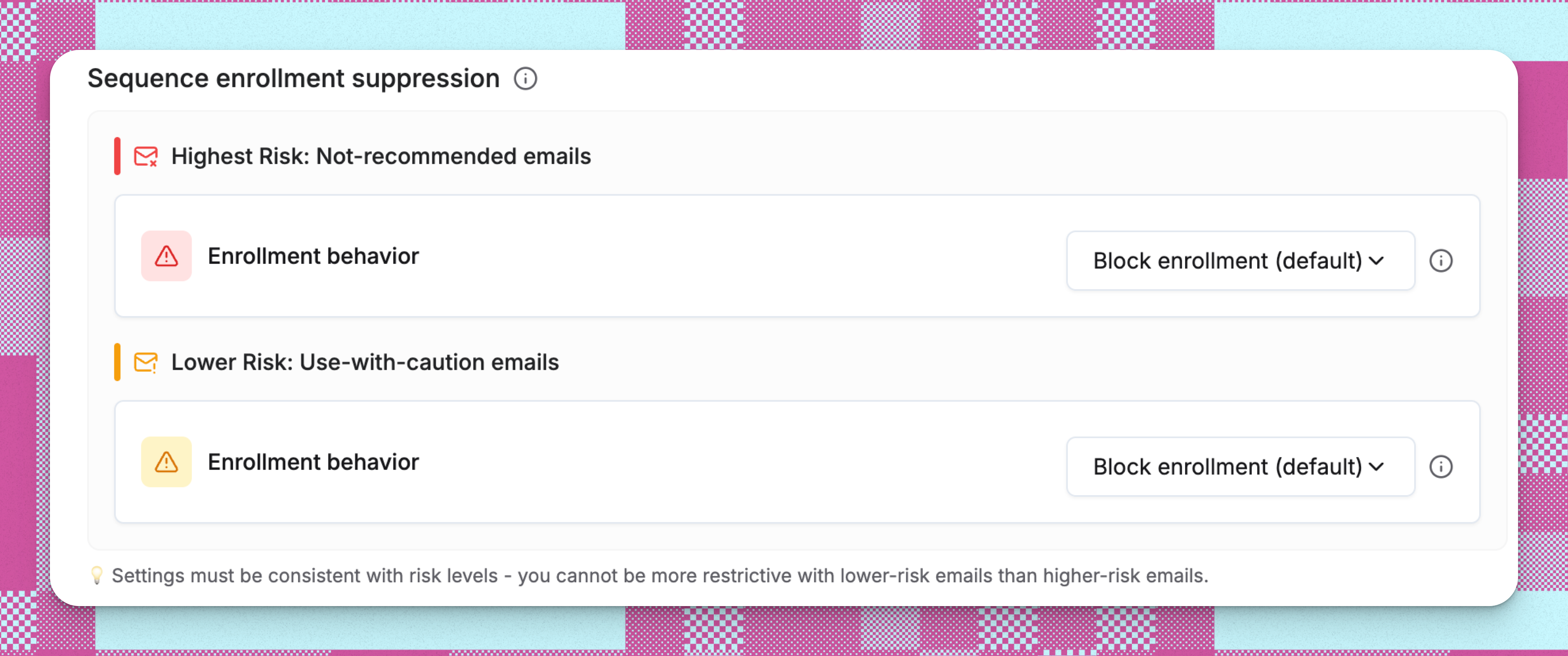
- By default, Not recommended emails are blocked from being added to sequences.
- Admins can allow users to override this block and retry enrollment using the “Ignore and Retry” option in the Category Details page.
- By default, Use with caution emails are also blocked from sequence enrollment.
- Admins may enable overrides, allowing users to retry enrollment through the “Ignore and Retry” in the Category Details page.
3. Email Send Suppression
This critical setting determines which verified email addresses can actually receive outbound emails from your team.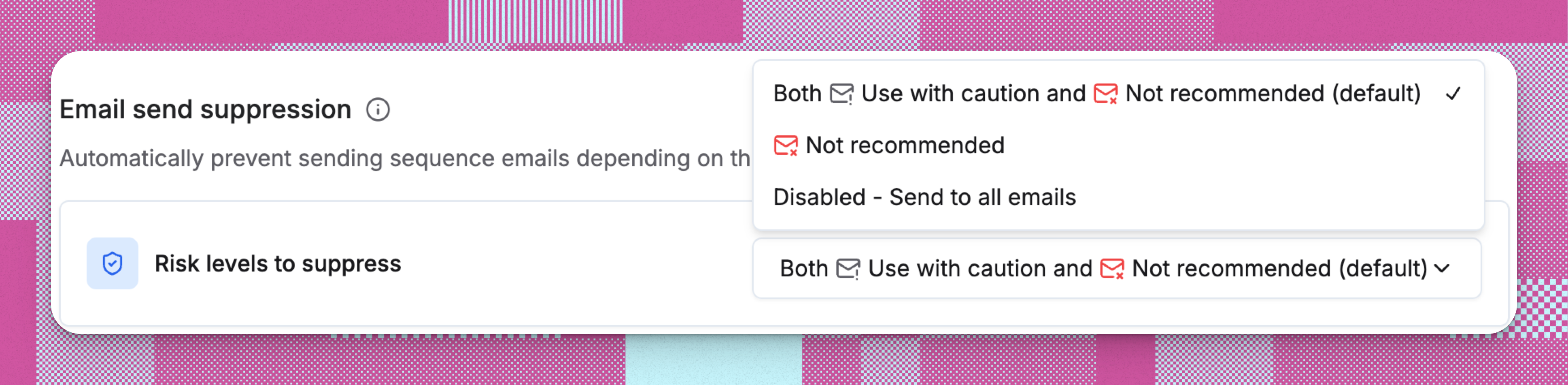
- By default, Reevo blocks both Use with caution and Not recommended emails from sending.
- Admins can change this setting to block only Not recommended emails, or disable send suppression entirely.
Email Verification in Reevo Workflows
Reevo’s built-in email verification safeguards every workflow stage - from contact creation to sequence sending - by automatically detecting and blocking risky email addresses. Here is how:- Contact Import and Creation → Email verification is launched behind the scenes when a contact is imported or created in Reevo
-
Contacts Page → Visual indicators show verification status for each contact

- Prospecting → Email verification happens during contact enrichment
- Sequence Enrollment → Contacts with risky emails are blocked from sequence enrollment
- Sequence Sending → Automatic blocking prevents risky emails from being sent
How Email Verification Works
Behind-the-scenes verification during contact creation
Behind-the-scenes verification during contact creation
- When you create a contact in Reevo (e.g. manually or importing via CSV) the contact’s email is verified in the background.
- Verification typically takes a minute or two but can take longer if many users are importing or creating contacts at the same time.
Verification during prospecting enrichment
Verification during prospecting enrichment
- When you enrich a contact’s email, the system immediately verifies the email address.
- Not-recommended emails are automatically blocked and the contact will not be created with that email.
Sequence enrollment protection
Sequence enrollment protection
- By default, both Use-with-caution and Not-recommended emails are blocked from sequence enrollment
- Admin settings allow relaxation of enrollment suppression
- Blocked contacts appear in enrollment runs with a failed status
Sequence email send protection
Sequence email send protection
- By default, the system prevents emails from being scheduled for Use-with-caution and Not-recommended addresses
- If the emails were already scheduled, they are additionally blocked at send time
- Sequences pause for these contacts instead of sending to risky addresses
- Admin settings control the risk threshold for send blocks
Cost & Quotas
- Email Verification is automatically included with your Reevo subscription
- No per-verification charges: No charge for verification of emails
Troubleshooting/FAQs
What happens if I try to enroll a blocked email in a sequence?
What happens if I try to enroll a blocked email in a sequence?
What happens when an email is blocked during prospecting?
What happens when an email is blocked during prospecting?
Can I change these settings for individual contacts?
Can I change these settings for individual contacts?
How many credits does email verification cost?
How many credits does email verification cost?
Why can't I change the high-risk enrollment setting?
Why can't I change the high-risk enrollment setting?
How do I know which risk level an email address has?
How do I know which risk level an email address has?
How do I know which risk level an email address has?
How do I know which risk level an email address has?
Why was my sequence enrollment blocked for some contacts?
Why was my sequence enrollment blocked for some contacts?
Can I enroll Use-with-caution or Not-recommended emails in sequences?
Can I enroll Use-with-caution or Not-recommended emails in sequences?
What if I really want to include a contact with a risky email in a sequence?
What if I really want to include a contact with a risky email in a sequence?
What’s the difference between Use-with-caution and Not-recommended emails?
What’s the difference between Use-with-caution and Not-recommended emails?
Do verification settings affect manual emails sent outside of sequences?
Do verification settings affect manual emails sent outside of sequences?
How quickly are emails verified?
How quickly are emails verified?
Where can I see email risk classification levels?
Where can I see email risk classification levels?
What happens if an email becomes Not-recommended after it’s already enrolled in a sequence?
What happens if an email becomes Not-recommended after it’s already enrolled in a sequence?
How do I find all risky emails in my database?
How do I find all risky emails in my database?
Why would an email change risk level?
Why would an email change risk level?
What if I know an email is valid but Reevo says it’s risky?
What if I know an email is valid but Reevo says it’s risky?