Accessing Custom Fields
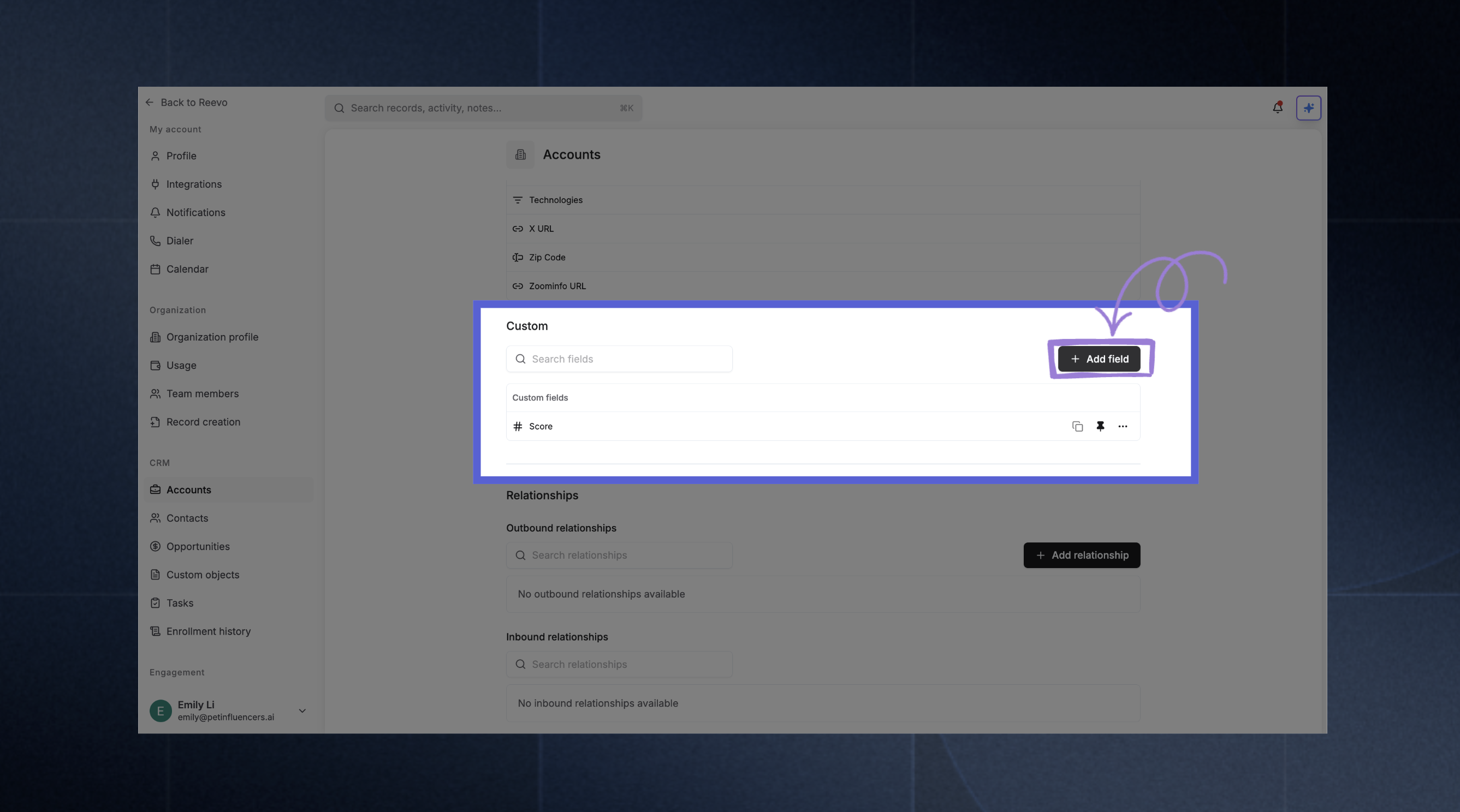
- Log in to Reevo
- Click Settings ⚙️ in the left sidebar
- In CRM section, select the object you want to configure, e.g.
- Under Custom Fields, click Add Field
Each custom field can be defined with a display name, description, and field type. Some field types allow pre-defined options, such as single- or multi-select dropdowns.
Supported Field Types
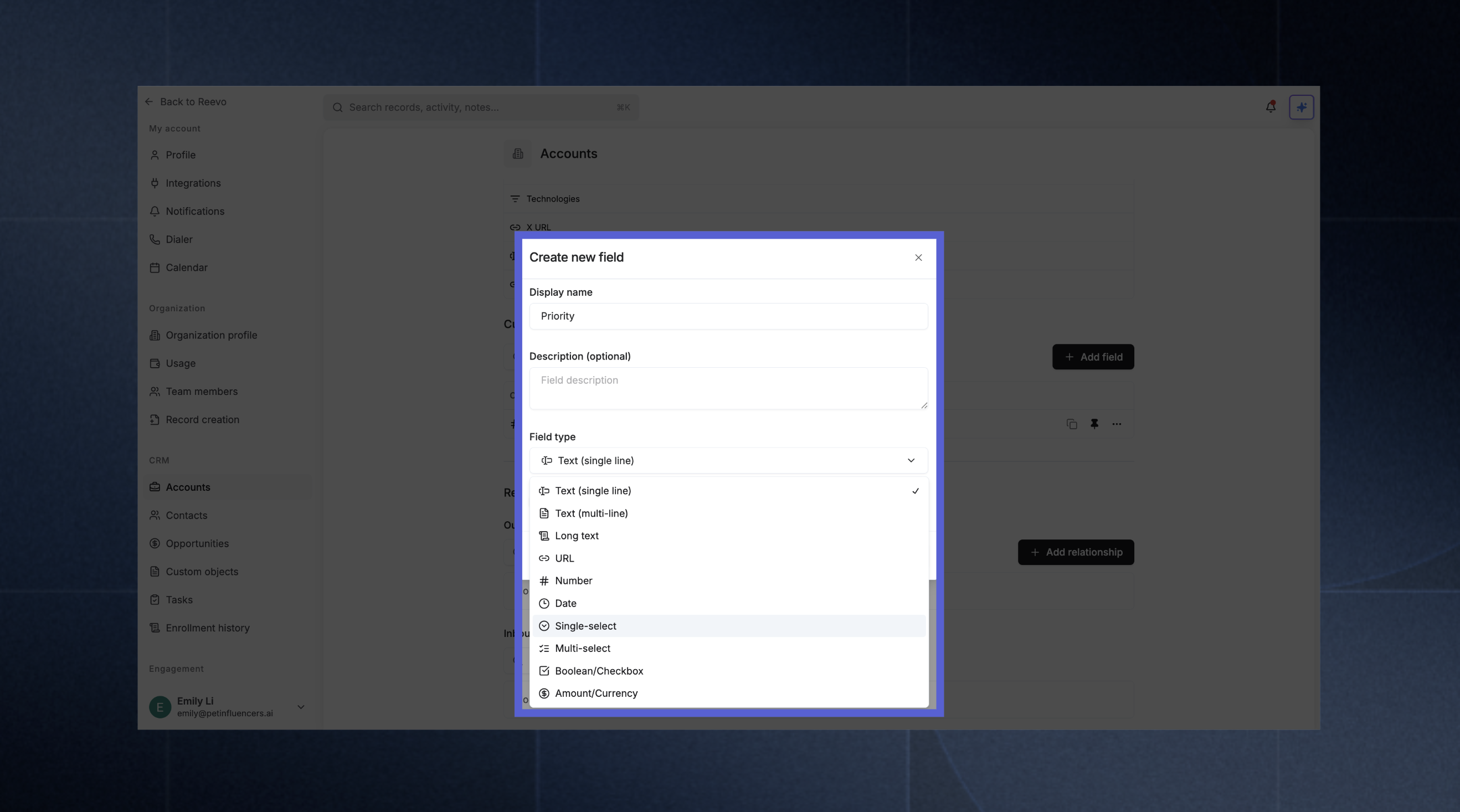
Five of these types can also be made unique, so no two records share the same value: Text (single line), Text (multi-line), URL, Number, and Amount / Currency. See Unique Fields.
Uniqueness is available on Accounts, Contacts, and custom objects. It isn’t available on Opportunities, so the option doesn’t appear when you add a field there.
Managing Fields
- Edit or Rename: Click the ellipsis (…) icon next to an existing field to edit its name, type, or options.
- Show on the detail page: When you create a field, turn on Add to Overview to place it in the Summary section of the record’s Overview tab. For a field that already exists, open a record, go to the Overview tab, and use the gear icon (Configure fields) on the Summary section to add or remove fields.
- Set as unique: Stop two records sharing the same value in this field. Available on the five field types listed above. Turning this on for a field that already holds data runs a check for existing conflicts first. See Unique Fields.
- Remove: From the same menu, select Delete Field and confirm when prompted.
Troubleshooting / FAQs
Why can't I see the option to add custom fields?
Why can't I see the option to add custom fields?
Only admins can create and manage custom fields. Check with your organization admin if you need this capability.
Can I change a field type after creating it?
Can I change a field type after creating it?
Changing field types after data has been entered may cause data loss or formatting issues. It’s best to plan your field types carefully before use. Contact support if you need to modify an existing field with data.
How many custom fields can I create?
How many custom fields can I create?
There is no hard limit on the number of custom fields per object. You can create as many as your organization needs across Contacts, Accounts, and Opportunities. If you run into any issues adding fields, contact support.
Do custom fields work with data imports?
Do custom fields work with data imports?
Yes, you can map custom fields during CSV import. The import process will show both standard and custom fields for mapping.
Can I use custom fields in Ask Reevo queries?
Can I use custom fields in Ask Reevo queries?
Yes, Ask Reevo has full access to custom field data. You can ask questions like “Show me all contacts where Priority Tags includes VIP” or create records with custom field values through conversation.
What happens to custom field data if I delete a field?
What happens to custom field data if I delete a field?
Deleting a custom field removes it from all records. This action cannot be undone, so make sure you no longer need the data before deleting.
Can I stop two records having the same value in a field?
Can I stop two records having the same value in a field?
Yes, by making the field unique. Turn on Set as unique when you create or edit the field, or manage everything in one place under Settings > Data integrity. It works on Text (single line), Text (multi-line), URL, Number, and Amount / Currency, on Accounts, Contacts, and custom objects. You can have up to 3 unique fields per object. See Unique Fields.
Still have questions? Sign in and use AskReevo for instant answers or to raise a support ticket.