Overview
Reevo allows you to purchase domains directly within the platform for email outreach campaigns. When you purchase a domain through Reevo, the platform handles domain registration, DNS configuration, and ongoing health monitoring automatically. This streamlines your email infrastructure setup and ensures optimal deliverability for your outbound campaigns. Purchasing domains through Reevo eliminates the need to manage domain registrars separately and ensures your domains are properly configured for email sending from day one. The domain purchase feature is part of Reevo’s email infrastructure setup. Domains purchased through Reevo are automatically configured for optimal email deliverability and are monitored continuously for health issues. This is different from simply verifying a domain you already own, which is handled in the Organization Profile settings under Verified Domains.Before You Create Mailboxes: Domain Requirements
You need to purchase domains in Reevo because mailboxes used require an associated domain to function. Mailboxes in Reevo are email accounts used to send outbound emails in sequences and campaigns.The Domain-to-Mailbox Workflow
The typical workflow is:- Purchase a domain in Settings → Email setup → Domains tab
- Wait for domain setup (up to 24 hours for DNS configuration)
- Create mailboxes using that domain (at least 1 mailbox purchase is required)
- Use mailboxes in your email sequences
Purchasing domains through Reevo serves several critical business purposes:
1. Email Infrastructure Foundation Domains are the foundation of your email sending infrastructure. Every mailbox you create needs to be associated with a domain (e.g.,sales@yourdomain.com). Without a domain, you cannot create mailboxes to send outbound emails.
2. Sender Reputation and Deliverability
When you purchase domains through Reevo, the platform automatically configures all necessary DNS records (SPF, DKIM, DMARC, MX records) to ensure optimal email deliverability. This proper configuration helps establish sender reputation and improves inbox placement rates.
3. Automated Warmup and Health Monitoring
Domains purchased through Reevo go through an automated warmup period and continuous health monitoring. This ensures your domains build healthy sender reputation from day one, which is critical for successful email outreach campaigns.
4. Streamlined Setup
Purchasing domains directly in Reevo eliminates the need to manage separate domain registrars and manually configure DNS settings. The platform handles domain registration, DNS configuration, and ongoing monitoring automatically, allowing you to focus on your outreach campaigns rather than technical setup.
How to Purchase Domains in Reevo
Prerequisites
Before purchasing a domain, ensure you have:- Admin access to your Reevo organization
- Available domain quota in your plan (your first domain may be included at no extra cost)
- (Optional) A destination URL if you want to redirect the domain to your company website
Accessing the Domain Purchase Flow
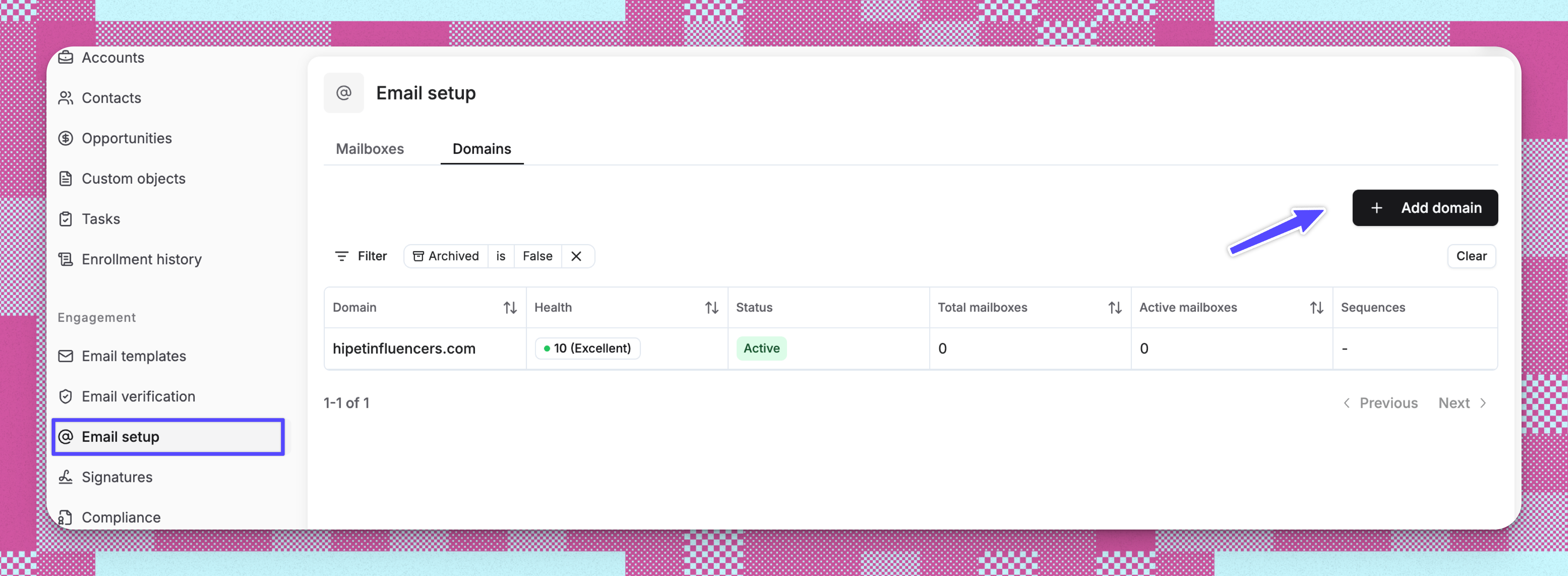
- Navigate to Settings → Email setup
-
Click the Domains tab → Add domain button
- Enter your desired domain name and search for availability
- Select your preferred domain from the available options and click next
-
Complete Required Settings:
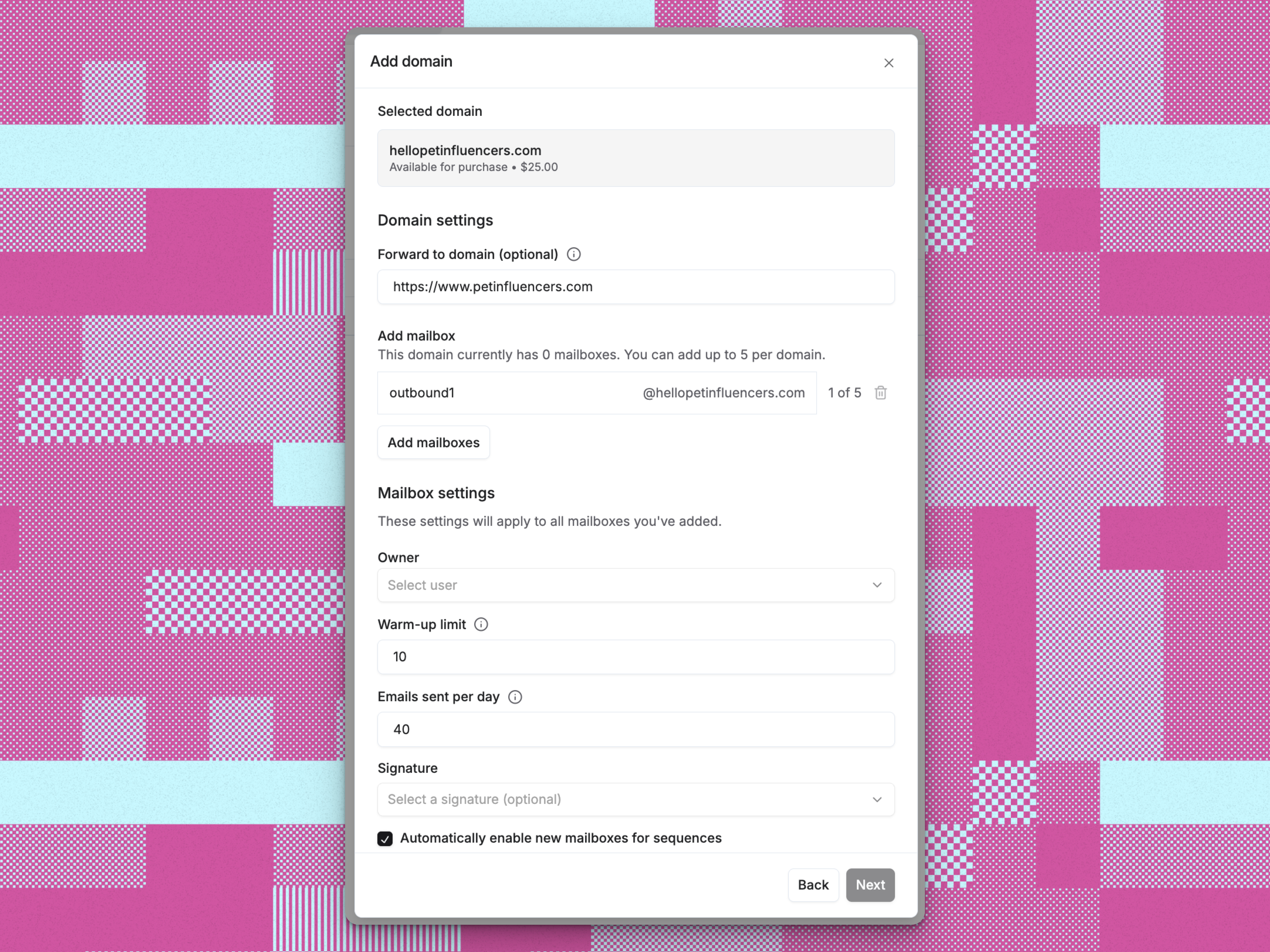
- (Optional) Enter a Redirect domain URL if you want your purchased domain to forward visitors to your company website
- Configure at least one mailbox (required for domain purchase):
- Enter mailbox name (e.g., “admin”, “sales”, “support”)
- You can create up to 5 mailboxes during the initial domain purchase
- Select the mailbox owner from your organization
- Set warmup limit (0-10 emails per day, default: 10). Setting this to 0 disables warm-up.
- Set daily quota (0-2,000 emails per day, default: 40). 40 is Reevo’s recommended value rather than a cap. Saving a higher number shows a deliverability warning instead of blocking you. Setting it to 0 disables the mailbox for sequences.
- Choose whether to include in default pool for sequences
- Enter mailbox name (e.g., “admin”, “sales”, “support”)
Complete Your Purchase
- Review the payment method for your domain:
- Invoice billing: Reevo will process the domain purchase for you. The cost will be added to your next Reevo invoice. The price shown is exclusive of any taxes that may apply. You’ll receive your invoice within 1-2 business days.
- Contact support: If the domain costs more than $100, you’ll need to email support to complete the purchase.
- Review the purchase summary showing the domain name and price
- Click Purchase to complete your order (or Contact support if the domain exceeds your plan limit)
After Purchase
After clicking Purchase, you’ll see a confirmation message indicating Reevo is attempting to purchase your domain. The domain will appear in your domains list with a status showing the purchase is in progress. Reevo automatically handles DNS configuration and begins health monitoring to ensure optimal email deliverability. Your domain will be ready for use within approximately 24 hours.Domain Health
Domain health in Reevo is a comprehensive scoring system that measures how well your purchased domains are configured and performing for email sending.What Domain Health Measures
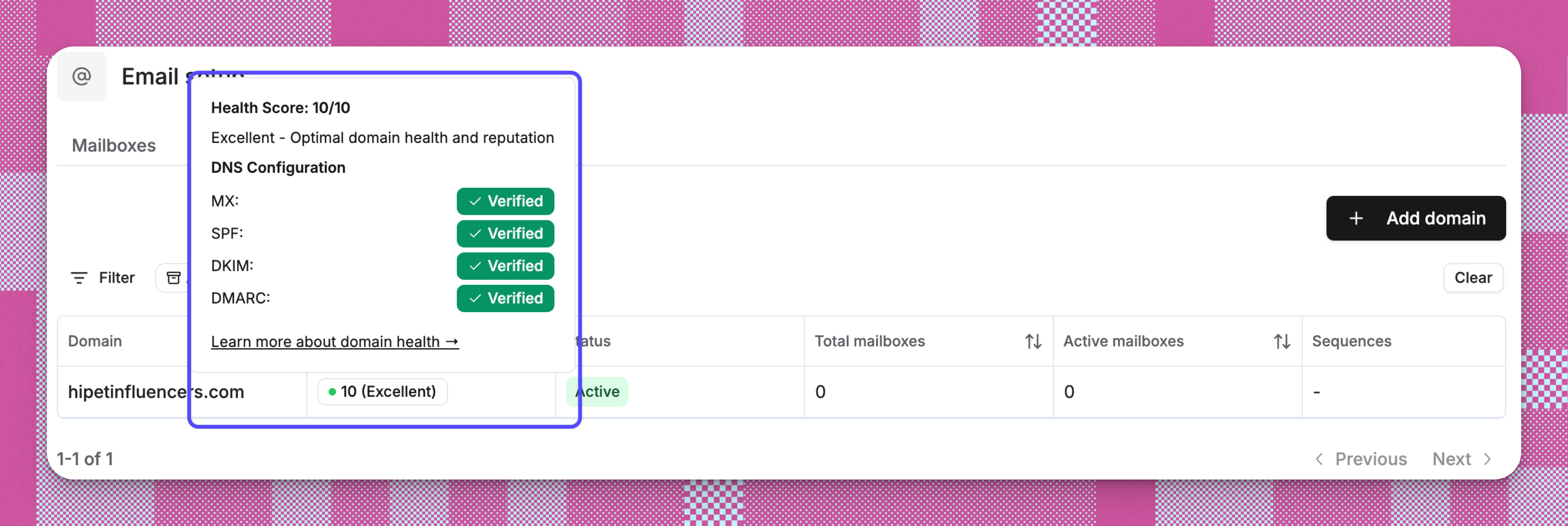
Domain health is calculated on a 1-10 scale and reflects two main components: 1. DNS Configuration - Checks for required DNS record. Missing records lowers the score. 2. Automated Health Monitoring - After you purchase a domain, Reevo automatically schedules daily health checks to monitor your DNS configuration.How You See Domain Health
In the Reevo interface, domain health appears in several places:- Domain List: Health badge (Green = 6-10, shown as Good or Excellent; Amber = 4-5, shown as Poor; Red = 1-3, shown as Critical)
- Domain Details: Numeric score (e.g., 7/10) with DNS verification status
- Health Card: Progress bar, health level, and tips to improve
Why Domain Health Matters
Email Deliverability: Domains with higher health scores have better inbox placement rates because they’re properly authenticated. Properly configured DNS records signal to email providers (Gmail, Outlook, etc.) that your emails are legitimate. Sender Reputation: Healthy domains build and maintain good sender reputation over time, which is critical for successful email outreach campaigns. Automatic Optimization: When you purchase domains through Reevo, the platform handles all DNS configuration automatically and monitors health continuously, so you don’t need to manually manage DNS records.Health Check Timing
- Initial check: Runs shortly after domain purchase
- Ongoing checks: Scheduled daily via automated workflows
- Setup time: DNS records can take up to 24 hours to fully propagate, so new domains typically show “Pending” status initially
Troubleshooting / FAQs
How long does it take for my domain to be ready?
How long does it take for my domain to be ready?
Allow a few minutes for processing after purchase. Your domain will be fully ready for sending emails within approximately 24 hours as Reevo completes DNS setup and initial health checks.
What if my desired domain is not available?
What if my desired domain is not available?
The search results will show alternative domain options with different extensions that are available for purchase. You can select any of these alternatives to proceed with your purchase.
How is my domain purchase billed?
How is my domain purchase billed?
Billing depends on your plan. Your first domain may be included in your Reevo plan at no extra cost. Additional domains are added to your next Reevo invoice. Domains over $100 require contacting support for purchase approval.
Can I purchase multiple domains at once?
Can I purchase multiple domains at once?
Currently, you can purchase one domain at a time through the interface. To purchase additional domains, repeat the purchase process for each domain.
What happens if the purchase fails?
What happens if the purchase fails?
If the purchase fails, you’ll see an error message prompting you to try again. Check your domain quota limits and try again. If the issue persists, contact support.reevo.ai
Do I need to configure DNS records manually?
Do I need to configure DNS records manually?
No. Reevo automatically handles all DNS configuration including SPF, DKIM, DMARC, and MX records to ensure optimal email deliverability. The system continuously monitors domain health to maintain high inbox placement rates.
Why do I need to purchase a domain before adding mailboxes?
Why do I need to purchase a domain before adding mailboxes?
Mailboxes require an associated domain to function. When you try to add a mailbox without any domains, Reevo will prompt you to purchase a domain first.
How does domain health affect my email campaigns?
How does domain health affect my email campaigns?
Domains with higher health scores have better inbox placement rates because they’re properly authenticated. Properly configured DNS records signal to email providers (Gmail, Outlook, etc.) that your emails are legitimate, which builds and maintains good sender reputation over time.
What's the difference between domain health and mailbox health?
What's the difference between domain health and mailbox health?
Domain health focuses on DNS configuration at the domain level and is scored 1-10 based on DNS records. Mailbox health is not a numeric score: it is a status of Satisfactory or Needs attention, based on bounce rate, unsubscribe rate, and the health of the parent domain. Both contribute to overall email sending success but are tracked separately.
What happens if my domain health score drops?
What happens if my domain health score drops?
If your health score drops, check the domain details page for specific DNS records that may be missing or misconfigured. The health details card provides recommended actions based on your current health level. For critical issues, contact support for assistance.
Why do I need to purchase a domain before adding mailboxes?
Why do I need to purchase a domain before adding mailboxes?
Mailboxes require an associated domain to function. When you try to add a mailbox without any domains, Reevo will prompt you to purchase a domain first.
Are mailboxes required when purchasing a domain?
Are mailboxes required when purchasing a domain?
Yes, when purchasing domains through Reevo, you must configure at least one mailbox during the purchase process. This ensures your email infrastructure is complete and ready for outreach campaigns from day one.
Can I add more mailboxes later?
Can I add more mailboxes later?
Yes, you can purchase additional mailboxes for your domain after the initial purchase. Navigate to Settings → Email setup → Mailboxes tab to add more mailboxes to your existing domains.