Understanding Contacts in Reevo
What Contacts Are Used For
Contacts help your team:- Track communication history (emails, meetings, calls) with each person
- Understand role, seniority, and influence within their company
- Personalize outreach and relationship management
- Identify key stakeholders involved in active deals or accounts
How Contacts Relate to Accounts and Opportunities
- Every Contact is typically linked to an Account, representing the company they work for.
- Contacts can also be associated with one or more Opportunities, showing their involvement in a specific deal or sales cycle.
- This connection helps sales, marketing, and success teams collaborate with full context across all touchpoints.
Standard and Custom Fields
Reevo includes standard fields on every Contact (e.g., First Name, Last Name, Title, Email, Phone). You can also configure custom fields to capture additional context that supports your GTM process. See Create and Manage Custom Fields to learn how to add or edit contact-specific attributes.Creating Contacts
Manual Contact Creation:
- Go to Contacts in Reevo.
- Click Create or +.
- Fill in required fields: First Name, Last Name, and (recommended) Email or Phone.
- Optionally add Title, Department, LinkedIn, or Primary Account.
- Assign an Owner (defaults to you).
- Click Create to save.
Automatic Contact Creation:
Reevo can automatically create contact records based on your email and meeting activity. Configure this behavior in Settings under Record Creation . For additional information on these setting refer to the Onboarding article.Multi-Email and Multi-Phone Support
Reevo supports multiple emails and phone numbers per contact because people often work with more than one company or use different contact details for different business contexts. This ensures your team can always reach someone using the right email or phone number for the specific account they’re associated with.How to Add or Manage Multiple Emails
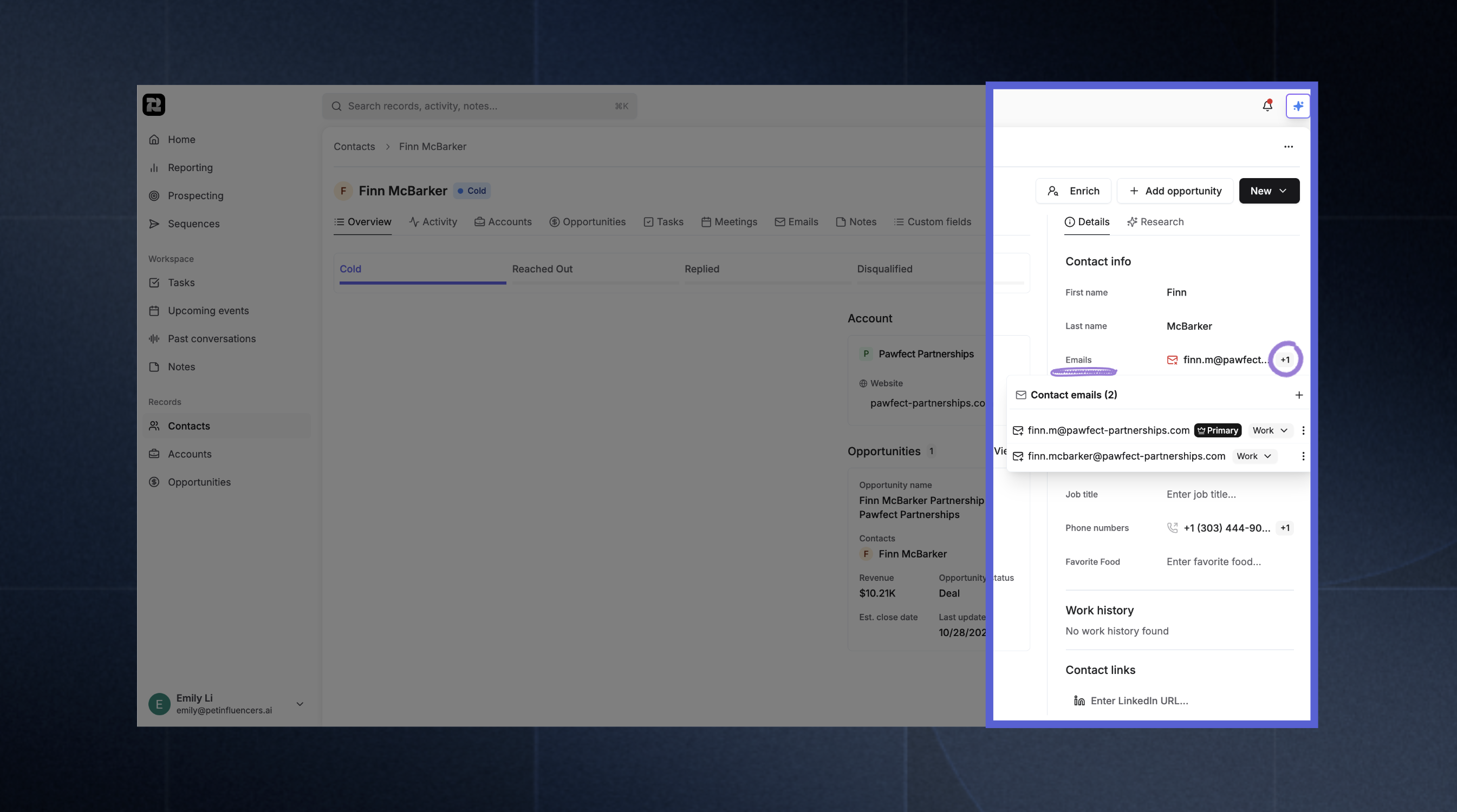
- Navigate to the Contacts section in Reevo
- Select a contact to open their details in the side pane
- Click the + icon to add another email address
- Use the dropdown to label each entry (e.g., Work, Personal)
- Mark one as Primary to set the default for communication. You can do this by clicking on the ellipsis (…).
How to Add or Manage Multiple Phone Numbers
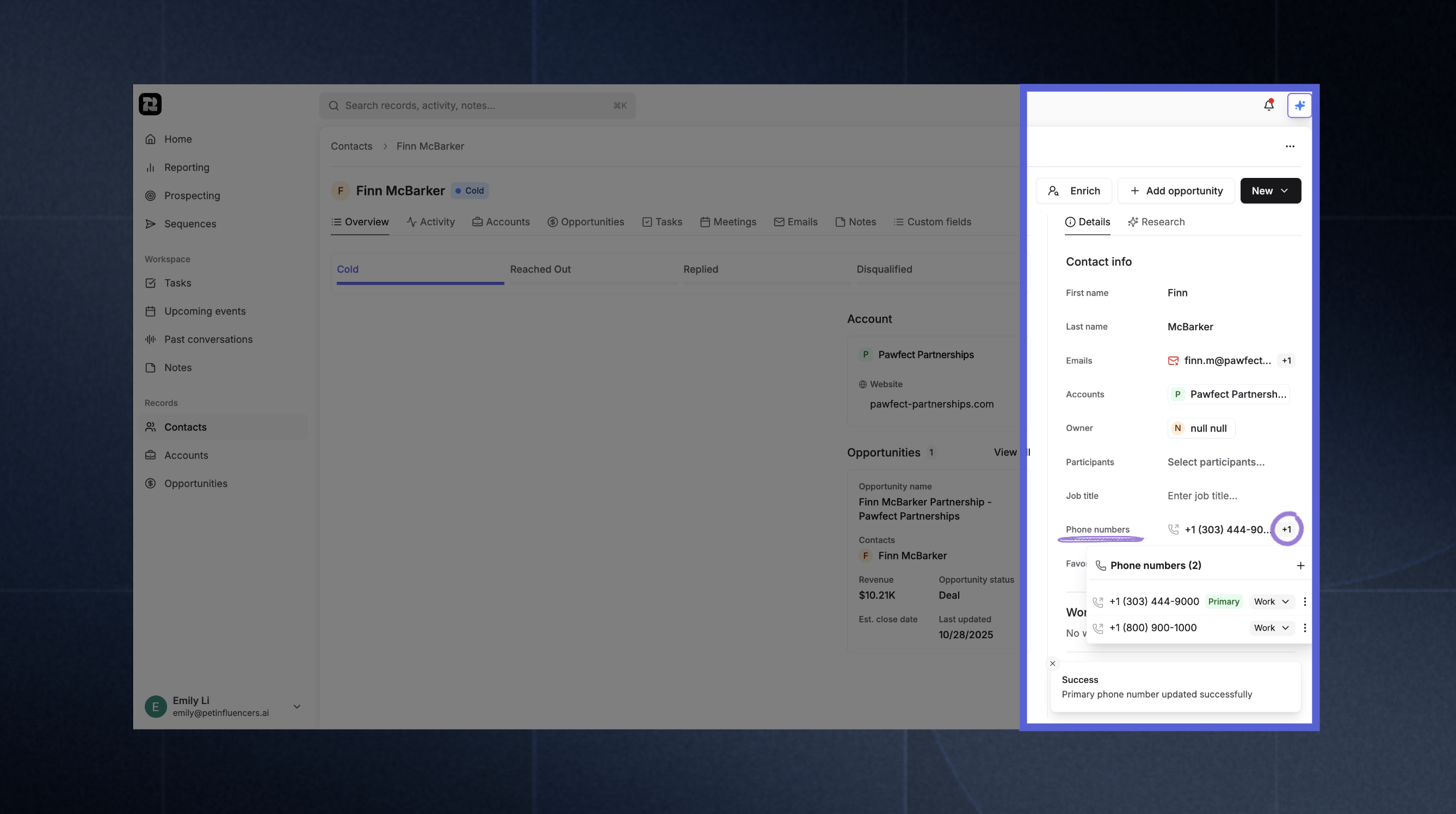
- Navigate to the Contacts section in Reevo
- Select a contact to open their details in the side pane
- Click the + icon to add another phone number
- Use the dropdown to label each entry (e.g., Work, Personal)
- Mark one as Primary to set the default for communication. You can do this by clicking on the ellipsis (…).
Activity Timestamps
Reevo automatically tracks the last time your team reached out to a contact — and the last time a contact engaged back. These timestamps appear in the Activity timestamps section of the contact’s Overview tab and update automatically as activity is logged. There are 8 fields in total, split into two groups.
Engagement fields reflect activity initiated by the contact:
There are 8 fields in total, split into two groups.
Engagement fields reflect activity initiated by the contact:
Multi-Account Associations
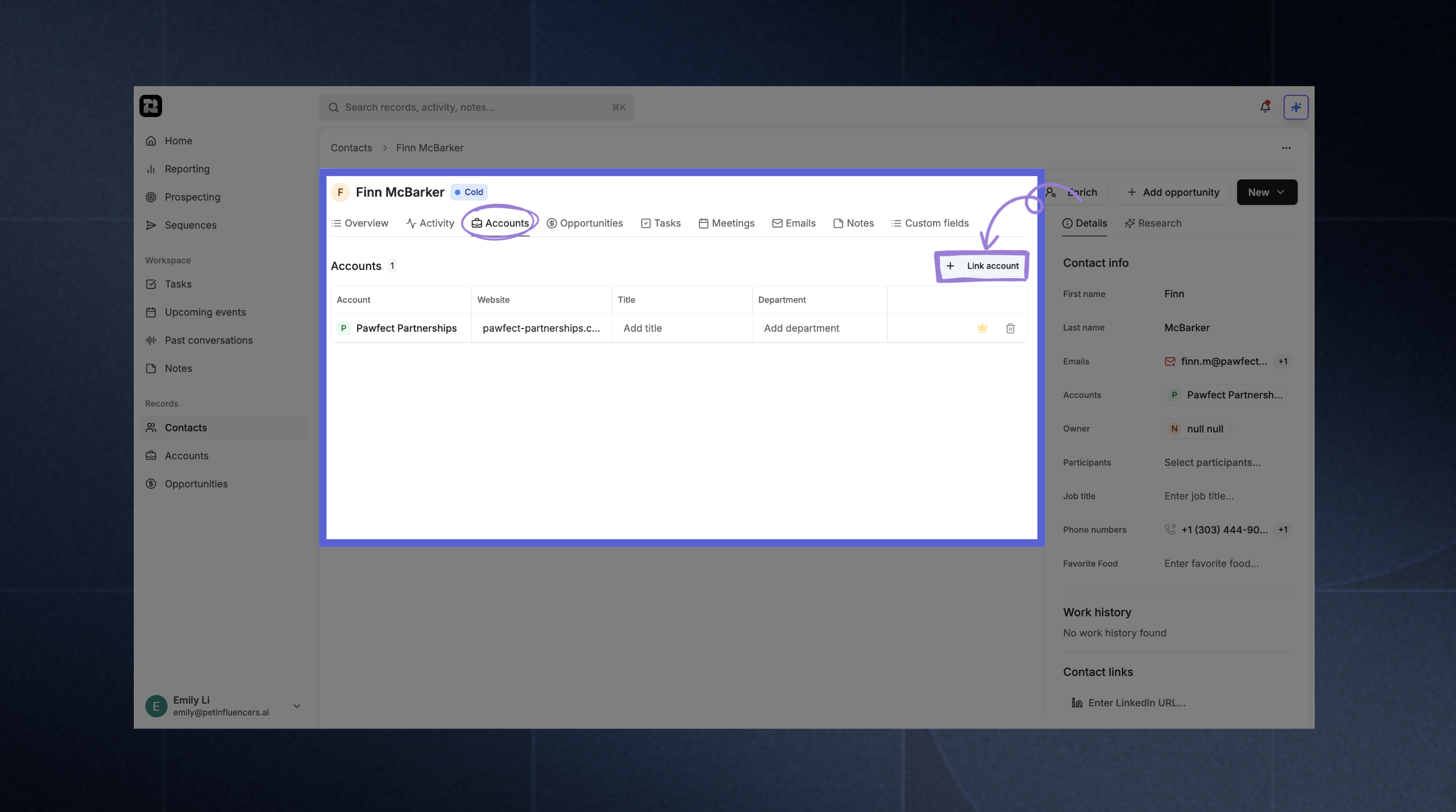 Reevo supports a flexible, many-to-many relationship between Contacts (individuals) and Accounts (companies or organizations). This means a single contact can be associated with multiple accounts at once.
How It Works
Each contact has one Primary Account, representing their main employer or affiliation, and can also be linked to one or more Secondary Accounts for other professional relationships. This structure helps preserve important business context during CRM operations, like account merges, contact ownership changes, or relationship tracking, without losing visibility into prior or parallel associations.How to Add Multiple Accounts
- Navigate to the Contacts section in Reevo
- Open a contact record
- Click the Accounts tab in the contact view
- Select Link Account
- In the Link account to contact modal, choose the following:
- Account: Select the company to associate
- Title: Enter the contact’s role at that company (e.g., Director, Consultant)
- Department: Add the department or team name (e.g., Sales, Engineering)
- Contact Emails: Choose which of the contact’s email addresses should link to this account
- Contact Phone Numbers: Select which phone numbers to associate
- Click Link account to save
Troubleshooting / FAQs
How do contacts differ from accounts?
How do contacts differ from accounts?
Can Ask Reevo help me find contact information?
Can Ask Reevo help me find contact information?
Can Ask Reevo create or update contacts for me?
Can Ask Reevo create or update contacts for me?
Can I customize which fields appear on the contact detail page?
Can I customize which fields appear on the contact detail page?
Can I add fields like phone number or LinkedIn to the quick-create contact form?
Can I add fields like phone number or LinkedIn to the quick-create contact form?
What happens when I merge or archive a contact?
What happens when I merge or archive a contact?
Why can't I edit a contact?
Why can't I edit a contact?
How do I prevent certain email addresses from creating contacts automatically?
How do I prevent certain email addresses from creating contacts automatically?
What happens if I try to create a contact with an email that already exists?
What happens if I try to create a contact with an email that already exists?
Can I override my organization's automatic contact creation settings?
Can I override my organization's automatic contact creation settings?
Why don't I see certain contacts in my search results?
Why don't I see certain contacts in my search results?
Can I enroll a contact in multiple sequences at the same time?
Can I enroll a contact in multiple sequences at the same time?
What happens to contacts when I disconnect my calendar or email integration?
What happens to contacts when I disconnect my calendar or email integration?
How do I know which email or phone number will be used when I contact someone?
How do I know which email or phone number will be used when I contact someone?
Can I change a contact's account association after creating them?
Can I change a contact's account association after creating them?
Why can't I enroll a contact in my sequence?
Why can't I enroll a contact in my sequence?
How does Reevo handle duplicate contacts?
How does Reevo handle duplicate contacts?
What is the difference between Last Engaged At and Last Outreach At?
What is the difference between Last Engaged At and Last Outreach At?
Does Last Outbound Call include voicemails?
Does Last Outbound Call include voicemails?
Does Last Inbound Email count email opens or clicks?
Does Last Inbound Email count email opens or clicks?
What meeting scenarios count toward Last Engaged Meeting vs. Last Attempted Meeting?
What meeting scenarios count toward Last Engaged Meeting vs. Last Attempted Meeting?
Can I filter or sort my contact list by activity timestamp fields?
Can I filter or sort my contact list by activity timestamp fields?
Still have questions? Sign in and use AskReevo for instant answers or to raise a support ticket.