Overview
Recordings help sales teams by providing conversation analytics, enabling coaching opportunities, and ensuring no important details are lost. You can review past conversations, extract action items, and analyze sentiment to improve your sales approach. Reevo organizes recordings in two ways: chronologically within each opportunity (showing the full buyer-seller interaction timeline) and globally by type (separating video meetings from phone calls for easy reference). Before managing recordings, ensure you have:- Connected your calendar: Link your Google Calendar or Zoom account so Reevo can automatically join and record scheduled meetings.
- Configured recording settings: Set your recording preferences in Settings > Meetings to control when recordings start automatically.
- Set up your dialer (for call recordings): Configure your phone number to enable call recording through Reevo’s dialer.
Accessing Your Recordings
Configuring Recording Settings
Recording behavior (which meeting types to record, the bot’s name, default privacy, blocked domains) is controlled from Meetings & Notetaker Bot Settings.Allowing or Blocking the Recording Bot
The full setup for adding the bot automatically vs. manually lives in Notetaker Bot. For an individual meeting, you can also control recording on the fly:- Open the meeting in Reevo.
- Use the Record meeting toggle to enable or disable the bot for that one event.
- The bot status shows whether it’s enabled, disabled, joining, or actively recording.
Adding the notetaker bot to a meeting will create contacts and record the meeting regardless of your recording settings. Meetings booked via Reevo Scheduler also always create contacts.
Controlling Recording During Live Meetings
Creating Recorded Meetings
Working with Transcripts
Reevo automatically transcribes all recordings, making conversations searchable.Managing Call Recordings
Phone calls made through Reevo’s dialer are automatically recorded and stored alongside meeting recordings.Sharing Recordings
Reevo lets you share recorded meetings two ways: with teammates inside your organization using an internal link, or with anyone outside your organization (prospects, partners, executives) using a secure external link. External links give you granular control over who can view the recording, what portion of it they see, whether AI-generated insights are included, and when the link expires. Recipients can watch the video, read the transcript, and review the summary and outline directly in their browser without needing a Reevo account. Sharing recordings is valuable for deal reviews, coaching sessions, cross-functional alignment, and keeping stakeholders in the loop on customer conversations.Show Content
Show Content
Prerequisites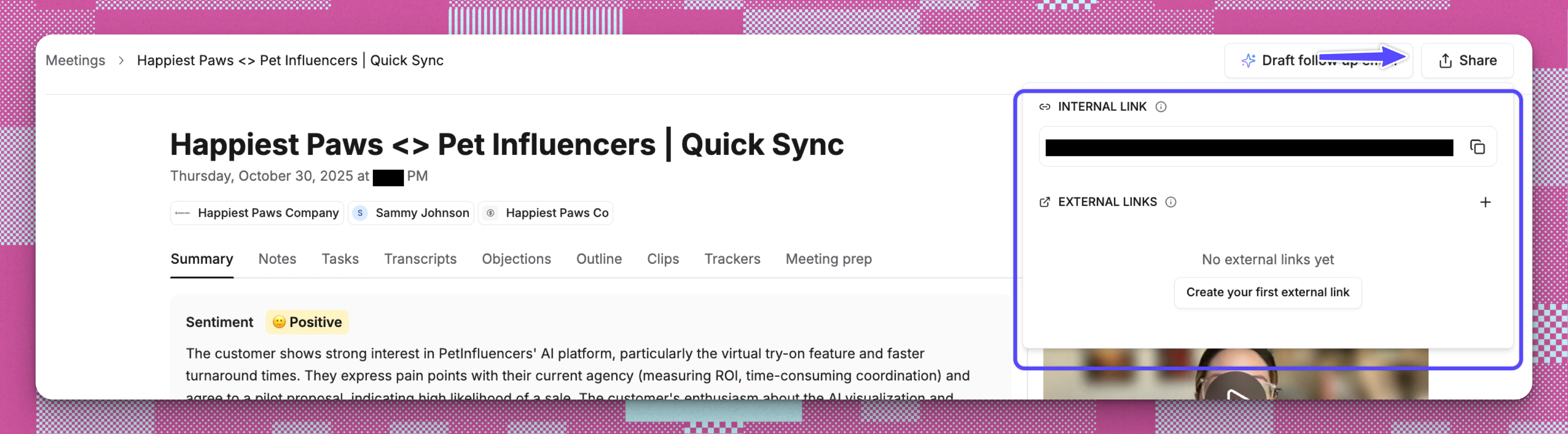
- The meeting must have been recorded. You cannot share a meeting that was not recorded. If the Share button is disabled, a tooltip will confirm: “Meeting was not recorded.”
- Your organization’s plan must include the Meeting sharing capability. If sharing is gated by your plan, the Share button will be disabled and a tooltip will prompt you to upgrade or resolve the issue before you can share.
- You need read access to the meeting you want to share.
- Navigate to the meeting detail page for a recorded meeting.
- Click the Share button in the top-right area of the page.
- A popover opens with two sections: INTERNAL LINK and EXTERNAL LINKS.
Sharing within your organization (Internal links):
- In the INTERNAL LINK section, you will see the current page URL.
- Click the Copy icon to copy the link to your clipboard.
- Send this link to any Reevo user in your organization. They will see the full meeting details when they open it, subject to their existing permissions.
- All recordings are automatically accessible to users in your organization based on their permissions
- Team members can view recordings from the Meetings page or within the relevant Account or Opportunity timeline
- Recording access follows your organization’s permission settings for accounts and opportunities
Sharing outside your organization (External links):
- In the EXTERNAL LINKS section, click the + button or, if no links exist yet, click Create your first external link.
-
Configure the following options:
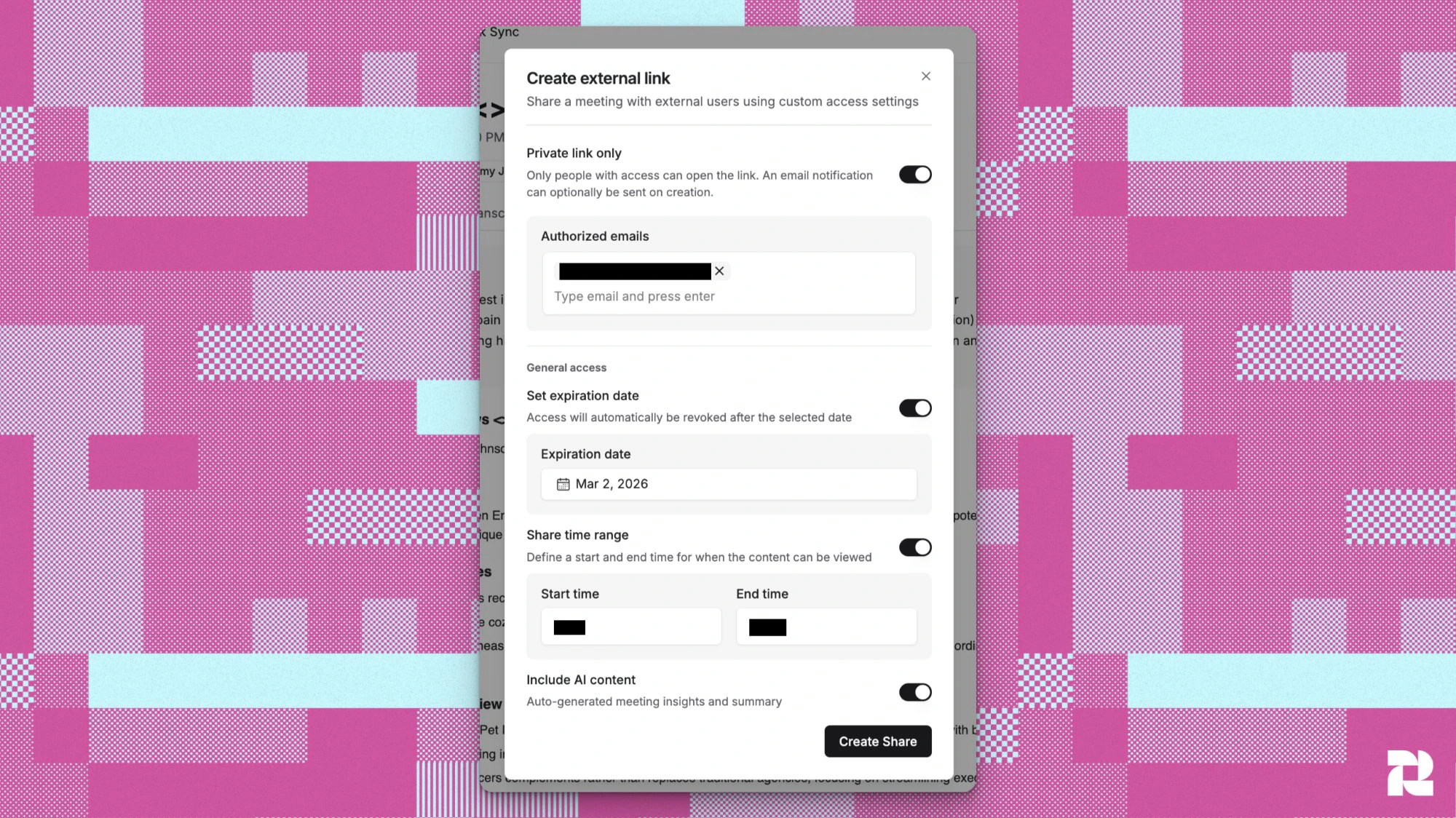
- Private link only: When enabled, only people whose email addresses you specify can open the link. When disabled, the link is public and anyone with it can view the recording.
- Authorized emails (shown when Private link only is on): At least one email is required for private links.
- Set expiration date: When enabled, access is automatically revoked after the date you choose (up to 180 days from today).
- Share time range: When enabled, you can define a Start time and End time so recipients only see a specific clip of the recording, not the entire meeting.
- Include AI content (On by default): When enabled, the shared page includes the AI-generated meeting summary, outline, and insights. Turn this off to share only the recording and transcript.
- Private link verification: When a private link is enabled, recipients must enter their authorized email address to verify their identity before they can view the recording. No Reevo account is required.
- Click Create Share.
-
For private links only: A confirmation dialog appears asking “Would you like to notify all recipients about this shared meeting link?” You have three choices:
- Notify all: Sends an email to every authorized recipient with the recording link, meeting title, date, participants, and (if AI content is included) a summary and next steps.
- Don’t notify: Creates the link without sending any emails.
- Back to Edit: Returns to the form to make changes.
- The link is automatically copied to your clipboard, and a confirmation toast appears: “Meeting share link has been created and copied to clipboard.”
Managing existing external links:
After creating an external link, you can update or revoke it at any time from the Share panel.To edit a link:- Open the Share panel on the meeting detail page.
- Find the link you want to change and click the Edit (pencil) icon.
- Update any of the link settings: authorized emails, expiration date, time range, or AI content toggle.
- Save your changes. The link URL stays the same — only the access rules change.
- Open the Share panel on the meeting detail page.
- Click the Delete (trash) icon next to the link you want to revoke.
- The link is immediately deactivated — anyone who tries to open it will no longer have access.
- The meeting recording (full or clipped, depending on your time range setting)
- The full transcript with speaker labels and timestamps
- The AI-generated meeting summary, outline, and next steps (if Include AI content is enabled)
Troubleshooting / FAQs
Why isn't my meeting being recorded?
Why isn't my meeting being recorded?
- Verify your recording settings are enabled in Settings > Meetings
- Ensure your calendar is connected and the Reevo bot was invited to the meeting
- Check that you selected the correct conferencing platform when creating the meeting
- If the bot is stuck in the waiting room, ask the host to admit it
Where can I find older recordings?
Where can I find older recordings?
All recordings are permanently stored and accessible through either the global Past Conversations page or the activity timeline on relevant Account and Opportunity pages. Use filters to narrow down by date or type.
Why can't I see my teammates' meetings?
Why can't I see my teammates' meetings?
By default, Past Conversations shows only meetings you were personally invited to. To see meetings across your team, use the My meetings / All meetings toggle in the top-right corner of the page and switch it to All meetings. Your preference is saved automatically.
Are recordings available immediately after a meeting ends?
Are recordings available immediately after a meeting ends?
Transcription processing begins as soon as the meeting ends. Most recordings and transcripts are available within a few minutes, though longer meetings may take additional time to process.
Can I download recordings?
Can I download recordings?
Recordings and transcripts are viewable within Reevo. Contact your Reevo representative for information about exporting options.
How do I control who can access recordings?
How do I control who can access recordings?
Recording access follows your organization’s permission settings. Contact your admin to adjust user roles and recording visibility.
Can I block certain domains from being recorded?
Can I block certain domains from being recorded?
Yes, you can add domains to the blocked list in Settings > Meetings. Meetings with participants from blocked domains won’t be recorded automatically, but you can still manually enable recording if needed.
Why do private link recipients have to enter their email?
Why do private link recipients have to enter their email?
Private links require email verification to confirm the recipient’s identity matches one of the authorized email addresses you specified. This prevents anyone who stumbles across the link from viewing the recording.