Call Intelligence helps you:
- Save Time: Eliminate manual note-taking and post-call summaries
- Never Miss Details: Automatically capture every word, objection, action item, and commitment with searchable transcripts
- Coach Your Team: Review exact conversations to identify coaching opportunities and best practices
- Qualify Faster: Instantly see if prospects meet MEDDIC, SPICED, or BANT criteria
- Close More Deals: Track objections and pain points to tailor your follow-up strategy
- Share Key Moments: Search transcripts to find and share specific quotes or discussion points with your team
Sales Methodology Frameworks
Reevo can evaluate your calls against proven sales qualification frameworks:MEDDIC
MEDDIC
Focuses on Metrics, Economic Buyer, Decision Criteria, Decision Process, Identify Pain, and Champion. Used in complex, enterprise sales to improve customer qualification and increase deal closure likelihood.
SPICED
SPICED
Analyzes Situation, Pain, Impact, Critical Event, Economic Buyer, and Decision. Helps you understand the customer’s environment, identify challenges, quantify effects, recognize urgent events, identify decision-makers, and clarify the decision-making process.
BANT
BANT
Assesses Budget, Authority, Need, and Timeline. Determines whether a prospect has financial capacity, decision-making power, genuine need, and appropriate timeframe for implementation.
Prerequisites
- Your calendar must be connected to Reevo
- Meeting recording must be enabled in Settings > Meetings
- The Reevo notetaker bot must join your calls (automatically added when you create meetings through Reevo)
What Gets Analyzed
After each recorded meeting, Reevo’s AI automatically generates: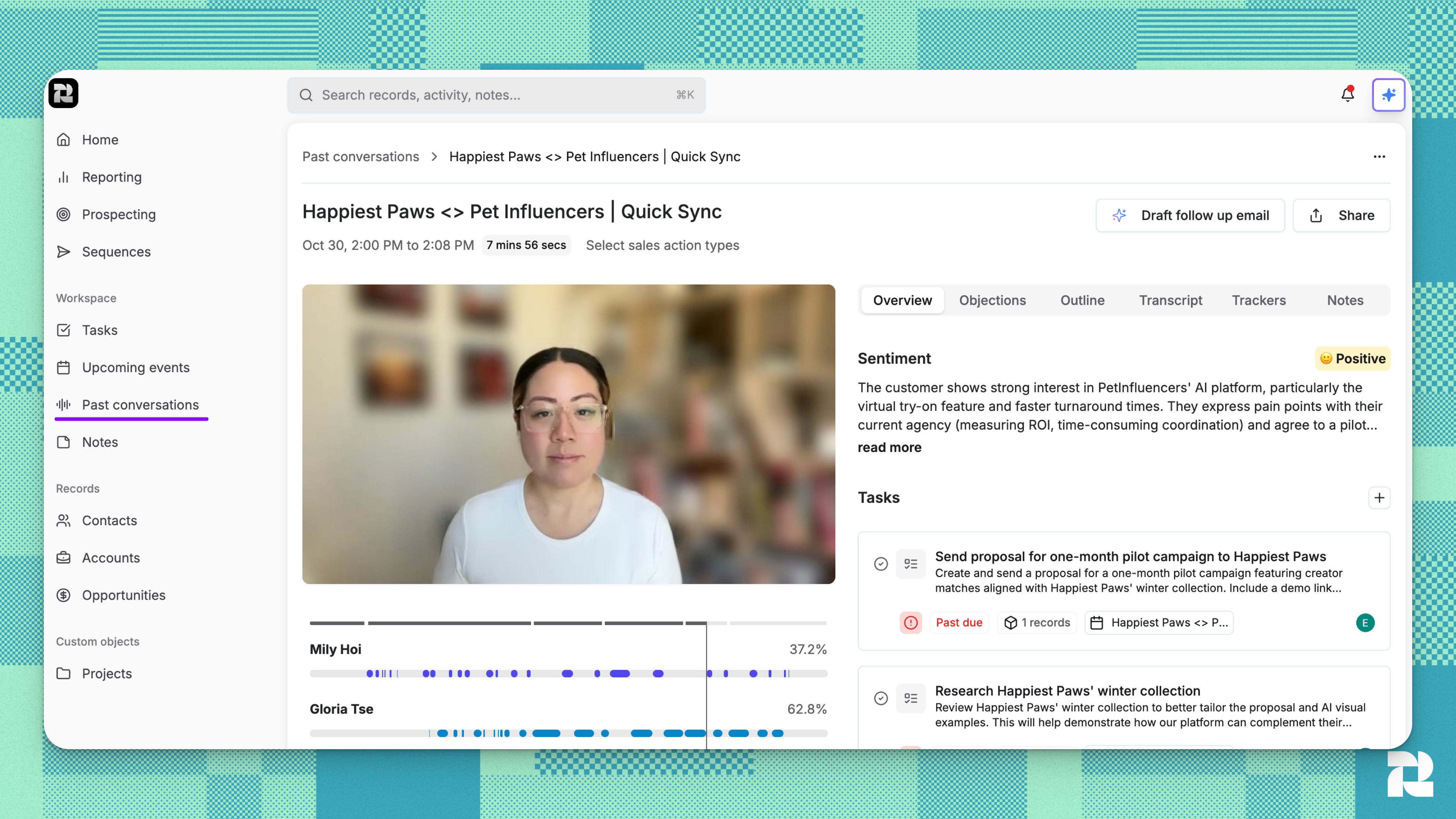
Meeting Brief
A concise overview of the entire call, summarizing key discussion points and outcomes from the seller’s perspective.Summary
A comprehensive summary capturing the full context of the conversation.Objections
Concerns or hesitations raised by potential customers during the call. These are barriers that need addressing to close the sale, covering areas like pricing, features, or perceived risks.Outline
A structured outline of topics discussed during the call, making it easy to navigate long conversations. The outline appears directly in the transcript view, showing topic headers at the relevant timestamps.Sentiment Analysis
Reevo’s AI analyzes the emotional tone and attitude of your customers throughout each call to help you understand how the conversation is progressing. What You’ll See: The sentiment analysis appears in the Overview tab and includes:- Sentiment Badge: A visual indicator showing the overall customer sentiment (displayed with an emoji and label like “Positive,” “Neutral,” or “Negative”)
- Polarity Score: Indicates whether the customer’s sentiment leans positive or negative
- Customer Emotions: Specific emotions detected during the conversation (e.g., enthusiasm, concern, frustration)
- Written Analysis: A concise summary (under 100 words) explaining the customer’s emotional state and engagement level
- Supporting Evidence: References to specific moments in the transcript where sentiment indicators were detected
- How receptive the customer is to your solution
- Whether concerns or objections are affecting their attitude
- The probability of moving the deal forward successfully
- Emotional shifts during different parts of the conversation
Action Items
Specific tasks resulting from the call that need completion, helping you advance the sales process or address client needs. Reevo automatically creates actionable tasks based on commitments, next steps, and action items discussed during the call. Each task includes:- Task title describing the action needed
- Detailed notes with context from the conversation
- Priority level (Urgent, High, Medium, Low) based on importance
- Due date when applicable
- Task owner automatically assigned to the most appropriate team member
- Links to the meeting so you can review the exact conversation that generated the task
- Citations showing which part of the transcript the task came from
Transcript
A complete word-for-word transcription of your call with speaker identification and precise timestamps. Each sentence shows who spoke, when they spoke, and exactly what was said. You can search the transcript, filter by speaker, and click any timestamp to jump to that moment in the recording.Trackers
Meeting Trackers in Reevo allow you to automatically monitor and track specific keywords, phrases, or topics across all your sales calls. When a tracked phrase is mentioned during a meeting, Reevo captures the exact moment it was said, who said it, and provides a direct link to that part of the conversation. This helps sales teams monitor competitive mentions, product features, pricing discussions, or any custom topics important to your business. Learn more about how to set up and manage your trackers hereHow to Access Call Intelligence
Step 1: View Your Meetings
Navigate to Workspaces > Past Conversations page to see all your recorded calls.Step 2: Open a Meeting
Click on any completed meeting to view its details, transcript, and AI-generated insights.Step 3: Review the Transcript
Click the Transcript tab to see the full conversation. Each line shows the speaker name, timestamp, and what was said. Click any timestamp badge to jump to that moment in the recording. Search the Transcript: Use the search box to find specific keywords or phrases mentioned during the call. Matching text will be highlighted throughout the transcript. Filter by Speaker: Select a specific speaker from the dropdown to see only their contributions to the conversation. Export Transcript: Click the copy icon to export the full transcript with timestamps and speaker names to your clipboard.Step 4: Review AI Insights
Switch to the Overview tab to see summaries, sentiment, and action items. The Insights tab shows objections, and the Outline tab displays the conversation structure. Each insight includes line numbers from the transcript so you can verify the AI’s analysis.Step 5: Ask Questions with Ask Reevo
Use the Ask Reevo chat feature to ask specific questions about your meetings. For example: “What objections did the client raise?” or “Summarize the key pain points discussed.” Ask Reevo can access meeting transcripts, notes, and recordings to provide comprehensive answers about your conversations. Learn more about Ask Reevo Copilot hereTroubleshooting / FAQs
My meeting was not recorded or transcribed.
My meeting was not recorded or transcribed.
Verify that meeting recording is enabled in Settings > Meetings and that the Reevo notetaker bot was present in the call. The bot must join for recording and transcription to occur.
The transcript shows "Transcript is processing and will be available shortly."
The transcript shows "Transcript is processing and will be available shortly."
Transcription typically completes within a few minutes after the call ends. If it takes longer than 10 minutes, contact support.
Speaker names are incorrect in the transcript.
Speaker names are incorrect in the transcript.
The AI automatically identifies speakers based on voice patterns and meeting participants. If names are incorrect, this typically improves over time as the system learns from your meetings.
I cannot find a specific word or phrase in the transcript.
I cannot find a specific word or phrase in the transcript.
Use the search box at the top of the transcript tab. The search is case-insensitive and will highlight all matches.
The AI missed important details from my call.
The AI missed important details from my call.
You can manually add notes to any meeting to supplement the AI analysis. The AI works best with clear audio and structured conversations.
I want to customize which insights are extracted.
I want to customize which insights are extracted.
Contact your Reevo administrator or support team to configure custom extraction fields for your organization’s specific needs.
The sentiment analysis seems inaccurate for my call.
The sentiment analysis seems inaccurate for my call.
Sentiment analysis is currently in beta and continuously improving. The AI focuses on customer emotions and engagement signals throughout the conversation. If you notice consistent inaccuracies, you can provide feedback to help improve the system. The analysis works best with clear audio and natural conversation flow.
Sentiment analysis is not available
Sentiment analysis is not available
If you see “Sentiment analysis is not available for this meeting,” this could be due to the call still processing (typically takes a few minutes), insufficient conversation data from very short calls, or technical processing delays. Contact Reevo support if you are experience issues with this module.
Still have questions? Sign in and use AskReevo for instant answers or to raise a support ticket.