Permissions
Admin users see additional management options and organization-wide metrics, while regular users see only mailboxes they own. Reevo recalculates mailbox health automatically on a scheduled basis using the most recent 14-day window of email activity, so health reflects recent performance rather than updating instantly.Primary Mailbox Management Location
-
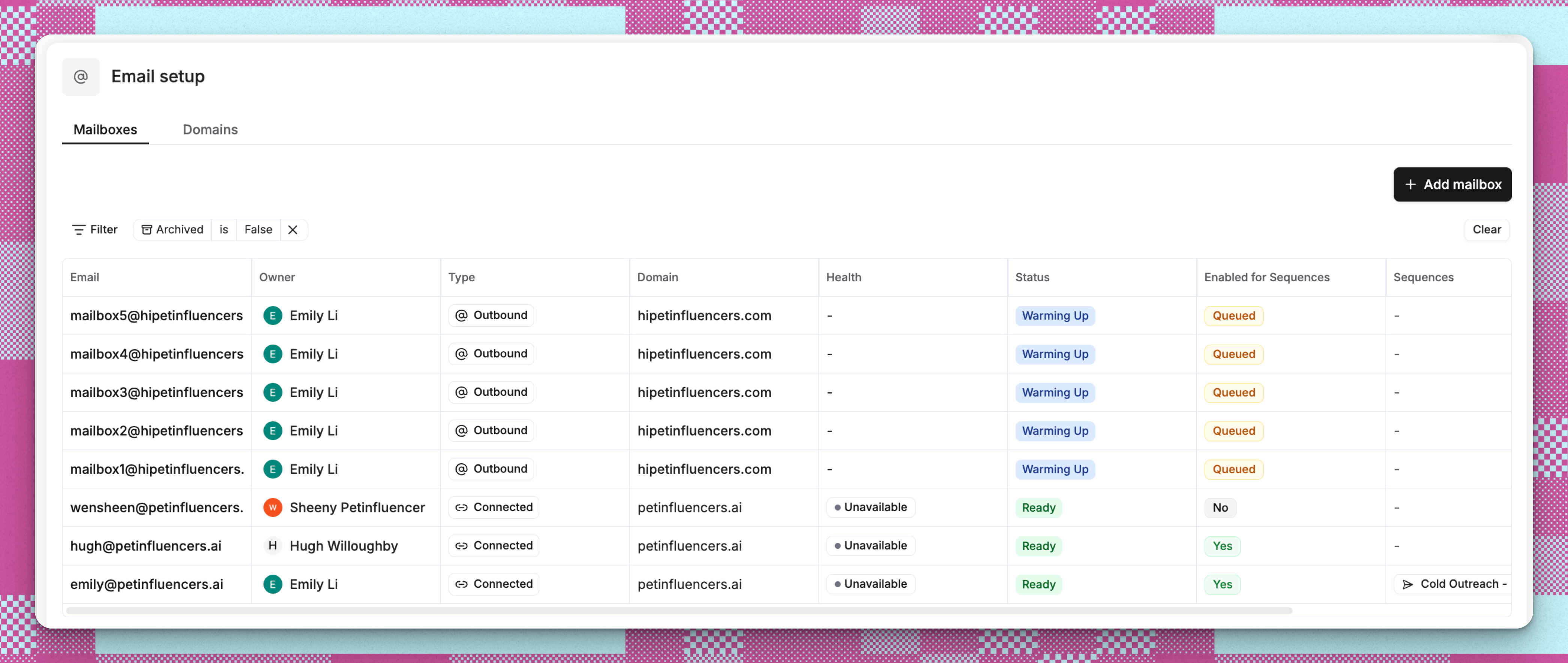
Navigate to Settings → Email setup → Mailboxes tab
-
View all mailboxes in a comprehensive list with:
- Mailbox type badges (Outbound/Connected)
- Health status indicators
- Default pool membership
- Owner information
- Associated sequences
- Use filters to find specific mailboxes by type, health, or status. Health filter options are Satisfactory, Needs attention, Warming up, and Not monitored.
- Click any mailbox to view its detailed management page
Individual Mailbox Details Page
Access the complete management interface for each mailbox by clicking on it from the mailboxes list. The detail page includes: Performance and Health Section- Warmup status and progress tracking
- Delivery statistics and metrics
- Health status (Satisfactory or Needs attention) with a breakdown by factor
- Recommendations for improving deliverability
- Mailbox details (type, status, email address)
- Owner assignment and permissions
- Email signature management
- Sending configuration (quotas, delays, warmup settings). While a mailbox is warming up, the effective daily cap is the warm-up limit rather than the full daily quota, and the card shows when full capacity unlocks.
- Active sequences using this mailbox
- Performance metrics across campaigns
- Historical sending data
Usage Tracking Dashboard
- Navigate to Settings → Usage
- View mailbox metrics including:
- Total mailboxes in your organization
- Mailboxes purchased through Reevo
- Current usage against plan limits
- Monthly consumption trends
Campaign Performance View
- Navigate to any campaign or sequence
- View the Mailbox metrics card showing:
- Total active mailboxes
- Health status distribution
- Quick link to manage mailboxes (opens in new tab)
Sequence-Specific Mailbox Information
- Open any sequence details page
- View the Setup tab to see:
- Mailboxes assigned to the sequence
- Sending pool configuration
- Individual mailbox performance within that sequence
Troubleshooting / FAQs
Where can I see all my mailboxes at once?
Where can I see all my mailboxes at once?
The main mailboxes list under Settings → Email setup → Mailboxes provides a comprehensive view of all mailboxes in your organization with filtering and sorting options.
How do I know if a mailbox is healthy?
How do I know if a mailbox is healthy?
Mailbox health is displayed as a color-coded badge in the mailboxes list: Satisfactory (green), Needs attention (red), Warming up (yellow), Not monitored (gray, for connected mailboxes), or Not rated (gray, when there is not yet enough data). There is no numeric mailbox health score. Health is based on bounce rate, unsubscribe rate, and the health of the parent domain. Warm-up metrics are shown for information but do not affect the badge.
Can non-admins manage mailboxes?
Can non-admins manage mailboxes?
Users can only view and edit mailboxes they own. Admins can manage all mailboxes in the organization. The “Add mailbox” button only appears for admin users.
Where do I configure mailbox sending limits?
Where do I configure mailbox sending limits?
Navigate to the individual mailbox detail page and edit the sending configuration. You can adjust daily quotas, delays between emails, and warmup settings.
How do I see which sequences are using a mailbox?
How do I see which sequences are using a mailbox?
The mailbox detail page shows all active sequences using that mailbox. You can also view sequence-specific mailbox assignments on each sequence’s setup page.
What's the difference between the mailboxes list and the usage page?
What's the difference between the mailboxes list and the usage page?
The mailboxes list provides detailed management capabilities for individual mailboxes. The usage page shows high-level consumption metrics and plan limits across your entire organization.
Can I archive or reactivate mailboxes?
Can I archive or reactivate mailboxes?
Yes, from the individual mailbox detail page, use the ellipsis menu to archive mailboxes. Archived mailboxes can be reactivated later. Connected mailboxes must be disconnected from your email provider first.
What is the daily quota and why does it matter?
What is the daily quota and why does it matter?
The daily quota is the maximum number of emails your mailbox can send in a rolling 24-hour window. Reevo recommends 40 emails per day for Reevo-managed mailboxes and 10 for connected mailboxes. These are recommended defaults, not hard caps: you can set a quota as high as 2,000 per mailbox, and Reevo will show a deliverability warning rather than block you. Keeping volume low protects your sender reputation by preventing sudden spikes that could flag your mailbox as spam.
What happens when I reach my organization's mailbox capacity?
What happens when I reach my organization's mailbox capacity?
You’ll see an alert: “Your organization has reached the maximum mailbox limit.” You’ll need to contact support to increase your limit.