Overview
You can push contacts & accounts from Clay directly into Reevo using Clay’s HTTP API integration and your Reevo API key. This allows you to sync data from Clay into Reevo for sequencing, dialing, and list management—all without manual entry.Basic Concepts & Terminology
- Clay – A lead sourcing and enrichment platform used to build targeted contact lists.
- API Key – A unique token used to authenticate and authorize data being pushed into Reevo.
- HTTP API (Clay) – Clay’s integration method to send data to external systems via web requests.
- Custom Fields – Fields you define in Reevo to track data like “Lead Source” or “Campaign.”
Where to Find It
- Generate your Reevo API key under: Settings → API Keys → Account & Contact Creation
- Set up the HTTP API integration within your Clay table where your contacts live.
Step-by-Step Instructions
1. Generate your API Key in Reevo
- Go to: Settings → Integrations → API keys → New API key
- In order to upsert contacts & accounts from Clay to Reevo, give the API key the following permissions at a minimum:
- Accounts - Read
- Accounts - Write
- Contacts - Read
- Contacts - Write
- In order to upsert contacts & accounts from Clay to Reevo, give the API key the following permissions at a minimum:
- Click Generate new API key
- Name the key and click Generate
- Copy the key and store it securely. You won’t be able to view it again after closing the popup.
2. Configure Clay HTTP API
- In your Clay table, add a new Enrichment column → select HTTP API
- Add a new HTTP API (Headers) account and give it any name
- Under Key, enter:
x-api-key - Under Value, paste your Reevo API key
- Under Key, enter:
3. Set your request details
- Method:
POST - Endpoint: https://api.reevo.ai/api/v1/public/account_contact
- Query Parameter:
- Key:
payload_type - Value:
json
- Key:
4. Define the body of your request
Use the JSON format below to map your Clay fields to Reevo. The only required field isemail, but you can include any of the supported values below.
Supported values:
Sending Custom Fields
- First create the field in Reevo. Refer to this article to learn how to create custom fields.
-
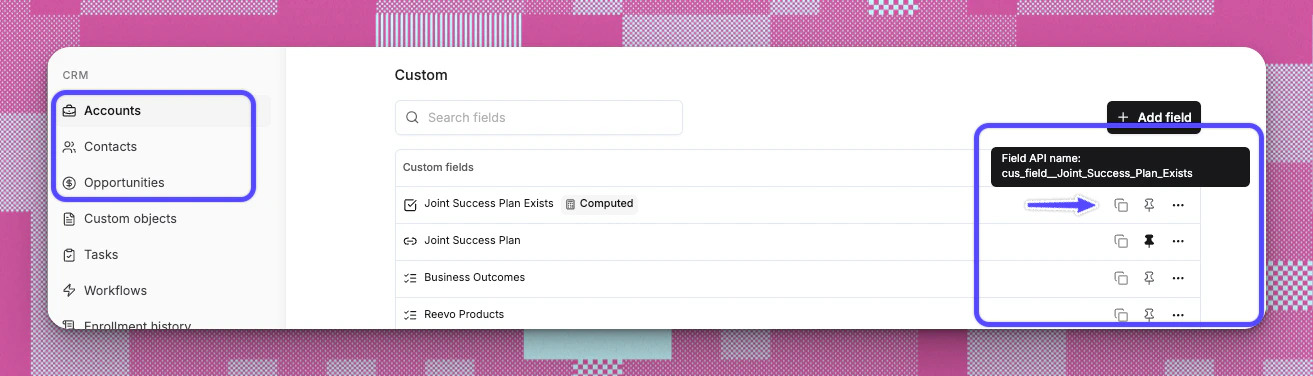
To find your custom field’s API name, go to settings where the custom field was created and hover over the field:
-
In the JSON body, use:
- Click Run on your Clay table
- If successful, you’ll see a Status Code: 200 response
Troubleshooting/FAQs
Where do I get my Reevo API key?
Where do I get my Reevo API key?
Go to Settings → Integrations → API Keys in Reevo and generate a new key.
Can I send custom fields to Reevo?
Can I send custom fields to Reevo?
Yes. You must first create the field in Reevo and copy the Field API name. Use it in the
contact_custom_fields or account_custom_fieldsobject of the JSON body.Where do I get custom field API names?
Where do I get custom field API names?
To find your custom field’s API name, hover over the field on the custom field Settings page in Reevo.
Can I map different columns in Clay to Reevo fields?
Can I map different columns in Clay to Reevo fields?
Yes. Just modify the JSON body to pull in any value from your Clay table.
What’s a common use case for custom fields?
What’s a common use case for custom fields?
Many users include a “Lead Source” or “List Name” so contacts can be filtered and grouped in Reevo for sequencing or dialing later.